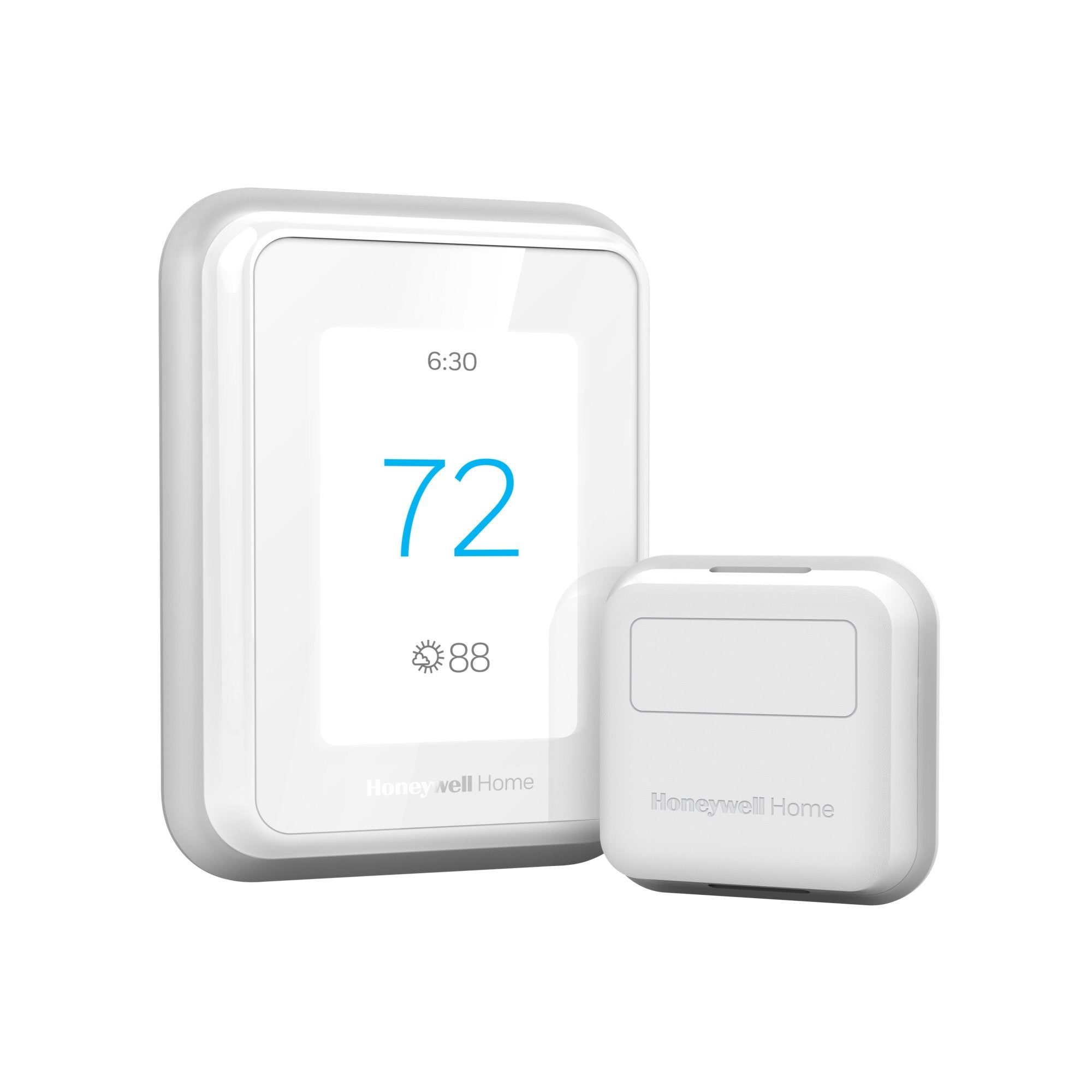
The right smart thermostat can slash your energy bills, boost comfort, and integrate seamlessly with your smart home — but only if it suits your specific setup. The Honeywell Home T9 Smart Thermostat is a top-rated choice for homeowners seeking a balance of advanced features and reliability, promising room-by-room temperature sensing, geofencing smarts, and broad platform compatibility that genuinely sets it apart from basic programmable models.
See current price and details for Honeywell Home T9 Smart Thermostat.
In this complete buying guide, we break down everything you need to know about the T9: its standout features, real-world performance, installation requirements, and who it's best suited for — so you can make a confident, informed purchase decision.
Our Top Pick: Honeywell Home T9 Smart Thermostat
The T9 earns its place as a best-in-class smart thermostat for multi-room homes, delivering precision room-based temperature control through smart sensors, rock-solid app integration, and compatibility with Alexa, Google Assistant, and HomeKit. It's the rare device that actually delivers on its "smart" promise.
TL;DR — Is the Honeywell Home T9 Worth It?
- Best for: Multi-room households that want precise, sensor-driven temperature control
- Standout feature: Optional Smart Room Sensors that detect occupancy and temperature in individual rooms
- Works with: Alexa, Google Assistant, Apple HomeKit, Samsung SmartThings
- Installation: DIY-friendly with C-wire or included power adapter; most installs take 30–60 minutes
- Skip it if: You have a single-zone home, no smartphone, or a complex multi-stage heat pump (check compatibility first)
Honeywell Home T9 Smart Thermostat — Full Review
The Honeywell Home T9 launched as the successor to the popular Honeywell Home Wi-Fi Smart Color Touchscreen Thermostat, but it's a genuinely different product at its core. Where the T6 focused on reliable scheduling and Wi-Fi connectivity, the T9 adds a dedicated sensor ecosystem that makes room-level comfort management a practical reality rather than a marketing footnote. The thermostat itself is a clean, circular device with a large color touchscreen, ambient light sensing for auto-brightness, and a built-in occupancy sensor that detects motion in the main hallway or living area where it's installed.
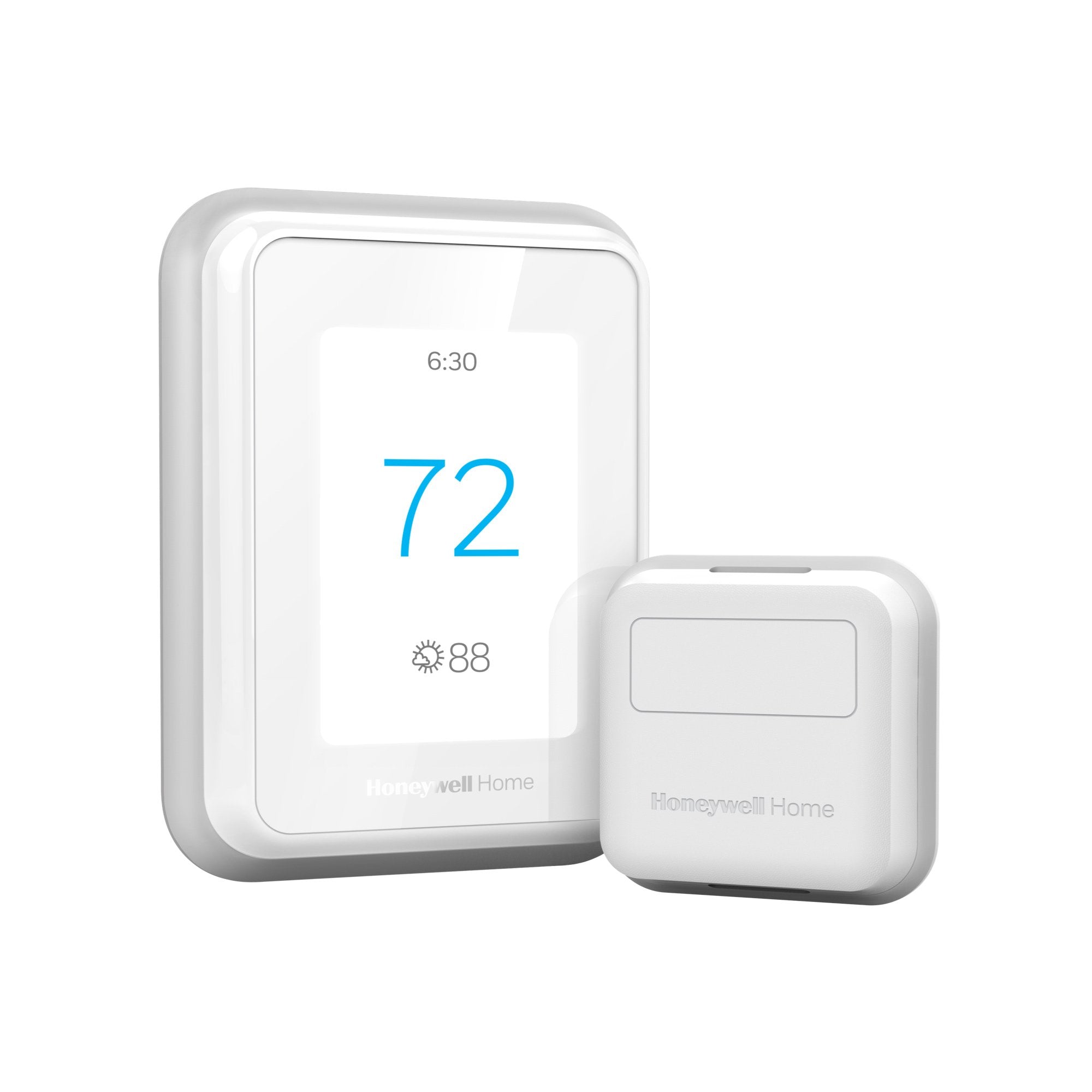
The real magic happens when you pair the T9 with Honeywell's optional Smart Room Sensors (sold separately, typically in two-packs). For those managing specialized ventilation in these rooms, our Panasonic WhisperGreen Select review provides insights into balanced airflow. Each sensor reports both temperature and occupancy back to the thermostat, allowing the T9 to prioritize heating or cooling the rooms that are actually being used. If everyone's in the living room in the evening, the T9 focuses there. When the bedroom becomes occupied at night, it shifts priority automatically. If you are using a Honeywell Home ST9400C universal furnace fan timer — which is the majority of North American homes — this is one of the most practical workarounds to uneven room temperatures that you can buy without a full zoning upgrade.
Setup is handled through the Honeywell Home app, which is available on both iOS and Android and has been substantially improved in recent years. The guided wiring walkthrough is genuinely excellent — you photograph your existing thermostat's wiring, and the app maps your terminals to the T9. For those optimizing their entire furnace setup, our Honeywell Home ST9400C universal furnace fan timer review explores adding a universal timer for better airflow control. Most users with a standard C-wire will be up and running in under an hour. Those without a C-wire can use the included UWP (Universal Wire Power) adapter, which eliminates the need for a common wire by intelligently stealing power from existing wires — though this adapter can occasionally cause compatibility quirks with older HVAC equipment, so it's worth double-checking Honeywell's compatibility checker before buying.
Energy-saving features include geofencing, which uses your phone's location to detect when you're heading home or leaving, adjusting the temperature accordingly. The "Smart Response" learning feature tracks how long your HVAC system takes to reach target temperatures and pre-conditions your home so it hits the right temperature exactly when you want it. These features work well in real-world testing and contribute to real energy savings — Honeywell estimates up to 23% savings on annual energy costs, figures that are broadly consistent with independent testing when the sensor ecosystem is fully deployed. If you're also looking at backup power for HVAC outages, or optimizing your home's air quality (see our Panasonic WhisperGreen Select guide), our Wayne ESP25 battery backup guide (similar to how we evaluate Ridgid sump pump options for critical water management (see our Ridgid SP-650C review) covers home backup options that may help during shorter outages.
Smart Platform Compatibility
The T9 supports Amazon Alexa, Google Assistant, and Apple HomeKit — making it one of the few thermostats in its price range to cover all three major voice ecosystems natively. Smart home integration is also available; for those building a full secure home, check out our Ring Alarm Pro guide or the ADT Self Setup guide, which is a bonus for users already invested in that ecosystem. The Honeywell Home app itself supports scheduling, geofencing, remote access, and sensor management without requiring any third-party hub, which keeps the experience self-contained for those who prefer simplicity. If you want a dedicated smart-home control screen, our ADT Self Setup guide explores how integrating security and climate control can streamline your home automation.
Display & Hardware
The T9 uses a 3.5-inch color touchscreen with a bright, responsive interface. The display shows current temperature, humidity, and your schedule at a glance. It dims automatically in low-light conditions thanks to the ambient light sensor. The device is wall-mounted (no base-station design like Nest's), giving it a low-profile footprint on the wall. Build quality feels solid — premium plastic with a matte finish that doesn't show fingerprints badly. The unit ships with a removable trim plate that covers up holes or paint shadows left by previous thermostat installations, a small but appreciated touch.
Pros
- Room sensor ecosystem is genuinely effective for single-zone homes
- Works with Alexa, Google Assistant, Apple HomeKit, and SmartThings
- Excellent DIY installation with guided app walkthrough
- Geofencing and Smart Response work reliably out of the box
- Large, bright color touchscreen with auto-dimming
- Built-in humidity display and monitoring
- Trim plate included for covering old thermostat holes
- Strong app with remote access and detailed scheduling
Cons
- Smart Room Sensors sold separately — full value requires additional spend
- No built-in learning algorithm (no auto-schedule creation like Nest)
- UWP C-wire adapter can cause issues with some older HVAC systems
- App can feel slow to sync on initial launch
- Circular design won't suit every décor aesthetic
- Geofencing requires location permissions (privacy consideration)
- No built-in speaker for audible alerts or voice response
This guide may contain affiliate links. If you purchase through our links, we may earn a commission at no extra cost to you. Our editorial opinions remain independent.
Technical Specifications
| Specification | Detail |
|---|---|
| Model Number | RTH9585WF1004 |
| Display | 3.5-inch color touchscreen |
| Connectivity | Wi-Fi 802.11 b/g/n (2.4 GHz), Bluetooth 4.0 LE |
| Sensor Protocol | Bluetooth LE (for Smart Room Sensors) |
| Compatible Systems | Conventional (1H/1C), Heat Pump (up to 2H/2C), Dual Fuel |
| Voice Assistants | Amazon Alexa, Google Assistant, Apple Siri (HomeKit) |
| Smart Home Platforms | Apple HomeKit, Amazon Alexa, Google Home, Samsung SmartThings |
| Power Requirements | C-wire required (UWP adapter included). Pro tip: Regular filter changes (see our Filtrete MERV-12 review) reduce blower strain. |
| Operating Voltage | 20–30 VAC, 50/60 Hz |
| Temperature Range | 37°F–99°F (3°C–37°C) |
| Humidity Sensing | Yes (display only, no active humidity control) |
| Occupancy Sensor | Yes (built-in) |
| Max Room Sensors | Up to 20 sensors |
| Geofencing | Yes (app-based, supports multiple users) |
| Dimensions | 3.86 x 3.86 x 1.26 inches (thermostat only) |
| Color | Arctic White |
| Warranty | 5 years |
Key Features Explained
Smart Room Sensors
Battery-powered sensors (sold separately) that report room temperature and occupancy via Bluetooth LE. Up to 20 can be paired. The T9 uses sensor data to actively prioritize the comfort of occupied rooms during scheduled periods.
Geofencing
Uses smartphone GPS to create a virtual boundary around your home. When the last household member leaves, the T9 switches to an energy-saving setback. When someone returns, it begins restoring your preferred temperature.
Smart Response
Learns how long your HVAC system takes to reach target temperatures and starts heating or cooling early so the home is at the right temperature exactly at the scheduled time — not 20 minutes later.
Flexible Scheduling
Up to 4 scheduling periods per day (Wake, Leave, Return, Sleep), independently configurable for each day of the week. Unlike Nest, there's no auto-learning — you set it manually, but the controls are straightforward in the app.
Apple HomeKit
Full native HomeKit support means the T9 can be controlled through the Apple Home app and Siri, and can participate in HomeKit automations. Setup requires scanning a HomeKit code during initial install.
Humidity Monitoring
The built-in humidity sensor displays current indoor relative humidity on the main screen. The T9 does not directly control a humidifier or dehumidifier — it's monitoring only — but the data is visible in the app over time. If humidity is a bigger comfort problem than temperature swing, see our GE ADEL50LZ dehumidifier buying guide (or read our detailed performance review) or check out our Panasonic WhisperGreen Select guide for bathroom ventilation for ventilation needs for managing damp rooms, or explore how to maintain overall air quality with a Filtrete MERV-12 air filter. For those needing more extreme temperature control in specific rooms, our MrCool DIY mini-split guide offers a more permanent solution.
Installation Tips
- Always turn off your HVAC system at the breaker before touching any wiring.
- Photograph your existing thermostat's wiring before removing any wires — label each wire with painter's tape if possible.
- Use Honeywell's online compatibility checker (search "Honeywell Home T9 compatibility") before purchasing.
- If you don't have a C-wire, install the included UWP adapter at the furnace/air handler — there are video guides available on Honeywell's support site.
- Place Smart Room Sensors at eye level (roughly 5 feet) on interior walls, away from vents and direct sunlight, for best temperature and occupancy accuracy.
Compatibility Warning
The T9 is not compatible with millivolt heating systems (older floor furnaces, fireplaces), high-voltage systems (240V electric baseboard heaters), or some complex multi-stage heat pumps with variable-speed blowers. Always verify your system type before purchasing. Honeywell provides a free compatibility tool on their support pages.
Who Should Buy the Honeywell Home T9?
The T9 makes the most sense for homeowners with multiple rooms that heat or cool unevenly—a challenge often solved by targeted heating op