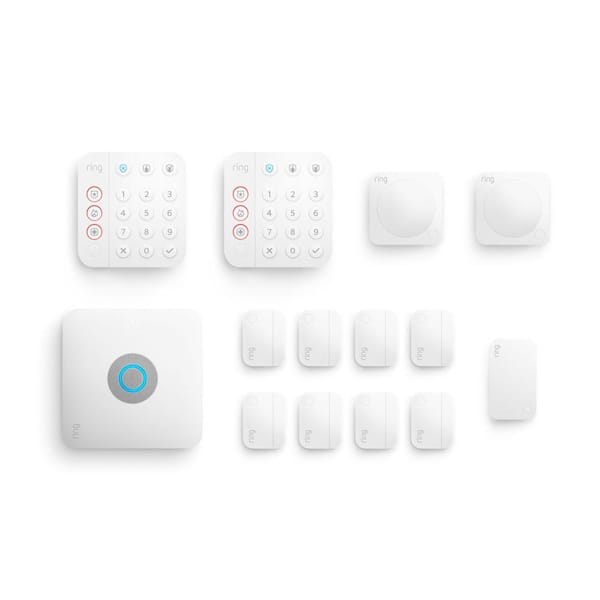
The Ring Alarm Pro 14-Piece Wireless Home Security System with Built-in eero Wi-Fi 6 Router is a sophisticated hybrid of network infrastructure and home protection.
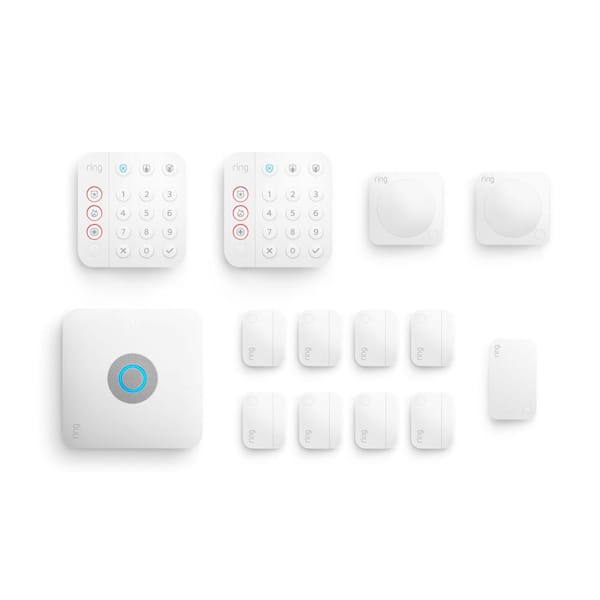
Best Overall Home Security & Networking Hub
Ring Alarm Pro 14-Piece Wireless Home Security System with Built-in eero Wi-Fi 6 Router — 9.1/10. A powerful all-in-one choice for homes that want DIY security coverage, optional professional monitoring, and built-in eero Wi-Fi 6 routing from one central hub.
Ring Alarm Pro 14-Piece Overview
The Ring Alarm Pro 14-Piece Wireless Home Security System with Built-in eero Wi-Fi 6 Router represents a fundamental shift in how home security is deployed. For a detailed performance test, read our comprehensive review.
Traditionally, a security system is a peripheral addition to a home's technology; however, the Alarm Pro positions itself as the core of the home's infrastructure. By embedding an eero Wi-Fi 6 router directly into the security base station, Ring has solved one of the most common points of failure in smart home security: internet stability and network congestion.
This 14-piece kit is engineered for broad coverage, moving beyond the limited scope of basic starter kits. While a smaller setup like the Ring Alarm Pro 8-Piece Kit might only secure a single front door and a hallway, this expansive bundle provides enough hardware to secure multiple entry points, several key interior zones, and a range extender to ensure that sensors in distant garages, sheds, or attic spaces remain connected. The system is designed for a DIY installation process, allowing homeowners to place sensors exactly where they are needed without the need for drilling holes, running wires through walls, or paying for a professional installation crew.
For those seeking a higher level of security, the system integrates seamlessly with the Ring Protect Pro subscription. This service transforms the device from a self-monitored alarm into a professionally monitored security system. The most critical feature unlocked by this subscription is cellular backup. In the event that your primary internet service goes down—whether due to a provider outage, a circuit breaker trip, or an intruder intentionally cutting the line—the built-in cellular connection ensures that the system can still alert the monitoring center and the homeowner, maintaining a continuous line of defense.
The inclusion of Wi-Fi 6 technology is not merely a branding exercise. Wi-Fi 6 (802.11ax) allows for more simultaneous device connections with significantly less congestion, which is vital in a modern "smart home" filled with bulbs, plugs, cameras, and streaming devices. For those also optimizing their home's utility infrastructure, see our Pelican PC600 water softener guide or check out the Express Water RO system review. Because the security sensors and the router live in the same chassis, the system can prioritize security traffic and maintain a more stable heartbeat for the sensors, drastically reducing the likelihood of false alarms caused by network timeouts or signal interference.
| Feature | Specification |
|---|---|
| Model Number | B08YMBQJ49 |
| Kit Components | 14 Pieces (Base Station, Keypad, Contact Sensors, Motion Detectors, Range Extender) |
| Router Technology | eero Wi-Fi 6 (Dual-Band) |
| Communication Protocol | Z-Wave (for sensors) / Wi-Fi (for hub and cameras) |
| Monitoring Options | Self-Monitored or Professional (via Ring Protect Pro) |
| Backup Connectivity | Integrated Cellular Backup (Subscription required) |
| Installation Type | DIY Wireless / Adhesive |
Pros
- Combines home security and eero Wi-Fi 6 routing in one base station
- 14-piece kit provides comprehensive starting coverage for medium homes
- Ideal for securing doors, windows, and critical interior transition zones
- Optional professional monitoring adds high-level emergency response
- Seamless integration for users already invested in the Ring ecosystem
- DIY-friendly setup eliminates expensive professional installation fees
- Wi-Fi 6 support reduces congestion for other smart home devices
Cons
- Cellular backup and professional monitoring require an ongoing subscription
- Not ideal for users with existing high-end mesh systems they wish to keep
- Proprietary ecosystem limits interoperability with non-Ring smart gear
- Larger homes may still require additional sensors beyond the 14 provided
- Professional monitoring availability can vary by region and plan
This review is based on a comprehensive analysis of the Ring Alarm Pro 14-Piece kit hardware and software capabilities. We may earn a commission if you purchase through our links.
Deep Dive: The Architecture of the Ring Alarm Pro
To fully appreciate the value of the Ring Alarm Pro, it is essential to understand the interaction between the Z-Wave protocol and the Wi-Fi network. Many newcomers to home security assume that every sensor connects via Wi-Fi. However, Wi-Fi is energy-intensive; if a contact sensor used Wi-Fi, you would be replacing batteries every few weeks. Instead, the Ring Alarm Pro utilizes Z-Wave, a low-energy wireless mesh network designed specifically for small data packets (like "Open" or "Closed").
The Ring Alarm Pro Base Station serves as the Z-Wave controller. When a contact sensor on a window is triggered, it sends a Z-Wave signal to the Base Station. If the system is "Armed," the Base Station triggers the siren and simultaneously sends an alert via the built-in eero Wi-Fi 6 router to the Ring cloud, which pushes a notification to your smartphone. This dual-layered approach ensures that sensors have multi-year battery lives while the hub maintains a high-speed connection to the outside world.
Pro Tip: The "Range Extender" included in the 14-piece kit is a critical component for homes with thick walls, plaster-and-lath construction, or long hallways. Place the extender halfway between the Base Station and the furthest sensor to maintain a strong Z-Wave mesh network and prevent "device offline" errors.
The integration of eero is a strategic masterstroke. eero is renowned for its "TrueMesh" technology, which allows multiple routers to work together to eliminate dead zones. Because the Ring Alarm Pro is a native eero device, you can easily add additional eero beacons or routers throughout your home to create a seamless mesh network. Your security system then benefits from this stability. For those expanding their surveillance, check out our Arlo Pro 4 buying guide or our performance review for a detailed breakdown of camera placement. This ensures that cameras—such as the Arlo Pro 4 Spotlight Camera Security Bundle—have a consistent, high-bandwidth stream to the cloud for recording and live viewing.
Furthermore, the hardware is designed for redundancy. The base station includes a backup battery that keeps the alarm operational even during a power outage. When paired with the cellular backup of the Protect Pro plan, the system becomes virtually immune to the most common ways intruders attempt to disable security systems: cutting the power and cutting the internet cable. This "triple-threat" redundancy—battery backup, cellular failover, and a high-performance Wi-Fi 6 core—puts the Alarm Pro in a class of its own compared to standard DIY kits.
Comprehensive Buyer's Guide: Evaluating Your Security Needs
Choosing the right security system involves more than just picking the kit with the most pieces. If you are comparing brands, you might also consider the Eufy Security Alarm review, or you might also SimpliSafe 12-Piece Wireless Home Security System (see our SimpliSafe security guide) or an professional security alternative for a different approach to Eufy Security Alarm (see our full review).
You must evaluate your home's architecture, your specific risk profile, and your technical comfort level. A 14-piece kit is considered a "medium-to-large" starter set, but its efficacy depends entirely on how you deploy the specific components provided.
Analyzing Entry Points and Perimeter Defense
The 14-piece kit provides a generous number of contact sensors. When planning your installation, you should categorize your entry points to ensure you aren't leaving critical gaps in your perimeter:
- High-Risk Zones: Ground floor windows, back doors, and garage-to-house doors. These should always have sensors. Statistical data shows these are the most common ingress points for intruders.
- Medium-Risk Zones: Second-story windows that are accessible via a porch roof or a trellis, and side gates leading to the backyard. While less common, these are often overlooked by homeowners.
- Low-Risk Zones: High windows or doors leading into secure internal courtyards. You can prioritize these sensors last if you find you have run out of hardware.
If your home has 20 or more ground-floor windows, you may need to purchase additional sensor packs or SimpliSafe 12-Piece Wireless Home Security System or SimpliSafe 13-Piece Wireless Home Security System (see our SimpliSafe review) to maintain a full perimeter of protection. It is better to have a few "blind spots" in a low-risk area than to leave a back door unsecured because you ran out of sensors.
Motion Detection and Interior Zoning
Motion detectors in the Ring Alarm Pro kit are designed to cover "zones" rather than individual doors. The most effective placement is in "choke points"—areas an intruder must pass through to reach the rest of the house. Examples include the main hallway, the living room entrance, or the master bedroom foyer.
To avoid the frustration of false alarms, avoid placing motion sensors in the following areas:
- Direct Sunlight: Avoid facing sensors directly toward a window where sudden infrared shifts (sunlight hitting the lens) may occur.
- Heat Sources: Do not place sensors directly above a radiator, space heater, or fireplace. Rapid temperature changes can trigger the Passive Infrared (PIR) sensors.
- Pet Areas: While Ring's sensors are designed to be pet-friendly, placing a sensor at a very low height in a room with large dogs can occasionally cause issues. Mounting them at the recommended 7-foot height usually resolves this.
The Subscription Debate: Self-Monitored vs. Professional
One of the most significant decisions for a Ring user is whether to pay for the Ring Protect Pro plan. This is not just about "extra features"; it is about the fundamental philosophy of your security.
| Feature | Self-Monitoring (Free) | Professional Monitoring (Paid) |
|---|---|---|
| Alerts | Instant Push Notifications | Instant Push + Monitoring Center Alert |
| Emergency Response | User must call 911 manually | Professional dispatch of emergency services |
| Internet Outage | System may go offline (unless cellular) | Cellular Backup maintains connection |
| Insurance Perks | Typically none | Potential for homeowners' insurance discounts |
| Cost | Included with hardware | Monthly/Annual Subscription fee |
Self-monitoring is suitable for those who are always near their phones and live in a highly connected environment. Professional monitoring (similar to the ADT Self Setup 9-Piece Home Security Kit
Related parts & accessories
Related parts & accessories
Step-by-Step Setup and Installation Process
The Ring Alarm Pro is designed for the non-technical user, but a methodical approach ensures the best security coverage and network stability. Following these phases will prevent the common "sensor offline" issues that plague rushed installations.
Phase 1: The Hub and Network Configuration
Start by plugging in the Ring Alarm Pro Base Station. Because this device is also your primary router, you must connect it to your modem via a high-quality Ethernet cable. Use the Ring app to configure your Wi-Fi SSID (network name) and password. Once the eero router is live, your entire home's internet will be powered by the security hub.
Critical Placement Strategy: Ensure the base station is located in a central area of the home, away from large metal objects or microwave ovens, which can interfere with the Z-Wave and Wi-Fi signals. If your modem is tucked away in a basement or a metal cabinet, consider using a long Ethernet cable to move the Ring Alarm Pro to a more open, elevated position.
Phase 2: Sensor Deployment and Pairing
Before sticking any sensors to your walls, "dry-pair" them. Use the Ring app to add each sensor one by one, ensuri