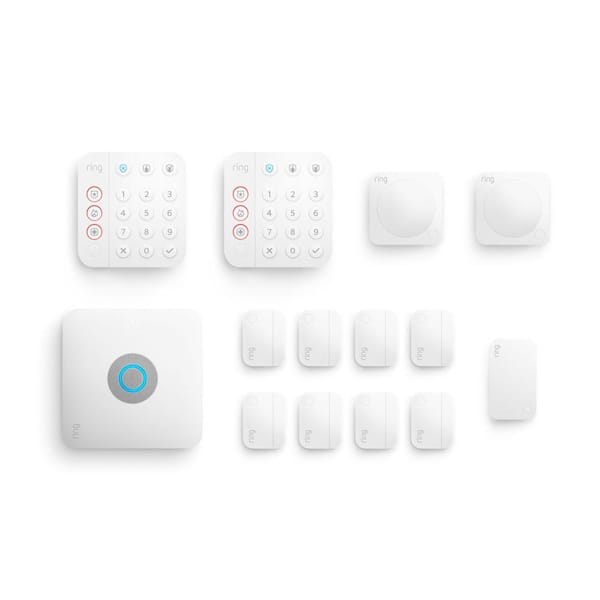
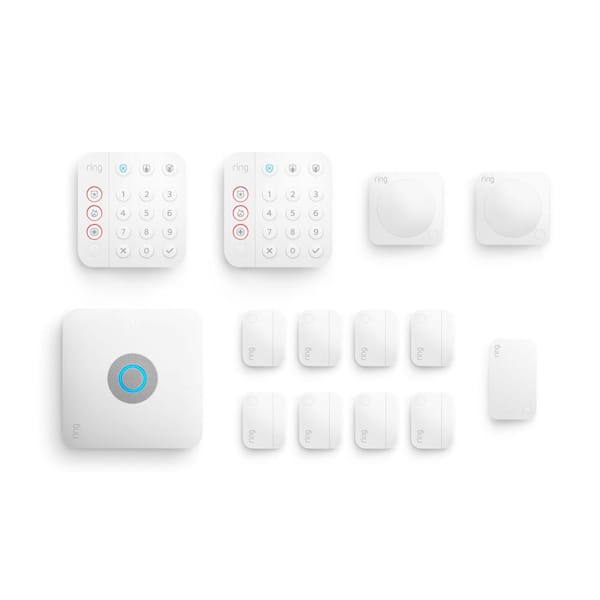
Ring Alarm Pro 14-Piece Wireless Home Security System
Score: 8.7/10 — A strong all-in-one DIY security system for households that want dependable alarm coverage and upgraded Wi-Fi from one central hub.
We may earn a commission from qualifying purchases made through links in this review.
Overview
The Ring Alarm Pro 14-Piece Wireless Home Security System (see our detailed Ring Alarm Pro 14-Piece buying guide) is designed for homeowners who want to combine two essential home systems: security monitoring and wireless networking. Instead of treating the alarm base station and router as separate devices, this kit builds an eero Wi-Fi 6 router directly into the Ring Alarm Pro base station. This convergence eliminates the need for multiple power bricks and reduces the cable clutter typically found near a home's modem.
That makes the Ring Alarm Pro 14-Piece Wireless Home Security System especially appealing for homes setting up security for the first time, upgrading from a basic alarm kit, or trying to reduce device clutter. The bundle provides a practical starting point for covering multiple doors, windows, and hallways, offering a comprehensive perimeter defense without professional installation fees.
The biggest caveat is that our detailed buying guide highlights that this system works best for households already comfortable with the Ring ecosystem. Optional professional monitoring, cellular backup, and some advanced features depend on a Ring Protect Pro subscription, so the total value depends heavily on whether you plan to pay for ongoing service. For those already invested in Ring doorbells or cameras, this hub acts as the "brain" that ties everything together into a cohesive smart home security network.
Key Features
Combines the alarm base station and a Wi-Fi 6 router in one hub, helping reduce hardware clutter while supporting modern wireless performance across the home.
Includes the core components needed to cover common entry points and interior areas in a small to medium-size home, from contact sensors to motion detectors.
Can be paired with a Ring Protect Pro subscription for 24/7 professional monitoring and emergency response support where available.
With the appropriate subscription, the system can maintain alarm connectivity if the home internet connection goes down, ensuring alerts still reach the cloud.
Works as part of a larger Ring setup, making it suitable for homes that may later add cameras, sensors, or other Ring-branded smart home devices.
Designed for self-installation, with wireless sensors and a keypad-based alarm interface for everyday arming and disarming.
| Feature | Value |
|---|---|
| Product name | Ring Alarm Pro 14-Piece Wireless Home Security System with Built-in eero Wi-Fi 6 Router (B08YMBQJ49) |
| Model number | B08YMBQJ49 |
| Category | Home Security Systems |
| Kit size | 14 pieces |
| Primary hub | Alarm Pro base station with built-in eero Wi-Fi 6 router |
| Included security components | Base station, keypad, contact sensors, motion detectors, and range extender |
| Networking standard | Wi-Fi 6 via built-in eero router |
| Installation type | DIY wireless installation |
| Professional monitoring | Optional with Ring Protect Pro subscription |
| Cellular backup | Available with compatible subscription plan |
| Best suited for | Homeowners who want to consolidate security and home Wi-Fi in one system |
Pros & Cons
Pros
- Combines home security and Wi-Fi 6 routing in one central device.
- 14-piece kit provides broad starting coverage for entry points and interior spaces.
- Good fit for homes already using or planning to use Ring devices.
- Optional professional monitoring adds a more complete security layer.
- Wireless sensors make installation more approachable than hardwired systems.
- Built-in eero platform is a major advantage over basic alarm-only hubs.
Cons
- Best features require an ongoing Ring Protect Pro subscription.
- Not ideal if you already have a premium mesh Wi-Fi setup you want to keep unchanged.
- Deepest value depends on staying within the Ring and eero ecosystem.
- Some homes may still need additional sensors or eero nodes for full coverage.
- Privacy-conscious buyers may prefer a system with less cloud dependence.
Performance
In day-to-day use, the Ring Alarm Pro 14-Piece Wireless Home Security System stands out because it does more than a traditional alarm kit. The alarm portion covers the expected basics: door and window monitoring through contact sensors, motion detection for interior spaces, keypad control, and a base station that manages the system. For most households, that is the core security experience they need, providing instant alerts to a smartphone when a sensor is triggered while the system is armed.
The built-in eero Wi-Fi 6 router is the feature that separates the Ring Alarm Pro from many competing DIY alarm systems. If your existing router is aging, unreliable, or poorly placed, consolidating routing and security into one base station can make the whole setup feel cleaner and more modern. Wi-Fi 6 is also a meaningful advantage for homes with multiple phones, tablets, laptops, smart speakers, cameras, and streaming devices competing for bandwidth. The eero integration ensures that your security devices have a prioritized, stable path to the internet, which is critical for receiving real-time notifications.
The security hardware is straightforward to live with. Wireless contact sensors are easier to place than hardwired alternatives, and the included keypad keeps the system usable for guests, family members, or anyone who does not want to rely entirely on an app. The range extender is also important because it helps the included sensors stay connected in larger layouts or homes with thicker walls, preventing "sensor offline" errors that plague cheaper wireless kits.
Where the system becomes more compelling is in its subscription-backed features. Optional 24/7 professional monitoring can make the system feel closer to a traditional monitored alarm service, while cellular backup helps preserve alarm connectivity if the primary internet service fails. For security-focused buyers, that backup capability is a major reason to choose this model over a simpler self-monitored kit. In a real-world scenario where a burglar might cut the exterior internet line, the cellular backup ensures the base station can still signal the monitoring center.
The Ring Alarm Pro 14-Piece Wireless Home Security System with Built-in eero Wi-Fi 6 Router (B08YMBQJ49) is strongest when you actually need both pieces of its identity: a home alarm system and an upgraded Wi-Fi router.
Deep Dive: How the Integrated System Works
To understand the value of the Ring Alarm Pro, one must understand the synergy between the Z-Wave security protocol and the Wi-Fi 6 networking layer. Traditional wireless alarms often use Z-Wave or Zigbee, which are low-power radio frequencies designed to travel through walls better than Wi-Fi and consume very little battery. The Ring Alarm Pro uses Z-Wave for the sensors (contact and motion) and the keypad, while using the eero Wi-Fi 6 chip for the base station's connection to the internet and the communication with Ring cameras.
When a door sensor is tripped, it sends a Z-Wave signal to the Base Station. The Base Station then processes this trigger. If the system is armed, it triggers the siren and simultaneously sends an alert via the eero router to the Ring cloud. Because the router is integrated, there is a reduced "hop" in the network, which can lead to slightly faster notification times. Furthermore, if the Wi-Fi goes down, the system switches to the internal cellular modem (provided you have the Pro subscription), ensuring that the security alert isn't lost simply because your ISP is having an outage.
The eero component isn't just a basic router; it is a mesh-capable node. This means that if you have a large home, you can buy additional eero beacons or routers and pair them with the Ring Alarm Pro base station. This creates a seamless mesh network across your home, where your devices automatically switch to the strongest signal as you move from room to room, all while the base station continues to manage the security perimeter. This architectural choice ensures that the security hub doesn't become a bottleneck for your high-speed internet traffic.
From a technical perspective, the integration of Wi-Fi 6 (802.11ax) allows for better handling of "congestion" in the smart home. In a typical modern house, there are dozens of devices—from smart bulbs to streaming sticks—all fighting for the router's attention. Wi-Fi 6 uses OFDMA (Orthogonal Frequency Division Multiple Access) to communicate with multiple devices simultaneously. This means your Ring cameras can stream high-definition footage without causing your laptop to lag during a Zoom call, all while the alarm system maintains its heartbeat connection to the monitoring center.
Setup and Installation Process
Installing the Ring Alarm Pro is designed to be a "plug-and-play" experience, though it requires a bit of methodical planning to get the best coverage (see our Ring Alarm Pro buying guide for component placement tips). The process begins with the Ring app, which guides you through the base station setup first. Because this unit acts as your router, you will need to connect it to your modem via an Ethernet cable and follow the eero app's instructions to configure your Wi-Fi name and password.
Once the network is live, adding sensors is a matter of "scanning" the QR codes on each device. The contact sensors use adhesive backing, making them easy to mount on door frames and window sills without drilling. A tip for installation is to test the alignment of the magnets before permanently sticking the sensors; if the gap is too wide, the system may not recognize the door as "closed."
The motion detectors should be placed in high-traffic "choke points," such as the main hallway or the living room entrance. It is important to avoid placing these directly facing heat sources like radiators or fireplaces, as sudden temperature changes can occasionally trigger false positives in PIR (Passive Infrared) sensors. The app allows you to test the range of these sensors to ensure they can communicate with the base station or the range extender.
The range extender is particularly vital for homes with multi-level layouts; placing it centrally on the first floor often ensures that upstairs sensors have a clear path back to the hub. For those with larger homes, mapping out the "Z-Wave mesh" is key. Unlike Wi-Fi, Z-Wave devices can act as repeaters for one another, meaning the more plugged-in Ring devices you have, the stronger the overall network becomes across the property.
Long-term Maintenance and Reliability
Maintenance for the Ring Alarm Pro is relatively minimal compared to traditional wired systems. The primary concern is battery management. Each contact sensor and motion detector runs on batteries; while they are designed to last for years, the Ring app will notify you when a sensor's battery drops below a certain threshold. It is recommended to check these once a year, especially in high-traffic areas where sensors are triggered frequently.
Software updates are handled automatically over the air (OTA). Both the eero routing firmware and the Ring security firmware update in the background, which means you get the latest security patches and feature improvements without needing to manually flash the device. However, it is a good practice to occasionally reboot the base station if you notice a dip in Wi-Fi performance, as is common with any home router.
From a longevity standpoint, the move to Wi-Fi 6 ensures that the hardware won't be obsolete in two years. As more smart home devices enter the market, Wi-Fi 6's ability to handle high-density traffic will keep the Ring Alarm Pro performing well. The physical build of the base station is sturdy and heat-dissipating, which is crucial since it handles both routing and alarm processing simultaneously.
One area of reliability to watch is the adhesive on the contact sensors. Over several years, the adhesive may weaken, especially in humid environments or on textured surfaces. Periodically pressing the sensors to ensure they are firmly seated prevents "false open" alerts that can lead to unnecessary anxiety or accidental alarm triggers.
Comparison: Ring Alarm Pro vs. Standard DIY Kits
When comparing the Ring Alarm Pro to standard DIY security kits, the most obvious difference is the networking capability. Most DIY kits provide a hub that simply connects to your existing router. If that router fails, the system is essentially blind (unless it has a cellular backup). The Ring Alarm Pro 14-Piece Wireless Home Security System, however, is the router. This removes a point of failure and simplifies the hardware stack.
In terms of sensor quality, Ring utilizes industry-standard Z-Wave, which is generally more reliable than the cheap 433MHz RF signals used in budget-tier security systems. The 14-piece kit provides a significant amount of hardware, allowing for a "layered" defense. If you have a larger property, this 14-piece kit provides the necessary scale for a "layered" defense, utilizing perimeter sensors on doors and windows alongside interior sensors in hallways—a level of coverage that smaller 5-piece kits cannot provide.
Compared to highly rated DIY alternatives like the SimpliSafe 13-Piece Wireless Home Security System or the SimpliSafe 12-Piece Wireless Home Security System (see our SS3-11 buying guide), the Ring Alarm Pro is very competitive. It mirrors the flexibility of the ADT Self Setup 9-Piece Home Security Kit (detailed in our comprehensive buying guide) or the Vivint Smart Home Security System (see our Vivint (VPK-2GIG-GO2) Review), ensuring you aren't locked into a long-term contract while allowing you to scale your sensors as needed. You aren't locked into a three-year contract, and you can add or remove sensors as your home layout changes. However, the trade-off is the lack of "white-glove" installation; you are the one drilling (if you choose to) and positioning the sensors.
Buyer's Guide: Is this the right kit for you?
Deciding whether to purchase the Ring Alarm Pro 14-Piece Wireless Home Security System depends on your current home infrastructure. To determine if this is the right fit, consider the following three scenarios:
Scenario A: The "Fresh Start" Home. If you are moving into a new home or have an old router that is barely hanging on, this kit is an absolute win. You solve two problems—security and Wi-Fi—with a single purchase. The eero Wi-Fi 6 performance is competitive and the security setup is comprehensive enough to protect a medium-sized home without needing immediate upgrades.
Scenario B: The Ring Power User. If you already have a Ring Video Doorbell or Floodlight Cams—similar to the high-end camera setups detailed in our Arlo Pro 4 buying guide (see also our