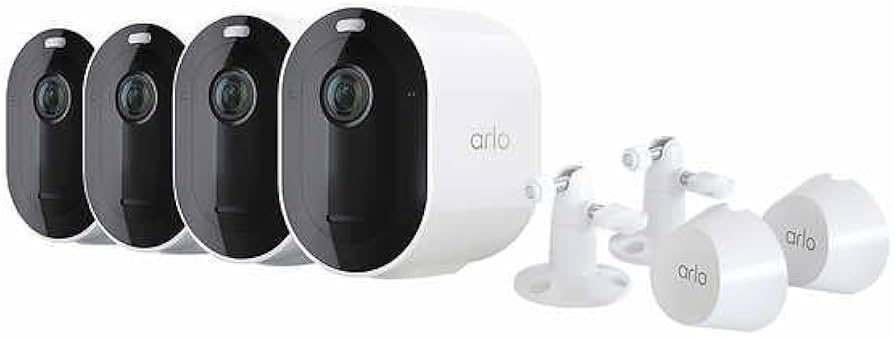
The Arlo Pro 4 Spotlight Camera Security Bundle (check out our complete product details) is a high-performance, 2K HDR hub-free surveillance system designed for professional-grade whole-home security coverage. With four 2K HDR cameras, wide 160-degree fields of view, and integrated spotlights for color night vision, it offers a professional-grade security perimeter without the need for complex wiring or proprietary base stations.
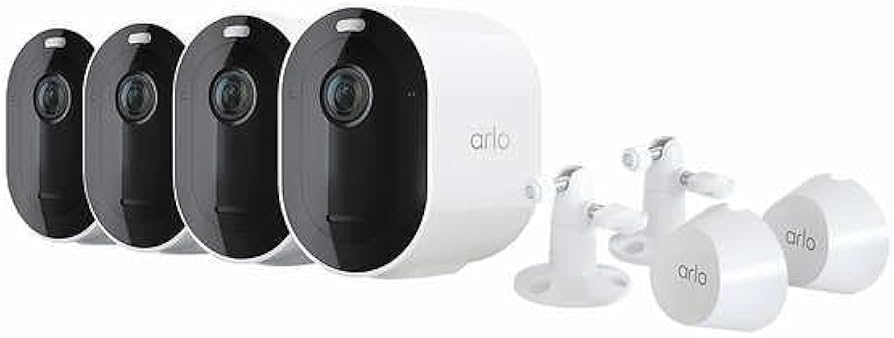
Best Overall Whole-Home Security: Arlo Pro 4 Spotlight Camera Security Bundle
Score: 9.0/10 — A powerful 4-camera outdoor security bundle with sharp 2K HDR video, color night vision, and flexible wire-free installation that makes it perfectly suited for comprehensive property monitoring.
Arlo Pro 4 Spotlight Camera Security Bundle (4-Camera System)
For a more granular technical breakdown, see the Arlo Pro 4 Spotlight Camera Security Bundle details.
The Arlo Pro 4 Spotlight Camera Security Bundle (see our comprehensive Arlo Pro 4 bundle breakdown) is engineered specifically for homeowners who need to monitor multiple critical zones—such as the front door, driveway, backyard, and garage—without the logistical nightmare of drilling holes for power cables. By bundling four high-performance cameras, Arlo provides a turnkey foundation for a perimeter security strategy that can be deployed in a fraction of the time required for traditional hardwired systems. This bundle eliminates the guesswork of purchasing individual units and ensures that your property's most vulnerable entry points are covered from day one.
Related parts & accessories
Related parts & accessories
At the heart of the VMK4450P system is the 2K HDR video capability. In the world of security cameras, resolution is everything; while 1080p is standard, 2K provides the necessary pixel density to zoom in on faces or license plates with significantly less blurring. The High Dynamic Range (HDR) processing is particularly vital for outdoor use, where a camera might be facing a bright sunrise or a dark porch with a single bright light. HDR balances these extremes, ensuring that a person walking from a bright street into a shaded entryway remains visible and clear, regardless of the lighting contrast.
Coverage is another area where the Pro 4 excels. The 160-degree field of view is intentionally wide to minimize blind spots. In a typical residential setup, this means a single camera mounted at the corner of a garage can often monitor both the driveway and the side yard simultaneously. This wide angle, combined with the integrated spotlight, transforms the camera from a passive observer into an active deterrent. When the motion sensor is triggered, the spotlight illuminates the area, not only alerting intruders that they have been spotted but also enabling the camera to capture full-color video rather than the grainy grayscale of standard infrared night vision.
The most significant architectural shift in the Arlo Pro 4 series is the removal of the required base station. Unlike previous generations that required a hub to bridge the cameras to the internet, the VMK4450P connects directly to your 2.4GHz Wi-Fi network. This simplifies the "out-of-the-box" experience and reduces the number of cables cluttering your router area. For those integrated into the smart home ecosystem, the system plays well with Amazon Alexa and Google Assistant, allowing you to stream your camera feeds directly to an Echo Show or Nest Hub using simple voice commands, making it a seamless addition to a modern connected home.
Pros
- Four cameras provide immediate, comprehensive whole-home coverage
- 2K HDR video offers superior clarity over standard 1080p systems
- 160-degree wide-angle lens reduces the number of cameras needed per zone
- Integrated spotlight provides active deterrence and color night vision
- True wire-free installation eliminates the need for professional electrical work
- Direct Wi-Fi connectivity removes the need for a separate proprietary hub
- Seamless integration with Alexa and Google Assistant ecosystems
- Versatile storage options including local USB and cloud backup
Cons
- Battery-powered design requires periodic recharging or solar accessories
- Performance is heavily dependent on the strength of your home Wi-Fi mesh
- Advanced AI detection and cloud storage require a monthly subscription
- Overkill for small apartments or single-room monitoring needs
- Mounting requires careful planning to avoid "false trigger" zones
| Specification | Arlo Pro 4 Bundle (VMK4450P) |
|---|---|
| Model Number | VMK4450P |
| Included Hardware | 4x Spotlight Cameras |
| Resolution | 2K HDR |
| Viewing Angle | 160 Degrees |
| Connectivity | Direct Wi-Fi (No Hub Required) |
| Night Vision | Color (Spotlight) / Infrared |
| Audio | Two-Way Audio (Built-in Mic/Speaker) |
| Storage | Local USB / Arlo Cloud |
| Compatibility | Alexa, Google Assistant |
| Weatherproofing | Weather-resistant outer shell |
Deep Dive: How the Arlo Pro 4 System Works
Understanding the mechanics of the Arlo Pro 4 Spotlight Camera Security Bundle is essential for maximizing its effectiveness. The system operates on a "trigger-and-capture" logic. Because the cameras are battery-powered, they do not record 24/7; instead, they remain in a low-power standby mode until the Passive Infrared (PIR) sensor detects a change in heat signatures (indicating a human or animal moving across the field of view). This ensures that the battery isn't wasted on static images of a driveway or backyard.
Once a trigger occurs, the camera wakes instantly and begins streaming 2K HDR video. If the event occurs at night, the system can either use standard infrared LEDs for a stealthy, black-and-white image or trigger the high-intensity spotlight for a color image. This "Color Night Vision" is a game-changer for security, as knowing the color of a vehicle or a suspect's clothing provides critical evidence that grayscale footage cannot offer. The sensor is designed to filter out minor movements, though fine-tuning via the app is often necessary to eliminate "ghost" triggers caused by wind-blown foliage.
The data path is equally streamlined. The footage is transmitted via Wi-Fi to your router. From there, you have two choices for storage. You can send the footage to the Arlo Cloud, where it is encrypted and stored for easy remote access from any smartphone. This is the most common setup, as it allows for instant notifications and playback. Alternatively, you can use a compatible Arlo SmartHub (sold separately) to enable local USB storage. Local storage is preferred by privacy-conscious users who want to avoid monthly fees and keep their data within their own four walls, though it requires a separate hardware purchase.
For advanced users, the Arlo Pro 4's software integration allows for "Smart Notifications." Instead of a generic "Motion Detected" alert, the AI can analyze the video feed to determine if the trigger was a person, a pet, or a vehicle. This categorization allows users to set different alert priorities—for example, receiving a loud notification for a "Person" at the back door, but a silent notification for a "Vehicle" in the driveway. This reduces notification fatigue and ensures that critical events are not overlooked.
Comprehensive Buyer's Guide: Is This Bundle Right For You?
Choosing a security system is less about the specs and more about the specific layout of your property. If you are considering a professional-grade installation, such as the one detailed in our Vivint review, or our ADT Self Setup 9-Piece Home Security Kit provides a great comparison. If you're starting from scratch, exploring the Ring Alarm Pro 14-Piece Wireless Home Security System can help you determine the number of sensors you actually need. To determine if the VMK4450P is the correct investment, consider the following environmental factors. If you're comparing this to professional monitoring, see our ADT Self Setup 9-Piece Home Security Kit for a more traditional alarm-based approach. The "one size fits all" approach rarely works in home security, and the Arlo Pro 4's unique architecture has specific requirements and benefits.
Property Size and Layout
A 4-camera bundle is the "sweet spot" for medium-to-large detached homes. In a typical configuration, you would place one camera at the front door, one covering the driveway/carport, one at the rear sliding door, and one covering a side alley or garage entrance. If you live in a small apartment with only one entry point, this bundle is excessive; you might consider a more compact setup like the Arlo Essential. However, for those with a fenced backyard or a multi-car driveway, the four-camera count ensures there are no "blind alleys" where an intruder could hide.
Consider the "overlap" strategy. For maximum security, cameras should be positioned so that each camera's field of view slightly overlaps with another. This prevents a "dead zone" where a savvy intruder could potentially avoid detection by sticking close to the wall beneath a camera. Because the Arlo Pro 4 has a 160-degree lens, achieving this overlap is significantly easier than with narrow-angle cameras.
Wi-Fi Infrastructure and Signal Management
Because these cameras lack a dedicated hub, they rely entirely on your home's Wi-Fi signal. If you have an older router located in the center of the house, the signal may be too weak by the time it reaches a camera mounted on an exterior brick wall. We strongly recommend using a Mesh Wi-Fi system (such as Eero or Google Nest Wifi) if you plan to place cameras at the far corners of your property, as stability is key for 2K streaming.
A weak signal leads to "dropped" recordings or delayed notifications, defeating the purpose of a security system. For a deeper dive into networking for security and systems with built-in Wi-Fi routing for more stability, see our Ring Alarm Pro 14-Piece details for more on integrated Wi-Fi routing. If you experience connectivity issues, the best solution is to place a Wi-Fi extender or an additional mesh node near the exterior wall where the camera is mounted. Ensure your upload speed is sufficient; 2K HDR video requires more bandwidth than standard 1080p, and slow upload speeds can cause the video to lag or fail to save to the cloud.
The Battery vs. Wired Dilemma
The "wire-free" nature of the Arlo Pro 4 Spotlight Camera Security Bundle is its greatest selling point, but it introduces a maintenance cycle. Depending on how often the cameras are triggered (e.g., a busy street vs. a quiet cul-de-sac), you will need to remove the cameras and charge them periodically. To mitigate this, Arlo offers solar panel accessories. If you have an area with decent sunlight, pairing the system with solar panels effectively turns them into "set and forget" devices, removing the need for manual charging.
For users who cannot tolerate the idea of taking a camera down for charging, there are also permanent power cables available. While this removes the "wireless" benefit, it gives you the stability of a hardwired system without the need for a professional electrician to run wires through your attic or crawlspace. You simply plug the cable into an outdoor outlet.
Detailed Installation and Setup Strategy
Installing the VMK4450P is designed to be a DIY-friendly process, but a strategic approach will save you from having to climb a ladder twice. Many users make the mistake of mounting the camera first and then attempting to sync it, only to find that the Wi-Fi signal is too weak in that specific spot.
Phase 1: The Bench Test
Before mounting any camera to a wall, pair it with the Arlo app while sitting at your kitchen table. This "bench test" ensures that the hardware is functioning correctly and that the latest firmware updates are installed. Updating firmware while the camera is in your hand is much easier than attempting a remote update on a camera mounted 10 feet in the air with a potentially unstable connection.
Phase 2: Signal Mapping
Take your smartphone to the exact spot where you intend to mount the camera. Check your Wi-Fi signal strength using the phone's status bar or a dedicated network analyzer app. If your phone shows only one bar of signal, the camera will likely struggle to upload 2K HDR footage. If the signal is weak, move the mounting point by a few inches or consider adding a Wi-Fi extender before drilling holes into your siding.
Phase 3: Physical Mounting and Angling
When mounting, aim for a height of 8 to 10 feet. Mounting too high reduces the effectiveness of the facial recognition and makes it harder to identify individuals. Mounting too low makes the camera vulnerable to tampering. Use the included magnetic mounts for flexibility, but ensure the security screw is tightened to prevent theft. Angle the camera slightly downward to capture the ground immediately below the device, preventing a blind spot where someone could stand directly underneath the camera.
Long-Term Maintenance and Optimization
A security system is only as good as its current state of operation. Much like maintaining a Wayne ESP25 battery backup sump pump system (similar to the Ridgid SP-650C review) to prevent home disasters, consistent maintenance of your cameras prevents security gaps, much like how a Basement Watchdog BW1033 prevents water damage. Because the Arlo Pro 4 is an outdoor device, it is subject to environmental wear and tear that can degrade image quality over time. Following a seasonal maintenance schedule ensures your VMK4450P bundle continues to deliver 2K clarity.
Lens Care and Cleaning
Dust, spider webs, and water spots can confuse the AI detection and cause "false positives." A spider web across the lens at night can reflect the infrared light, blinding the camera and triggering endless motion alerts. Every quarter, wipe the lens with a clean, microfiber cloth and a small amount of lens cleaner. Avoid using harsh chemicals or paper towels, which can scratch the protective coating of the 2K lens.
Battery Health and Winterization
Lithium-ion batteries are sensitive to extreme temperatures. In very cold climates, you may notice the battery draining faster than in the summer. This is a chemical reality of battery performance. If you live in an area where temperatures frequently drop below freezing, prioritize the use of Arlo's offi