⚠️ Pre-Release Notice
Editor's note: The Google Nest Learning Thermostat 4th Gen had not been officially released at the time this guide was prepared. Specifications, pricing, and features are based on pre-release information and are subject to change. We will update this article upon official launch and hands-on verification.
See current price and details for Google Nest Learning Thermostat (4th Gen).
The smart thermostat market has matured dramatically over the past decade, but the Google Nest Learning Thermostat (4th Gen) remains the benchmark against which every rival is measured. This latest iteration focuses on seamless integration and faster learning to lower home energy costs.
With this 4th-generation smart thermostat, Google has refined nearly every element of its iconic design — thinner profile, sharper display, faster learning — while adding Matter support that makes it a genuinely future-proof addition to your smart home. (If you're considering a complete heating overhaul, check out our MrCool DIY mini-split buying guide). Whether you're upgrading from an older Nest, ditching a dumb thermostat for the first time, or comparing the Nest 4th Gen head-to-head with the Ecobee SmartThermostat Premium or Honeywell Home T9 Smart Thermostat, this guide covers everything you need to make a confident decision.TL;DR — What You Need to Know
- The Nest Learning Thermostat 4th Gen learns your schedule in about a week and programs itself automatically.
- A redesigned 3.2-inch high-resolution display replaces the older backlit dial with a crisp, always-on ambient screen.
- Matter over Wi-Fi support means it works with Apple Home, Amazon Alexa, Google Home, and SmartThings simultaneously.
- Compatible with most 24V heating and cooling systems (including mini-split heat pumps), but does NOT support line-voltage (120V/240V) baseboard systems.
- Professional installation is available but most homeowners with basic wiring experience can DIY in under 30 minutes. (If you're upgrading your entire HVAC system, see our guide to DIY mini-split installations).
- Energy History and Nest Home Report help you track and reduce your HVAC bill over time. For a complete ventilation strategy, see our Panasonic WhisperGreen Select buying guide, and check out our Filtrete MERV-12 air filter review to ensure your system is breathing efficiently. Keeping filters clean is just as critical as smart scheduling for lowering energy costs.
Our Top Pick: Google Nest Learning Thermostat (4th Gen)
The gold standard in smart thermostats gets meaningfully better with its fourth generation. Exceptional auto-scheduling, a stunning new display, and broad smart-home compatibility make the Google Nest Learning Thermostat (4th Gen) the easiest recommendation for most homeowners — provided your system is compatible.
Google Nest Learning Thermostat 4th Gen — In-Depth Review (Based on pre-release specifications; hands-on testing pending)
Design & Display
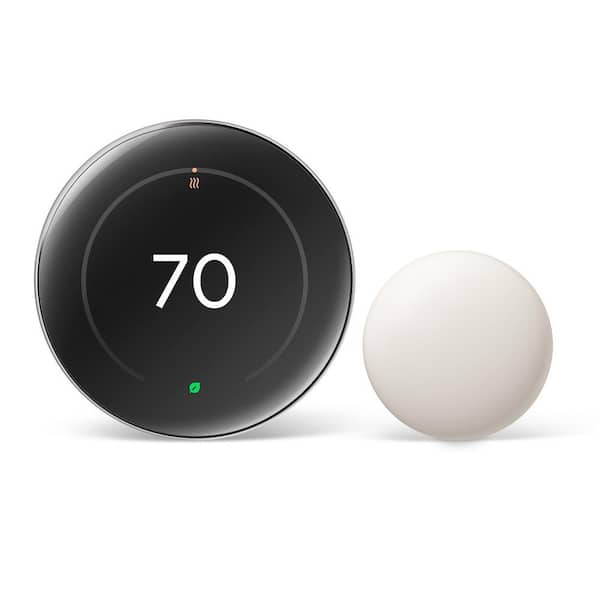
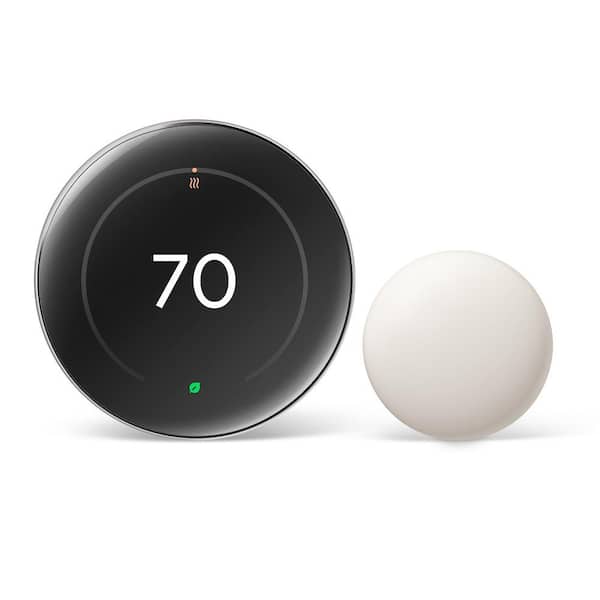
Google's engineers shaved roughly 25% of the thickness off the 3rd Gen body, resulting in a unit that sits far more elegantly on the wall. The stainless-steel outer ring is available in four finishes — Polished Silver, Matte Black, Sand, and Fog — giving it a jewelry-like quality that stands apart from the utilitarian look of most competitors. The new 3.2-inch circular LCD is the most dramatic upgrade: it's sharper, brighter, and capable of displaying a full clock face, outdoor weather conditions, and your current set temperature simultaneously in what Google calls its ambient mode — enabled in part by the Soli-based radar sensor that detects your presence and wakes the display as you approach. At a glance across the room, you always know what the house is doing without having to interact with the device at all.
The physical interface is unchanged in philosophy but improved in execution. You still rotate the outer ring to adjust temperature and press it to confirm, an interaction model that has felt natural since the 1st Gen launched in 2011. What's new is that the ring now has a more precise click and a quieter, damped feel. The display auto-brightens based on ambient light, dimming at night so it won't disturb a sleeping household. Users who found older Nest displays too dim in bright rooms will appreciate that the new panel pushes meaningfully higher peak brightness.
Learning Algorithm & Scheduling
The "Learning" in the name has always been the killer feature, and Google has updated the underlying algorithm for the 4th Gen to converge on a reliable schedule faster — typically in five to seven days rather than the one to two weeks the 3rd Gen needed. The thermostat tracks when you manually adjust temperature, when occupancy sensors detect motion, and when the Nest app reports your phone's location to build a picture of your daily routine. Within that first week, it starts proposing adjustments and can fully automate your schedule without you ever opening a scheduling interface. For homeowners who found the manual programming of traditional thermostats a chore they never completed, this remains genuinely transformative.
Home/Away Assist continues to work as before, cross-referencing the built-in occupancy sensor with your phone's GPS to set the thermostat to an energy-saving Eco temperature whenever the house is empty. The 4th Gen adds a new "Early-On" feature that factors in both your target temperature and your local weather forecast to start heating or cooling earlier on extreme weather days, so the house reaches the right temperature at the right time rather than just running the system at a fixed offset. Early testing from Google suggests this alone can meaningfully reduce overshoot, a common source of energy waste in cold climates.
Smart Home Integration & Matter
Matter over Wi-Fi support is the 4th Gen's most strategically important addition. Unlike the older Nest thermostats that were effectively siloed in Google's ecosystem, the 4th Gen can be added to Apple Home, Amazon Alexa routines, SmartThings automations, and Google Home — all at the same time, without choosing sides. This matters enormously for households that have assembled devices across different ecosystems over the years. For Google Home users, the experience is deepest: you get Nest-specific energy reporting, family sharing, and integration with other Nest Protect smoke detectors and Nest cameras. If you are building a full home security suite, we recommend starting with a comprehensive system (like the ADT Self Setup kit); see our guides on the Ring Alarm Pro 14-Piece Kit, Arlo Pro 4, or SimpliSafe 12-Piece Kit. But Apple Home users finally get a first-class experience with full HomeKit control and Siri voice commands, something the 3rd Gen never officially supported.
The Google Home app remains the primary interface for setup and energy analytics. The Energy History dashboard shows you daily and monthly heating and cooling runtime, alongside Nest Leaf moments (when you chose an energy-saving temperature), and a Nest Home Report that emails you a monthly summary. (For those managing humidity alongside temperature, check out our GE ADEL50LZ dehumidifier buying guide to keep your air quality balanced). Google also offers participation in utility Seasonal Savings programs in eligible US regions, where the Nest makes small automatic adjustments during peak grid demand periods in exchange for bill credits — a feature that has collectively saved Nest users billions of heating and cooling hours since it launched.
Pros
- Faster, more accurate auto-scheduling than previous generations
- Stunning new high-resolution circular display with ambient clock mode
- Matter support works simultaneously with Google Home, Apple Home, Alexa, and SmartThings
- Thinner, premium build quality with four finish options
- Early-On weather-predictive start reduces temperature overshoot
- Utility Seasonal Savings programs available in many US markets
- Detailed Energy History and monthly Home Report
- Easy DIY installation with in-app wiring guide and compatibility checker
Cons
- No built-in room sensor — requires separate Nest Temperature Sensors for multi-zone accuracy
- Does not support line-voltage (120V/240V) baseboard heating systems
- Requires a C-wire or Nest Power Connector accessory (included in box) on some systems
- Premium pricing compared to the Ecobee SmartThermostat Premium or Honeywell Home T9 Smart Thermostat
- Full feature depth still requires Google account and the Google Home app
- No touchscreen — rotating ring isn't ideal for every user
Full Specifications
| Specification | Detail |
|---|---|
| Display | 3.2-inch circular LCD, high-resolution, ambient always-on mode |
| Diameter × Depth | 3.3 in (83.7 mm) × 0.83 in (21 mm) — thinner than 3rd Gen |
| Connectivity | Wi-Fi 802.11 b/g/n/ac (2.4 GHz & 5 GHz), Matter over Wi-Fi, Bluetooth LE |
| Smart Home Protocols | Matter, Google Home, Amazon Alexa, Apple HomeKit, SmartThings |
| Sensors | Temperature, humidity, occupancy (radar/Soli-based), ambient light, far-field activity |
| System Compatibility | Most 24V heating and cooling systems; up to 3 stages heat / 2 stages cool |
| Not Compatible | Line-voltage (120V/240V) systems, millivolt systems |
| C-Wire Requirement | Required; Nest Power Connector included for systems without C-wire |
| Available Finishes | Polished Silver, Matte Black, Sand, Fog |
| Temperature Range | 50–90°F (10–32°C) |
| Power | Wired 24V system (no battery-only operation) |
| App | Google Home (iOS 16+ / Android 9+) |
| Energy Reporting | Energy History dashboard, monthly Home Report, Seasonal Savings |
| Warranty | 2-year limited hardware warranty |
Feature Highlights at a Glance
Auto-Schedule
Learns your routine in 5–7 days. Programs itself so you never have to touch a scheduling interface.
Home/Away Assist
Combines phone GPS and built-in occupancy sensor to switch to Eco mode when everyone leaves.
Early-On
Weather-predictive startup: the system runs earlier on extreme days so you're always comfortable on arrival.
Matter Support
Works simultaneously across Google Home, Apple Home, Alexa, and SmartThings — no ecosystem lock-in.
Energy History
Day-by-day HVAC runtime breakdown with explanations for each heating and cooling event.
Seasonal Savings
Opt-in utility program makes small adjustments during peak demand; eligible users earn bill credits.
⚠️ Check Compatibility Before You Buy
The Nest 4th Gen works with most 24V low-voltage HVAC systems — forced air, heat pump systems (such as mini-splits), radiant water — but it is not compatible with line-voltage electric baseboard heaters (120V or 240V), millivolt systems (some gas fireplaces and older boilers), or proprietary multi-stage systems that use more than 8 wires. Use Google's free compatibility checker (or if you're considering a new system entirely, check out our Pioneer mini-split guide or Carrier 38MAQB09R-3 guide, Bosch Mini-Split guide, or our Daikin RXB12AXVJU guide) in the Google Home app or on Google's website before purchasing. If you're unsure, photograph your existing thermostat's wiring and compare it against the guide.
ℹ️ Do You Have a C-Wire?
The Nest 4th Gen requires a constant power source via a C-wire (common wire). If your current thermostat has a wire labeled "C" in its terminal block, you're good to go. If not, Google includes a Nest Power Connector in the box — a small add-on that wires into your furnace to provide the constant power the Nest needs. The in-app setup guide walks you through both scenarios step by step.
How It Compares: Nest 4th Gen vs. Key Competitors
To help you understand where the Nest 4th Gen sits in the market, here's a side-by-side comparison of the most popular smart thermostats in 2024. Pricing is approximate at time of writing and will vary by retailer.
| Feature | Nest Learning 4th Gen | Ecobee SmartThermostat Premium | Honeywell Home T9 Smart Thermostat | Nest Thermostat (Budget) |
|---|---|---|---|---|
| Approx. Price |