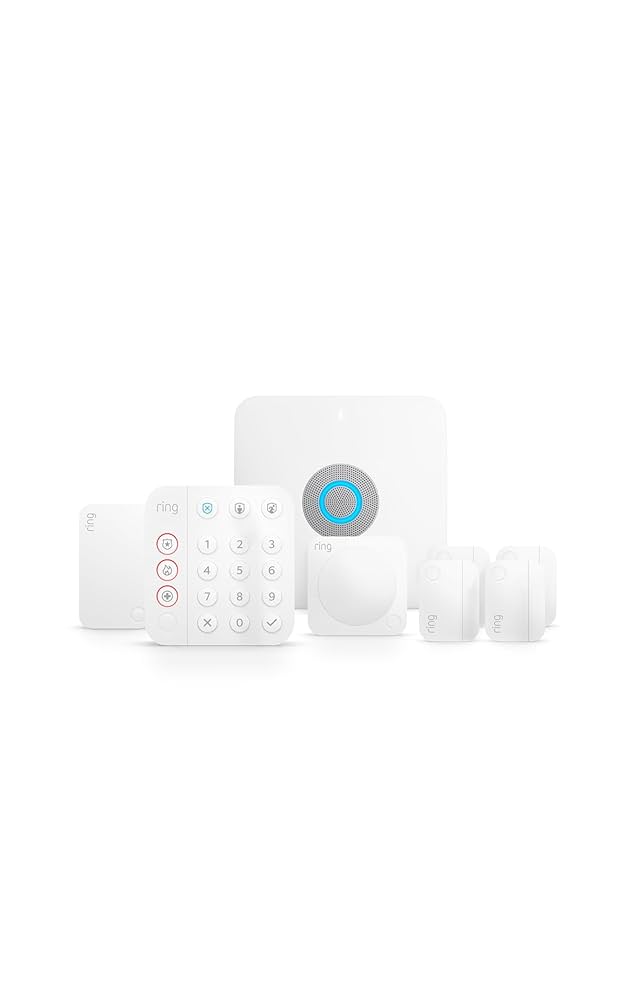
Finding the balance between a secure home and a fast network can be challenging. The Ring Alarm Pro 8-Piece Kit with Built-in eero Wi-Fi 6 Router solves this by merging professional-grade DIY security (comparable to fully managed options like Vivint) with a high-performance Wi-Fi 6 router. Designed to eliminate the clutter of separate hubs, this all-in-one system provides a streamlined foundation for the modern smart home, featuring optional 24/7 professional monitoring and critical LTE internet backup to keep your home protected during outages.
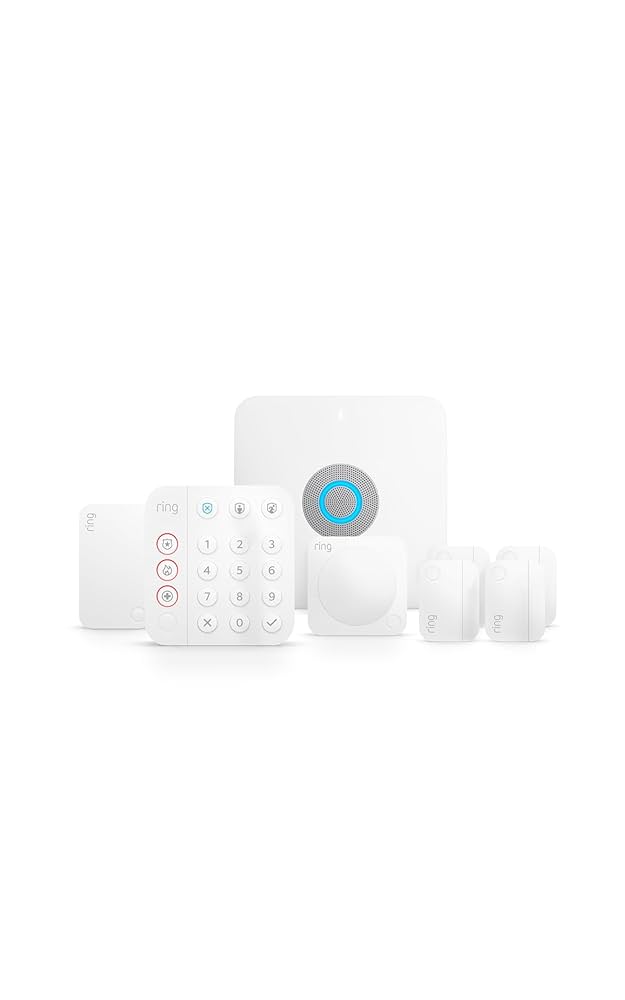
Best Overall: Ring Alarm Pro 8-Piece Kit with Built-in eero Wi-Fi 6 Router
Score: 9.1/10. A powerhouse all-in-one solution for small to mid-sized homes that integrates DIY security, expandable sensors, and eero Wi-Fi 6 routing into a single, manageable ecosystem.
Ring Alarm Pro 8-Piece Kit with Built-in eero Wi-Fi 6 Router
The Ring Alarm Pro 8-Piece Kit with Built-in eero Wi-Fi 6 Router is designed for households that want more than a basic alarm system.
Its primary innovation is the Alarm Pro base station, which doubles as a fully functional eero Wi-Fi 6 router. This integration removes the clutter of having multiple hubs and power bricks in your living room, while ensuring that your security sensors and smart home devices have a dedicated, high-performance network to communicate over.This 8-piece kit is curated as a practical starting point for apartments, townhomes, and small to mid-sized houses. It typically provides a comprehensive baseline of protection by covering key entry points with contact sensors and adding motion detection for high-traffic areas like hallways or living rooms. The inclusion of a keypad allows for physical arming and disarming near the front door, and the range extender ensures that sensors in distant rooms maintain a stable connection to the base station.
For those looking to scale, the system is highly modular. While the 8-piece kit covers the essentials, homeowners can expand their perimeter by adding more contact sensors, motion detectors, or integrated sirens. For larger properties, the Ring Alarm Pro 14-Piece Kit is generally the more cost-effective starting point; see our Ring Alarm Pro 14-Piece Kit review for a detailed comparison.
Because it is built into the Ring ecosystem, it integrates seamlessly with Ring Video Doorbells and Cameras (for a budget alternative, see the Arlo Essential review) (similar to how the Arlo Pro 4 Spotlight Camera Security Bundle (for more on entry-level camera systems, see our Arlo Essential review) manages its ecosystem), allowing you to create complex automation routines—such as having a specific camera record when a security sensor is tripped.
The most critical consideration for potential buyers is the optional Ring Protect Pro subscription. While the hardware works as a DIY alert system out of the box, the "Pro" features are unlocked via this plan. This includes 24/7 professional monitoring, where a dispatch center is notified if your alarm triggers, as well as cellular backup internet. The backup internet feature is a significant advantage: if your primary ISP goes down, the eero router can switch to LTE, keeping your security system and essential devices online.
| Specification | Ring Alarm Pro 8-Piece Kit |
|---|---|
| Model Number | B08HSTJPM5 |
| Category | Home Security Systems |
| Core Hub | Ring Alarm Pro base station with built-in eero Wi-Fi 6 router |
| Kit Size | 8-piece starter kit |
| Included Components | Base station, keypad, contact sensors, motion detector, and range extender |
| Best For | Small to mid-sized homes, apartments, and Ring smart-home users |
| Optional Subscription | Ring Protect Pro (Professional monitoring, LTE backup, local video storage) |
| Networking | Built-in eero Wi-Fi 6 routing |
Pros
- Combines home security and eero Wi-Fi 6 routing in one device
- Simplified setup for small to mid-sized residential spaces
- Easily expandable with a wide range of compatible Ring accessories
- Optional professional monitoring provides peace of mind for emergency response
- LTE backup ensures connectivity during internet service outages
- Deep integration with Ring cameras and smart lighting
Cons
- Full feature set requires a recurring Ring Protect Pro subscription
- Potential overkill for users who only want a simple chime alarm
- Requires commitment to the Ring/Amazon ecosystem for maximum value
- Large homes may require additional eero nodes for seamless mesh coverage
- Not the ideal choice for users who already possess high-end enthusiast mesh routers
Comprehensive Buyer's Guide: Integrating Security and Networking
How the Ring Alarm Pro System Works
The Ring Alarm Pro operates on a "Hub and Spoke" architecture. The base station (the hub) acts as the brain of the system, communicating with sensors via Z-Wave and Wi-Fi. Unlike traditional wired systems that require drilling through walls and running cables, the Pro system uses wireless protocols to connect contact sensors (on doors/windows) and motion detectors. When a sensor is tripped while the system is armed, the base station triggers a siren and sends an instant notification to your smartphone.
The integration of eero Wi-Fi 6 changes the dynamic of the home network. By placing the router and the security hub in the same device, Ring minimizes "latency" (the delay between a sensor trigger and a notification). Furthermore, the Wi-Fi 6 standard allows for more devices to be connected simultaneously without slowing down the network, which is essential for homes with multiple smart cameras and IoT devices. This convergence is particularly useful for reducing "network congestion," as security traffic can be prioritized internally within the eero environment.
From a technical standpoint, the Z-Wave protocol used by the sensors is a low-energy wireless mesh. This means that sensors don't just talk to the base station; they can relay signals through other Z-Wave devices. This effectively extends the range of the system, ensuring that a window sensor in a far bedroom can still communicate with the hub even if a thick wall is in the way. When combined with the range extender included in the 8-piece kit, the system achieves a level of coverage that rivals professional wired installations.
The Importance of the Subscription Model
When buying a DIY security kit (such as the Eufy Security Alarm S330, which we analyze in our Eufy Security Alarm (S330) review), it is vital to distinguish between Self-Monitoring and Professional Monitoring. With self-monitoring (free), you get a notification on your phone, and it is up to you to call the police or fire department. For many, this is sufficient if they are always near their phones or have a trusted neighbor. However, professional monitoring (via Ring Protect Pro) transforms the device from a notification system into a life-safety system. If you're considering a fully managed experience, check out our SimpliSafe system review and the SimpliSafe 12-Piece Wireless Home Security System (see our comprehensive review) for a comparison of monitoring styles. A trained operator—similar to those providing the ADT Self Setup 9-Piece Home Security Kit (see our professional security comparison)
Related parts & accessories
Additionally, the LTE backup feature is a critical "fail-safe." In traditional DIY systems, if a burglar cuts the external internet cable or if a local ISP outage occurs, the system becomes a "dumb" siren—it will make noise in the house, but no one outside will know. The Alarm Pro solves this by including an internal cellular modem. If the primary internet connection drops, the eero router switches to a cellular data stream. This ensures that the signal still reaches the monitoring center regardless of the state of your home internet, providing a layer of redundancy usually reserved for high-end commercial security.
The subscription also provides local video storage benefits for Ring cameras. Instead of relying solely on the cloud, the Alarm Pro can act as a bridge for managing footage, which improves playback speed and reduces the bandwidth load on your external internet connection. For users investing in a full suite of Ring cameras, the Protect Pro plan is practically essential to unlock the full utility of the hardware.
Detailed Installation and Setup Process
The installation of the Ring Alarm Pro is designed to be "plug-and-play," targeting users who may not be comfortable with electrical work. The process typically follows these specific phases:
Step 1: Hub Configuration: The process begins by connecting the base station to your modem via a high-speed Ethernet cable. Using the Ring app, you will configure the eero Wi-Fi network, setting your SSID and password. Since the hub is the router, this step establishes the wireless backbone for every other device in the house. (For those updating their home electrical panel to support new smart home gear, our guide on how to replace a circuit breaker safely and our analysis of AFCI vs Standard breakers provides essential safety steps.)
Step 2: Sensor Placement: Applying industrial-strength adhesive strips to contact sensors is the next move. Experts recommend placing these on the front and back doors, as well as any ground-floor windows that are hidden from street view. The sensors consist of two parts: the main sensor and the magnet. They must be aligned precisely to ensure the "closed" circuit is recognized by the hub.
Step 3: Motion Mapping: Placing the motion detector requires strategic thinking. Rather than placing it in every room, focus on "choke points"—areas an intruder must pass to access the rest of the house, such as a main hallway or the landing of a staircase. Avoid placing motion sensors directly facing windows or heat sources (like radiators) to prevent false alarms triggered by sunlight or thermal currents.
Step 4: Keypad Positioning: The keypad should be mounted near the primary entrance. This allows residents to arm the system as they leave and disarm it immediately upon entering. While the app is convenient, a physical keypad prevents the alarm from triggering while you are struggling to unlock your phone or if your phone battery has died.
Step 5: Range Optimization: If you have a larger home, place the range extender halfway between the base station and the furthest sensor. This eliminates "dead zones" and ensures a consistent signal strength, which is vital for the stability of the LTE fail-over and Z-Wave communication.
Maintenance and Long-Term Care
Wireless security systems are not "set it and forget it." Just as you would maintain critical home infrastructure—such as using a Wayne ESP25 battery backup sump pump review to prevent flooding during storms—you must implement a regular maintenance schedule for your security sensors (similar to how you'd manage the requirements in a Panasonic WhisperGreen ventilation guide), similar to how you'd maintain other critical home utilities like a Culligan water filter system or a high-performance submersible utility pump or ensure your basement is protected with a Ridgid SP-650C sump pump guide.
Every three to six months, it is recommended to perform a "walk test." This involves putting the system in test mode and triggering every sensor one by one to confirm the base station is receiving the signal. This prevents the discovery of a dead sensor during an actual emergency.Battery management is the second pillar of maintenance. While the sensors use high-efficiency batteries designed to last for years, environmental factors (like extreme cold near a drafty window) can drain them faster. The Ring app provides low-battery notifications, but it is a best practice to keep a stock of compatible CR2032 or similar batteries on hand. A single dead sensor can create a gap in your perimeter security, rendering the rest of the system less effective.
Firmware updates are handled automatically over-the-air (OTA). Because the base station is also a router, these updates are critical. They don't just patch security vulnerabilities; they often optimize Wi-Fi 6 performance and improve the stability of the eero mesh. Users should occasionally restart their base station after a major update to ensure all settings are properly applied across the network.
Pro Tip: If you have a very large home, don't rely solely on the range extender. Consider adding additional eero Wi-Fi 6 nodes to create a mesh network. This will not only improve your internet speed in distant rooms but also provide a more stable backbone for any Wi-Fi-based Ring cameras you add later, reducing "buffering" when viewing live feeds.
Pitfalls and Common Misconceptions
One common misconception is that the Ring Alarm Pro is a "complete" replacement for a professional security company. While it offers professional monitoring, it is a DIY-installed system. This means the quality of the security depends entirely on the user's placement of sensors. If a user forgets to protect a side window, the system cannot "know" that the entry point is vulnerable. This highlights why a comprehensive strategy—similar to the one discussed regarding the ADT Self Setup 9-Piece Home Security Kit—is essential for total home coverage. Unlike professional installs, there is no site survey performed by an expert to identify weak points.
Another pitfall is the assumption that the built-in router is sufficient for every home size. While Wi-Fi 6 is fast, the physical range of a single router is limited by the laws of physics and the construction of your home (e.g., brick or plaster walls). Users with multi-story homes may find that the signal degrades on the top floor. In these cases, the "all-in-one" nature of the Pro hub can actually be a limitation if the ideal spot for the security hub is not the ideal spot for the Wi-Fi router.
Finally, buyers often overlook the "ecosystem lock-in." Once you invest in a Ring Alarm Pro and a Protect Pro subscription, switching to a different security provider becomes a s