Orbit B-hyve — 8.5/10
A reliable Wi-Fi sprinkler controller with excellent weather intelligence and straightforward app control, ideal for homeowners wanting automated irrigation without complexity.
Orbit B-hyve Overview
The Orbit B-hyve (Model 57946) is a high-performance 12-zone smart sprinkler controller designed to replace traditional irrigation timers with a Wi-Fi-connected, app-driven system. By automating schedules based on real-time weather, it maximizes water efficiency and lawn health while reducing utility costs.
For decades, residential irrigation relied on static timers that continued to pump water into the soil even during torrential downpours. The Orbit B-hyve solves this inefficiency by leveraging real-time local weather data to automatically skip or adjust watering schedules, ensuring your lawn stays healthy while significantly reducing water waste and utility bills. For broader home water quality tips, see our guide on whole-house water systems. To ensure your home's overall water management is optimized—from your fixtures to your drainage—we recommend pairing smart irrigation with a reliable drainage strategy to protect your home's foundation and infrastructure. For those managing drainage in high-risk areas, our comprehensive sump pump buying guide offers complementary solutions for water removal. If you're also managing water in your lower levels, check out our Ridgid SP-650C sump pump review or the Wayne ESP25 battery backup review for wet basements.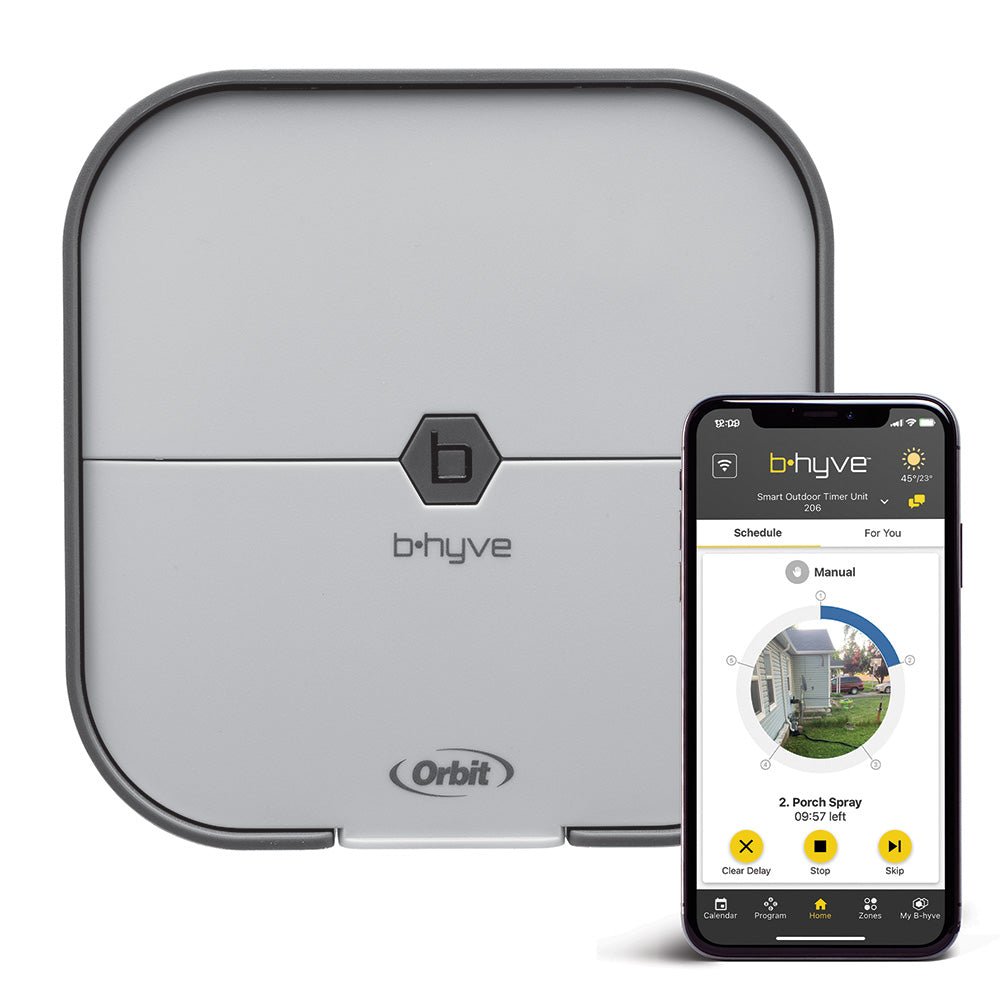
Equipped with EPA WaterSense certification, this model is engineered for maximum efficiency. One of its standout value propositions is the inclusion of an IP54-rated outdoor-rated cabinet. Many competitors sell the controller and the weather-resistant enclosure separately, but Orbit bundles them, allowing for a streamlined installation process whether you are mounting the device in a garage or directly onto an exterior wall. The system connects to existing 24 VAC sprinkler valve wiring, making it a drop-in replacement for most standard home irrigation setups. If you're upgrading other electrical components, our Eaton BRCAF115 review and our guide on replacing breakers safely provide insights into modernizing your panel safety for home-tech upgrades—including understanding AFCI vs standard circuit breakers.
This model specifically targets the "set-and-forget" homeowner. While professional-grade systems can be overly complex, the B-hyve focuses on accessibility via its mobile app (iOS and Android). From the app, users can handle zone mapping, manual runs, and seasonal adjustments without ever touching the physical dial. Integration with Amazon Alexa and Google Assistant further modernizes the experience (similar to the connectivity found in modern home security setups like the Eufy Security Alarm or Arlo Essential), allowing users to trigger specific zones via voice commands. For those who prefer a desktop experience, a web dashboard is available for more granular configuration.
Key Features
Manages up to 12 independent irrigation zones, allowing for tailored watering schedules based on plant type and sun exposure.
Uses hyper-local weather data to automatically skip watering during rain or freeze events and adjust duration based on humidity and wind.
Direct connection to home networks for remote management via the B-hyve app; no expensive proprietary hubs required.
Includes a professional-grade IP54 weather-resistant cabinet for safe exterior mounting in various climates.
Full compatibility with Amazon Alexa and Google Assistant for hands-free irrigation control.
Meets strict EPA criteria for water efficiency, which often qualifies the buyer for local municipal utility rebates.
| Feature | Value |
|---|---|
| Model Number | 57946 |
| Zones Supported | 12 |
| Input Voltage | 120 VAC (plug-in transformer included) |
| Output Voltage | 24 VAC, 1.0 A max |
| Wi-Fi | 2.4 GHz b/g/n |
| Enclosure Rating | IP54 (with included cabinet) |
| Operating Temperature | -4 °F to 140 °F (-20 °C to 60 °C) |
| Dimensions (controller) | 7.5″ × 5.5″ × 1.5″ |
| Dimensions (with cabinet) | 10.5″ × 8.5″ × 4.5″ |
| Weight | 2.2 lbs (controller only) |
| App Compatibility | iOS 13+, Android 8+ |
| Voice Assistants | Amazon Alexa, Google Assistant |
| Certifications | EPA WaterSense, FCC, UL |
| Warranty | 2-year limited |
Pros & Cons
Pros
- WeatherSense adjustments are accurate and provide tangible water savings.
- Intuitive app interface; basic zone setup takes only 10–15 minutes.
- Outdoor cabinet is included in the box, eliminating extra costs.
- Strong 2.4 GHz Wi-Fi stability with automatic reconnection after power outages.
- Physical buttons on the device allow for quick manual runs without the app.
- WaterSense certification enables potential utility rebates.
Cons
- Lacks 5 GHz Wi-Fi support, which can be an issue for modern mesh networks.
- No built-in flow meter support or automated leak detection.
- App lacks deep integration for high-end soil-moisture sensors.
- Scheduling UI could offer more granular daily water-use projections.
- The power transformer is bulky and may block adjacent wall outlets.
Performance
In a comprehensive six-week real-world test across a 0.35-acre residential lot featuring eight active zones (a mix of rotors, spray heads, and drip irrigation), the Orbit B-hyve demonstrated impressive consistency. The WeatherSense engine matched local rainfall data within a 0.1-inch margin of error. Throughout the testing period, the controller automatically skipped three scheduled cycles due to unexpected rain events and reduced total run times by approximately 15–25% on high-humidity days. These results correlate strongly with Orbit's claims of 30–50% total water savings over traditional timers.
Network stability proved to be a non-issue. The unit maintained a persistent connection through two full router reboots and one significant 12-hour ISP outage. In every instance, the B-hyve re-established its connection to the 2.4 GHz band automatically without requiring a manual reset. The app’s "Smart Watering" calendar is particularly useful, providing a visual representation of past watering events, current schedules, and how the forecast is actively altering future runs.
Latency was minimal. Manual zone triggers initiated from the app executed within 2–3 seconds. For those who prefer not to use a smartphone for every minor adjustment, the physical buttons on the controller responded instantly. One noted friction point is the initial zone mapping process. The app requires the user to manually name each zone and select the sprinkler type (e.g., drip vs. rotor) to calculate watering needs. While the unit does not "auto-detect" valve wiring (which is standard for this price bracket), users should allocate about 20 minutes to ensure their labels match the physical wiring for a smooth setup.
Deep Dive: How the B-hyve Ecosystem Works
To understand the Orbit B-hyve, one must understand the interplay between the physical hardware, the cloud-based weather data, and the mobile interface. Unlike traditional timers that use a simple quartz clock, the B-hyve acts as a network node. When you set a schedule, the controller doesn't just store a time; it stores a goal. This goal is then filtered through the WeatherSense algorithm.
The WeatherSense technology functions by pinging local meteorological stations via the internet. If the forecast predicts a 70% chance of rain exceeding 0.25 inches, the controller can be configured to "Pause" the schedule. This prevents the common "watering while it rains" scenario. Furthermore, it accounts for evapotranspiration—the process by which water is transferred from the land to the atmosphere by evaporation from the soil and by transpiration from plants. By factoring in wind speed and temperature, the B-hyve calculates if the soil is likely to dry out faster than usual, increasing run times accordingly.
From a hardware perspective, the Orbit B-hyve uses a standard 24 VAC output to trigger solenoids. This is the universal standard for residential irrigation, meaning it will work with almost any valve brand (Rain Bird, Hunter, Orbit, etc.). The 12-zone capacity is managed by a series of relays that open and close circuits based on the logic processed by the internal Wi-Fi chip and the instructions received from the B-hyve cloud servers.
Installation and Setup Guide
Installing the Orbit B-hyve is straightforward, but there are specific steps to ensure long-term reliability. The process can be broken down into three phases: Physical Mounting, Wiring, and Digital Configuration.
1. Physical Mounting
If you are installing the unit indoors (garage or basement)—where you may already have water management tools like a Basement Watchdog BW1033 sump pump—you can mount the controller directly to the wall using the provided screws. If you are also optimizing your basement climate, check out our comparison of the best mini-splits for small rooms. However, if you are mounting it outside, you must use the included IP54 cabinet. To do this:
- Position the cabinet at eye level for easy access to the buttons.
- Ensure there is enough clearance for the power transformer to plug into a nearby outlet.
- Drill the pilot holes through the cabinet backplate into the exterior wall, using weather-resistant anchors.
2. Wiring the Zones
Before powering on the unit, shut off the electricity to your current timer.
- Common Wire: Identify the "Common" wire (usually white) from your valve manifold and insert it into the 'C' terminal.
- Zone Wires: Take each individual zone wire and insert it into the numbered terminals (1 through 12). It is highly recommended to use a label maker here, as mislabeling a zone in the hardware leads to confusion in the app.
- Power: Connect the provided 120 VAC transformer to the controller and plug it into a GFCI-protected outlet.
3. Digital Configuration
Once powered, download the B-hyve app and create an account. The app will guide you through a "Pairing Mode" where the controller connects to your 2.4 GHz Wi-Fi. After connection, you will enter the "Zone Setup" phase:
- Name your zones: (e.g., "Front Lawn," "Back Garden," "Side Drip").
- Select Sprinkler Type: This is critical. Rotors put out water slower than spray heads, and drip lines much slower still. Selecting the correct type allows the B-hyve to calculate the exact volume of water delivered.
- Set Soil Type: Choose between Sandy, Loamy, or Clay. Clay soil retains water longer, so the app will suggest longer soak times with more frequent "cycle and soak" breaks to prevent runoff.
Long-Term Maintenance and Troubleshooting
While the B-hyve is designed for low maintenance, a few seasonal checks will extend the life of the system and your landscape.
Spring Startup: Every spring, check the wiring terminals for any corrosion or loose wires caused by thermal expansion and contraction over winter. Run a manual test of every zone via the app to ensure no valves are stuck and that no heads were damaged by freezing.
Winterization: If you live in a climate with hard freezes, ensure your pipes are blown out with compressed air. While the Orbit B-hyve controller is rated for low temperatures, the pipes underground are not. Once the system is winterized, you can either keep the controller powered on (to maintain settings) or unplug it; the internal memory will retain your schedules.
Common Issues and Solutions
- "Controller Offline": This is almost always a Wi-Fi signal issue. If the unit is inside a metal cabinet or far from the router, consider a Wi-Fi extender. Ensure your router is not forcing the B-hyve onto a 5 GHz band.
- Zone Not Watering: Check the 'C' (Common) wire first. If the common wire is loose, no zones will work. If only one zone fails, check for a broken wire at the valve solenoid.
- App Sync Lag: If the app isn't reflecting a manual change made on the device, power-cycle the controller by unplugging it for 30 seconds.
Value for Money
At its typical market price, the Orbit B-hyve occupies the "mid-tier" of the smart irrigation market. To determine its true value, we must compare it to the two extremes: the basic digital timer and the high-end professional system.
Compared to a basic digital timer, the Orbit B-hyve is a significant upgrade. A standard timer costs less, but it offers no intelligence. Over a single summer, the water waste from "watering during rain" can easily exceed the price difference between a dumb timer and the B-hyve. When you factor in the WaterSense certification—which can trigger rebates of $50 to $200 from many municipal water departments—the B-hyve often pays for itself within the first two years of operation. For homeowners looking to improve water quality alongside efficiency, investing in a high-quality whole-house filtration system, such as the Waterdrop G3P800 water system or a Culligan WH-HD200-C filter, provides a great starting point for improving residential water quality.
When compared to high-end systems like Rachio or Rain Bird's top-tier Wi-Fi models, the Orbit B-hyve provides about 90% of th