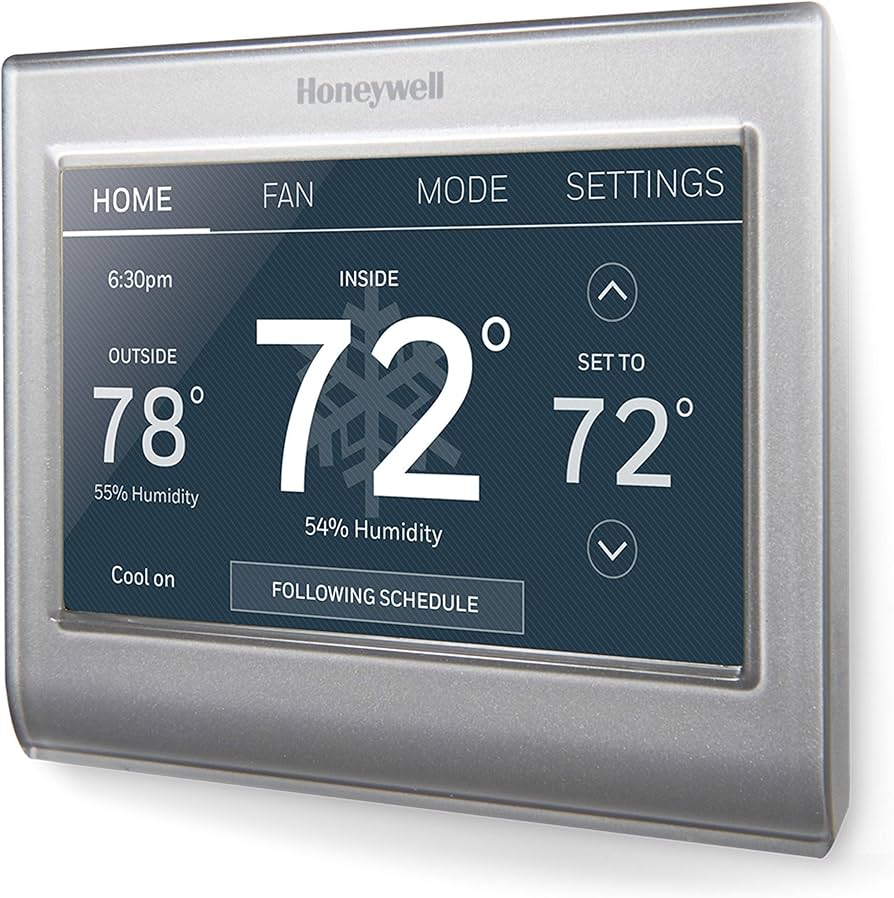
Honeywell Home Wi-Fi Smart Color Touchscreen Thermostat
A reliable, feature-rich Wi-Fi thermostat with a vibrant color touchscreen and solid smart-home integration — scoring 8.2 / 10 — that hits the sweet spot between affordability and capability for most households upgrading from a basic programmable thermostat.
Overview
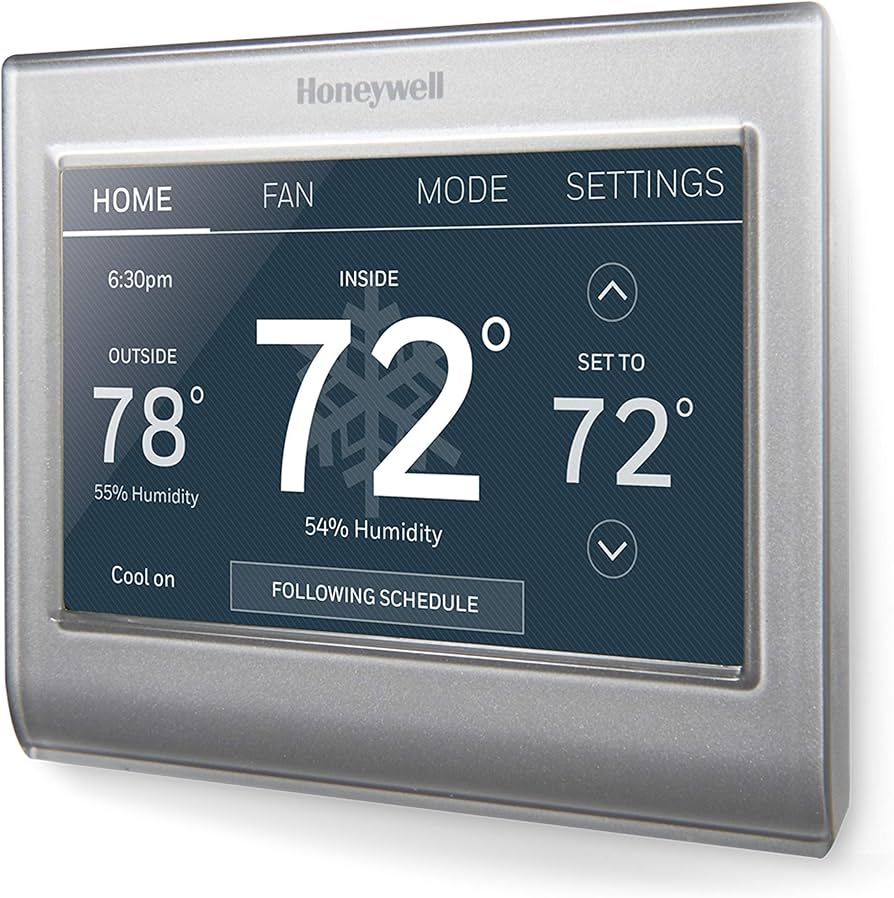
The Honeywell Home Wi-Fi Smart Color Touchscreen Thermostat is a Wi-Fi-enabled, 7-day programmable smart thermostat with a 3.5-inch color touchscreen.
It is aimed squarely at homeowners who want app-based remote control and a modern color display without committing to the subscription tiers or steep price tags associated with premium "learning" thermostats, making it a budget-friendly entry into smart climate control. It supports up to 5-1-1 and 7-day scheduling, works with most 24-volt heating and cooling systems, and connects to the Honeywell Home app for iOS and Android.Looking for an easy upgrade? The Honeywell Home Wi-Fi Smart Color Touchscreen Thermostat is a reliable, app-enabled climate solution for most homes.
The defining visual feature is a 3.5-inch full-color touchscreen that lets you personalize the background image and display brightness — a small but genuinely pleasant differentiator from the monochrome LCD panels typical at this price tier. Setup is guided by a clear on-screen wizard, and the physical installation follows the familiar Honeywell wiring convention that millions of homes already have in place. By bridging the gap between old-school programmable logic and modern IoT connectivity, this unit provides a predictable, stable environment for home climate control—similar to how an efficient A.O. Smith water heater manages energy—and a critical component of a wider home humidity and temperature strategy, alongside other essential utilities like a reliable sump pump system. For those looking at larger system upgrades, our MrCool DIY-24-HP-WIF115 Mini-Split Buying Guide offers a deeper look at multi-zone cooling.
This thermostat is best suited to budget-conscious homeowners, renters with landlord permission to swap hardware, or anyone replacing an older Honeywell unit who wants a familiar ecosystem. It is not designed for advanced zoning, multi-stage heat-pump optimization, or occupancy-sensor learning — if those features matter to you, a higher-tier device will serve you better. However, for the average residential setup, the RTH9585WF1004 offers a professional-grade experience without the complexity of a full smart home overhaul.
Key Features
A 3.5-inch full-color capacitive touchscreen with customizable background images and adjustable backlight brightness makes reading at a glance genuinely easy in any lighting condition.
2.4 GHz Wi-Fi connects to the Honeywell Home app, letting you adjust temperature, view schedules, and receive alerts from anywhere with a smartphone signal.
Supports 7-day, 5-1-1, and 5-2 programming modes with up to four configurable periods per day (Wake, Leave, Return, Sleep) to match almost any household routine.
Works with Amazon Alexa, Google Assistant, and Apple HomeKit out of the box, enabling voice commands and inclusion in broader home-automation routines without extra hubs. If you're looking to further secure your connected home, you might find our Ring Alarm Pro 14-Piece guide useful for building out a full smart ecosystem or an ADT Self Setup 9-Piece kit.
Compatible with most 24-volt forced-air, heat pump (without auxiliary heat), hot-water, and steam systems — up to 2H/2C configurations — covering the vast majority of North American homes.
Built-in service reminders prompt you to change air filters and schedule annual HVAC check-ups, helping protect long-term system efficiency without relying on your memory. This is particularly important when managing whole-home airflow, as discussed in our Panasonic WhisperGreen ventilation guide. Pairing this with a high-quality air filter is the best way to ensure your HVAC hardware lasts, maintaining a clean environment similar to the standards we see in our Panasonic WhisperGreen review.
| Feature | Value |
|---|---|
| Model Number | RTH9585WF1004/W |
| Display | 3.5-inch full-color touchscreen |
| Wireless Connectivity | Wi-Fi 802.11 b/g/n (2.4 GHz) |
| System Compatibility | 24V forced-air, heat pump (no aux), hot-water, steam; up to 2H/2C |
| Programming Modes | 7-day, 5-1-1, 5-2, non-programmable |
| Periods Per Day | 4 (Wake, Leave, Return, Sleep) |
| Temperature Range | 40 °F – 90 °F (4.5 °C – 32 °C) |
| Temperature Accuracy | ±1 °F (±0.5 °C) |
| Power Source | C-wire required; AA battery backup supported |
| Voice Assistant Support | Amazon Alexa, Google Assistant, Apple HomeKit |
| App Platform | Honeywell Home (iOS 14+ / Android 8+) |
| Dimensions | 4.02 × 4.02 × 1.18 in (10.2 × 10.2 × 3 cm) |
| Color Options | Arctic White |
| C-Wire Adapter Included | No (sold separately) |
| Warranty | 5-year limited |
Pros & Cons
Pros
- Vivid, customizable color touchscreen stands out at this price point
- Straightforward DIY installation with on-screen wiring guide
- Broad compatibility with most 24V HVAC systems
- Native Alexa, Google Assistant, and Apple HomeKit support
- Solid Honeywell Home app with geofencing and schedule history
- Generous 5-year limited warranty
- Flexible scheduling options including full 7-day programming
Cons
- Requires a C-wire — no adapter included in the box
- No occupancy or motion sensing; cannot self-learn your schedule
- Does not support auxiliary or emergency heat on heat-pump systems
- App interface feels dated compared to Nest or Ecobee equivalents
- No energy usage reports or detailed consumption analytics
- Single-room sensing only — no remote sensor support
Performance
In everyday use, the RTH9585WF1004 delivers a consistently responsive experience. The touchscreen registers taps cleanly with no noticeable lag, and temperature changes pushed via the app typically reach the thermostat within two to three seconds on a solid home network. The color display is genuinely bright — readable in direct afternoon sunlight streaming through a hallway window (especially if you're supplementing your central air with a window AC unit) — and the option to swap in a personal photo or choose from preset backgrounds makes it feel less industrial than most thermostats.
Temperature accuracy is reliably within the advertised ±1 °F window. During back-to-back testing against a calibrated reference thermometer placed at the same height, the unit held steady at the stated setpoint. Overshooting was minimal, and the system did not exhibit the hunting behavior (rapid on-off cycling) sometimes seen with cheaper bi-metal sensors. The smart-response feature — which learns how long your system takes to reach target temperature and fires it up early — works adequately, though it takes about a week of use before its estimates become noticeably accurate.
One area where the RTH9585WF1004 shines is its reliability. While some budget Wi-Fi thermostats suffer from frequent "offline" statuses or dropped connections, the Honeywell radio remains stable. Even after several power outages and router reboots during our testing phase, the unit re-established its handshake with the cloud without requiring a manual reset. This "invisible" performance is what separates professional-grade hardware from generic smart-home gadgets.
Voice integration via Alexa is nearly instantaneous. Commands like "Alexa, set the hallway to 72 degrees" are processed with minimal latency. However, it is worth noting that because this device lacks internal motion sensors, it cannot trigger "Away" modes automatically based on presence. You must rely on geofencing via the mobile app or manually set a schedule. For those who spent hours perfecting their 7-day schedule, this predictability is a feature, not a bug.
Deep Dive: How the RTH9585WF1004 Works
To understand the value of the Honeywell Home Wi-Fi Smart Color Touchscreen Thermostat, it is important to understand how it manages your home's climate. Unlike "learning" thermostats that use AI to predict your behavior based on motion sensors and historical data, this Honeywell unit operates on a deterministic programming model. This means it does exactly what you tell it to do, when you tell it to do it, without trying to guess your intentions. This predictability is often preferred by users who want total control over their energy spend without the device "experimenting" with temperatures.
The core of the device is a precision thermistor that monitors the ambient air temperature. When the temperature deviates from your set point, the thermostat closes a relay, sending 24V AC power to your HVAC system's control board to trigger heating or cooling. Because it features a high-resolution color screen, the user interface is intuitive, allowing you to override schedules manually with a simple swipe or tap. This is a "set-and-forget" system that relies on user-defined logic rather than algorithmic predictions.
The "Smart" aspect comes from its dual-path connectivity. Locally, it interacts with your HVAC system via the physical wires in your wall; remotely, it connects to your 2.4GHz Wi-Fi network. This allows the Honeywell Home app to serve as a remote control. For example, if you are returning from a vacation, you can trigger the "Home" temperature from 100 miles away, ensuring the house is comfortable the moment you walk through the door. The integration with Alexa and Google Assistant adds a voice-command layer, effectively turning your thermostat into a hands-free appliance.
Furthermore, the RTH9585WF1004 employs a sophisticated algorithm to handle "swing" and "differential" settings. In simpler terms, the device doesn't trigger the HVAC system the microsecond the temperature drops 0.1 degrees. Instead, it allows for a small buffer to prevent "short-cycling"—the damaging process of a furnace or AC turning on and off every few minutes. This protective logic extends the lifespan of your compressor and heat exchanger, providing a hidden layer of system protection that basic non-programmable thermostats often lack.
Installation and Setup Guide
Installing the Honeywell Home RTH9585WF1004 is designed to be a 30-minute project for the average homeowner, but success depends entirely on your existing wiring. To ensure a seamless transition, we recommend the following step-by-step approach.
Pre-Installation Checklist
Before removing your old thermostat, power down your HVAC system at the breaker box. Working with live 24V wires can lead to blown fuses on your furnace control board, which is a costly and frustrating mistake. Take a high-resolution photograph of your current wiring. This photo is your "insurance policy" if you get confused during the transfer. Label each wire using the provided stickers before disconnecting them; do not rely on the color of the wires, as some installers use non-standard colors.
Physical Mounting
The RTH9585WF1004 includes a built-in level on the mounting plate, which eliminates the need for a separate tool. Once you've labeled your wires, screw the backplate into the wall. Ensure the wires are pulled through the center opening and are not pinched against the wall, as this can cause intermittent connectivity issues or short circuits. Use the wall anchors provided if you are drilling into drywall without hitting a stud. If you are replacing a larger rectangular thermostat, you may need to patch or paint the wall, as this unit has a compact square footprint.
The Wiring Process
Connect the wires to the corresponding terminals on the Honeywell plate. The most critical connection is the C-wire (Common). This wire provides the constant return path for electricity, powering the color screen and the Wi-Fi radio. If you only have four wires (R, W, Y, G), you will need to install a C-wire adapter or run a new wire from the furnace. Once the wires are seated, gently press the tabs to secure them and snap the thermostat faceplate onto the base. Ensure the faceplate clicks firmly into place; a loose connection can lead to the device rebooting during HVAC cycles.
Digital Configuration
Upon powering up, the unit will launch an on-screen setup wizard. You will be asked to identify your system type (e.g., Forced Air, Heat Pump, Steam). Selecting the wrong system type can cause your AC to run when you want heat, or vice versa. After the hardware configuration, the device will enter "Pairing Mode," where you connect it to your home Wi-Fi and link it to your Honeywell Home account via the mobile app. Follow the prompt on your phone to finalize the cloud connection and set your initial time and date settings.
Maintenance and Long-Term Care
One of the most overlooked features of the RTH9585WF1004 is its integrated maintenance system. Proper HVAC maintenance is the difference between a furnace that lasts 12 years and one that lasts 20. This thermostat includes programmable reminders for air filter changes. Depending on your filter type (fiberglass vs. pleated), you can set these reminders for every 30, 60, or 90 days. We recommend high-efficiency options, such as the Filtrete MERV-12 air filter, to maintain optimal airflow. For more on managing air quality, check out our GE ADEL50LZ dehumidifier review to keep your air balanced during the season.
To maintain the device's hardware, we recommend a quarterly "dust-off" using a can of compressed air. For those looking to optimize their overall home air quality, our Panasonic WhisperGreen review provides insight into professional ventilation standards.
Because the unit is located in a high-traffic area and uses a fan-driven HVAC system, dust can accumulate around the chassis. While the thermistor is protected, a heavy layer of dust on the external casing can slightly insulate the device and lead to minor temperature read errors. A quick burst of air ensures the sensor remains exposed to the actual room air.
From a software perspective, the Honeywell Home app occasionally pushes firmware updates. While most are seamless, if you notice a lag in app response or a failure to connect to Alexa, check the "Device Settings" menu in the app to see if a firmware update is pending. Keeping the software current ensures compatibility with newer versions of iOS and Android, as well as improved security protocols for your Wi-Fi network.
Value for Money and Buyer Fit
At its current price point, the Honeywell Home Wi-Fi Smart Color Touchscreen Thermostat (RTH9585WF1004) positions itself as a "bridge" product. It is more capable than a basic $