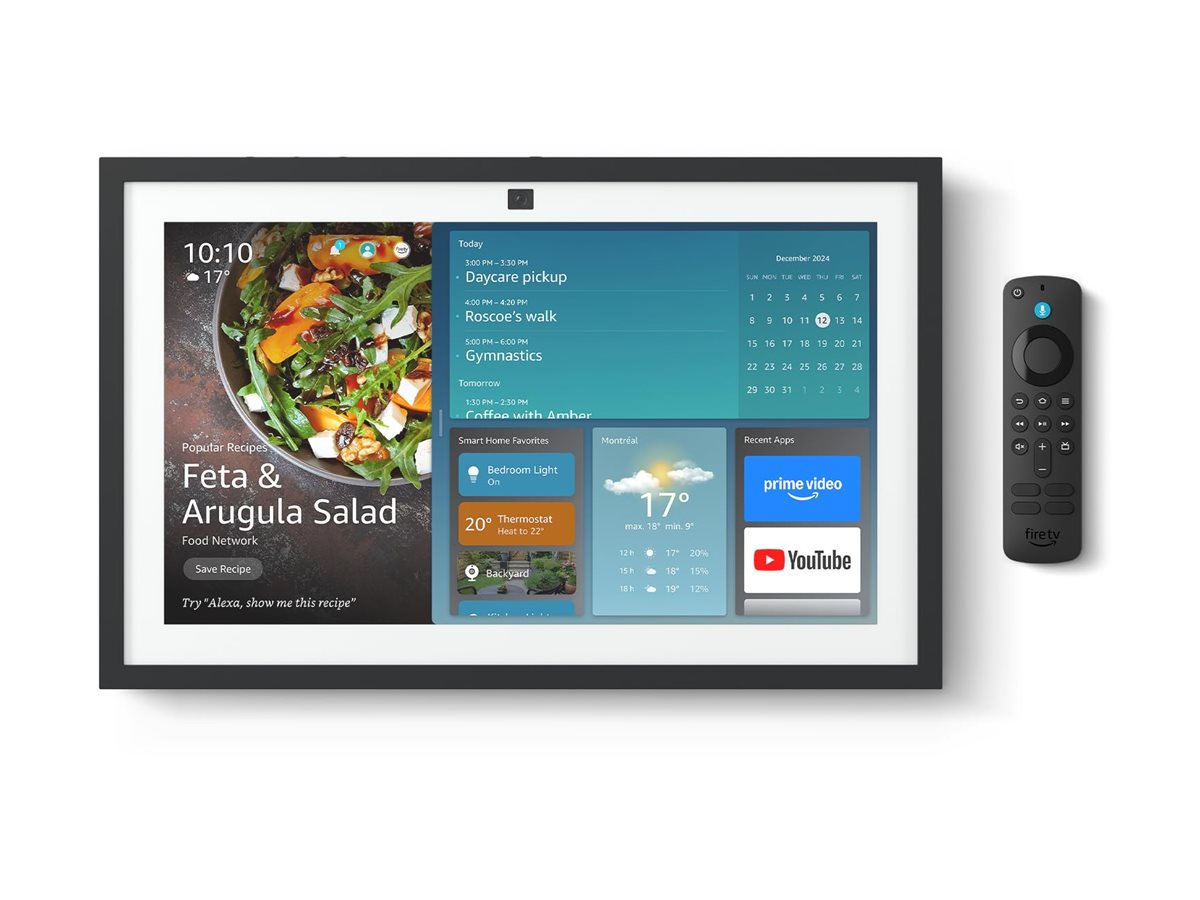
In this buying guide, we explore how the Amazon Echo Show 15 (2nd Gen) transforms a shared wall into a digital command center. With its massive 15.6-inch display and integrated support for Matter and Zigbee, it moves beyond a simple voice assistant. If you're designing a whole-home security system, you might find our Ring Alarm Pro guide or ADT Self Setup guide useful for integrating sensors with your hub. The Show 15 serves as a comprehensive visual hub for managing lights, locks, cameras, and family schedules in one centralized location—making it a perfect companion to high-end monitoring like the Arlo Pro 4 4-Pack.
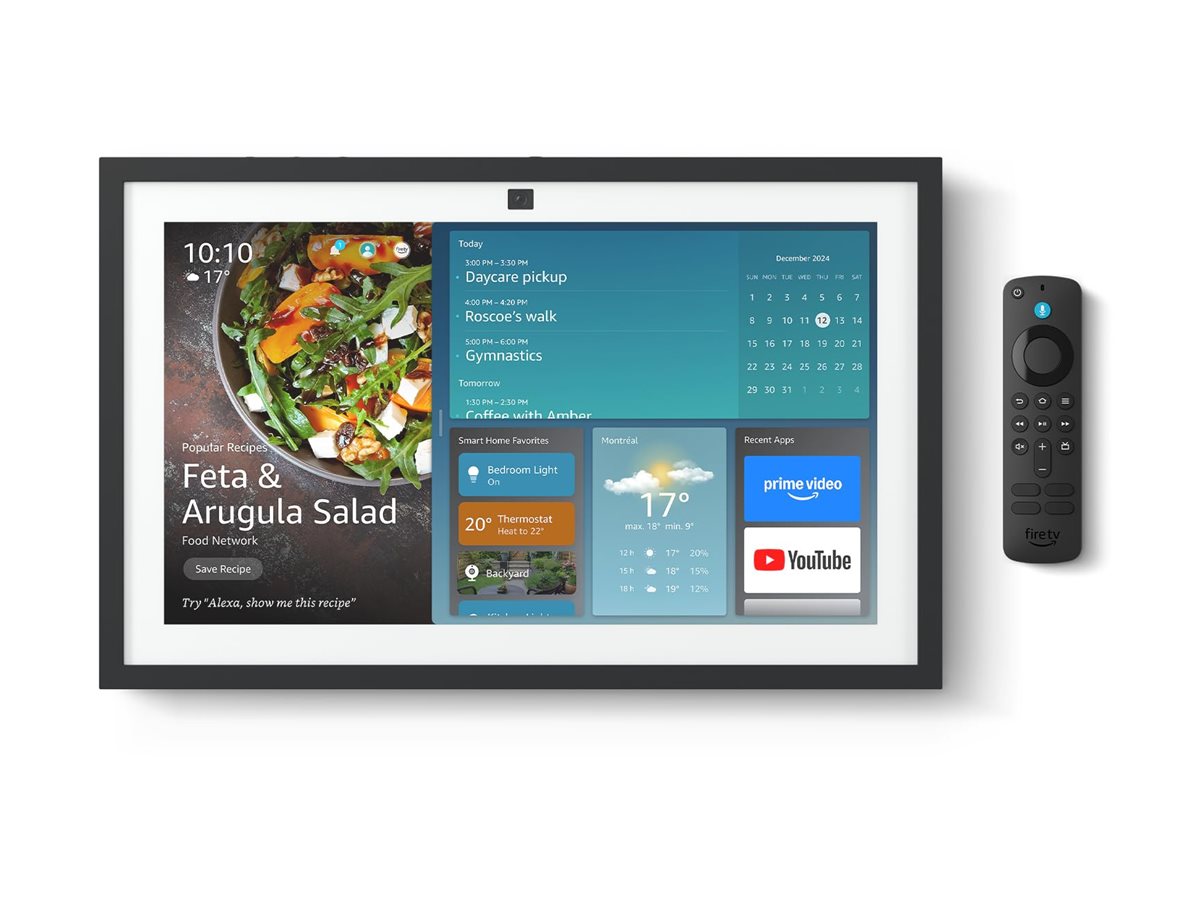
Best Overall Smart Display Hub: Amazon Echo Show 15 (2nd Gen)
Score: 9.1/10. The definitive choice for households needing a shared visual command center for compatible devices, routines, and family organization.
Amazon Echo Show 15 (2nd Gen)
The Amazon Echo Show 15 (2nd Gen) is engineered for the "high-traffic" zones of a home.
While smaller Echo Show models are designed for bedside tables or kitchen counters, the Show 15 is intended to be a permanent fixture—either wall-mounted or standing on an easel—that serves as the digital heartbeat of the household. Its 15.6-inch touchscreen is not just about size; it is about information density. It allows a user to glance at a family calendar, check a Ring doorbell feed, and adjust the living room thermostat without switching screens or issuing multiple voice commands.At its core, the Echo Show 15 acts as a powerful Smart Home Hub. The inclusion of the Amazon Echo Show 15 (2nd Gen) ensures that the device supports the latest industry standards. By incorporating Matter and Zigbee, Amazon has reduced the reliance on proprietary bridges for many third-party devices. This means you can often pair compatible smart bulbs, plugs, and sensors directly to the Show 15, streamlining your network architecture and potentially reducing the number of power bricks plugged into your wall outlets.
For those building a comprehensive security layer, consider exploring the ADT Self Setup guide or our SimpliSafe 12-piece kit guide to complement your visual hub, ensuring a seamless transition between monitoring and control.
For families, the "Widget" system is the standout feature. Instead of a static home screen, the Echo Show 15 uses a customizable dashboard. You can pin a Sticky Note for a spouse, a shopping list for the kids, and a curated photo gallery all on one screen. This converts the device from a gadget into a utility, replacing the traditional magnetic whiteboard or corkboard with a dynamic, voice-controlled interface that can be updated remotely via the Alexa app.
While the device is a powerhouse of automation, it is most effective when integrated into a wider Alexa ecosystem. The ability to trigger complex Alexa Routines—such as a "Good Morning" routine that opens the blinds, reads the news, and turns on the coffee pot—is amplified by the visual feedback the Show 15 provides. You aren't just hearing your home wake up; you are seeing the status of every device in your home as the routine executes on the large display.
Pros
- Massive 15.6-inch display allows for true dashboard functionality
- Native support for Matter and Zigbee increases device compatibility
- Excellent for shared spaces like kitchens and hallways
- Widget-based interface keeps calendars and lists visible at all times
- Integrated Alexa Routines simplify complex home automation
Cons
- Requires a permanent placement strategy (wall mount or easel)
- Overkill for small rooms or individual bedside use
- Full potential requires an ecosystem of Alexa-compatible hardware
- Screen can be a distraction in minimalist environments
Technical Specifications
| Specification | Amazon Echo Show 15 (2nd Gen) |
|---|---|
| Model / SKU | B0CF4T8LBX |
| Display size | 15.6-inch Full HD Touchscreen |
| Smart Home Protocols | Matter, Zigbee, Wi-Fi |
| Voice Assistant | Alexa (Built-in) |
| Automation | Alexa Routines / Smart Home Dashboard |
| Mounting Options | Wall-mount or Tabletop Easel |
| Primary Use Case | Centralized Family Hub / Home Controller |
Comprehensive Buying Guide: Smart Home Hubs & Displays
Choosing a smart home controller is no longer just about whether the device can turn on a light. As the ecosystem evolves toward Matter and Thread, the "Hub" has become the brain of the home. To determine if the Amazon Echo Show 15 is the right fit, you must evaluate your current hardware, your household's habits, and your desire for visual versus voice-only control.
How the Echo Show 15 Works as a Hub
Unlike a standard smart speaker, the Echo Show 15 operates on a "Visual-First" philosophy. It uses a combination of far-field microphones and a capacitive touchscreen to ingest commands. When you tell Alexa to "show me the front door," the device doesn't just confirm the action; it pulls the RTSP stream from your compatible camera (such as those detailed in our Arlo Pro 4 review and buying guide), providing an essential visual layer to your home security by rendering the stream in high definition. For a deep dive into hardware, see our Arlo Pro 4 analysis. This is critical for security and monitoring, where seeing the person at the door is more valuable than hearing a notification.
From a technical standpoint, the Zigbee and Matter integration allows the Show 15 to act as a coordinator. For those looking to integrate professional-grade monitoring, our comprehensive SimpliSafe 13-piece kit review provides a great look at hardware that complements a visual hub. In a traditional setup, a Zigbee bulb needs a Zigbee bridge to talk to the internet. The Echo Show 15 can often act as that bridge, creating a local mesh network where devices communicate with each other and the hub, reducing latency and improving reliability when your internet connection fluctuates. This localized communication means that even if your external internet connection drops, some of your basic home automations can continue to function without interruption.
The device also utilizes a proprietary "wake-on-approach" sensor. By leveraging its camera and infrared sensors, the device can recognize when a user is approaching and automatically surface the most relevant widgets. For example, if it is 7:00 AM, it might prioritize the daily weather and calendar. At 6:00 PM, it might shift to a grocery list or a recipe for dinner. This contextual awareness minimizes the amount of manual interaction required to get the most out of the system.
Deep Dive into Installation and Placement Strategies
The physical placement of a 15.6-inch screen is the most critical part of the setup process. Because it is designed for shared viewing, avoid placing it in a "dead zone" or a corner where glare from windows will wash out the display. The ideal height for a wall-mounted unit is eye-level for the average adult, typically between 55 and 65 inches from the floor. This ensures the touchscreen remains ergonomic for manual overrides and that the camera is positioned correctly for video calls or security monitoring.
If you are renting or cannot drill into your walls, the included easel stand is a viable alternative. However, placing it on a kitchen island or a sideboard may lead to "counter clutter." We recommend a dedicated side table or a floating shelf to maintain the "dashboard" feel while keeping the screen accessible. For those opting for the wall mount, consider the proximity to power outlets. The Echo Show 15 requires a constant AC power source; it does not have an internal battery. To achieve a professional, "hidden wire" look, you may need to install a recessed outlet behind the device or use high-quality cable raceways that match your wall color.
Environmental factors also play a role. In a kitchen, the device should be placed away from direct heat sources (like stoves or ovens) to prevent overheating and avoid areas with high steam, such as directly above a dishwasher or kettle. In a living room, placing it near a centralized seating area allows it to serve as a digital photo frame or a secondary screen for streaming content while others are in the room.
Advanced System Configuration and Maintenance
To keep the Echo Show 15 running at peak performance, users should perform a monthly "Hub Audit." This involves checking the Alexa app for any disconnected Zigbee or Matter devices and ensuring that firmware updates have been applied to all connected peripherals. Because the Show 15 acts as a central coordinator, a firmware mismatch between the hub and a smart switch can occasionally cause latency in routine execution.
Screen maintenance is another consideration. Since the device is often placed in high-traffic areas (like kitchens), it is prone to fingerprints and grease splatters. Use a dry, lint-free microfiber cloth for cleaning. Avoid using harsh chemical cleaners or ammonia-based sprays, as these can degrade the oleophobic coating on the touchscreen, leading to permanent smudging and reduced touch sensitivity.
For those managing a complex home with dozens of devices, we recommend utilizing the "Device Groups" feature aggressively. Instead of having a master list of 50 bulbs, group them by "Kitchen," "Living Room," and "Exterior." This transforms the Echo Show 15's dashboard from a cluttered list into a structured architectural map of your home, allowing you to dim all "Living Room" lights with a single tap rather than hunting for individual switches.
The Evolution of Matter and Zigbee Support
The inclusion of Matter and Zigbee in the Amazon Echo Show 15 (2nd Gen) is not just a spec sheet addition; it represents a fundamental shift in smart home ownership. Historically, "walled gardens" meant that if you bought a Philips Hue bulb, you needed a Hue Bridge. If you bought a Samsung sensor, you needed a SmartThings Hub. This led to "hub creep," where the average enthusiast had five or six different bridges plugged into their router.
Matter is a royalty-free connectivity standard. If you're upgrading your home infrastructure to support these new standards, you might also consider our Ring Alarm Pro guide for more insights on connected hubs. Matter allows devices from different manufacturers to work together seamlessly. Because the Echo Show 15 supports Matter, it can act as a controller for Matter-certified devices regardless of whether they were made by Amazon, Apple, Google, or a third-party startup. Zigbee provides a low-power, mesh-networking alternative for devices like motion sensors and contact switches, which don't need the high bandwidth of Wi-Fi. By combining both, the Show 15 minimizes the traffic on your home Wi-Fi network, which is critical for maintaining high speeds on your laptops and gaming consoles.
Comparing the Echo Show 15 to Other Hubs
When compared to the Amazon Echo Hub (2023), the Show 15 offers significantly more real estate for media and calendars, whereas the Echo Hub is more focused on a compact, dedicated control panel. If your primary goal is a "Wall Tablet" experience—something that can display a full-page recipe or a detailed family schedule—the Show 15 wins decisively. If you want a discreet, switch-like controller that blends into the wall and is used purely for toggling lights, the Echo Hub is the better choice.
Compared to non-visual hubs like the Hubitat Elevation Local Smart Home Hub or Samsung SmartThings Hub (3rd Gen), the Echo Show 15 provides an immediate, intuitive user interface. While Hubitat is preferred by power users who want 100% local control and complex logic without a cloud dependency, the Echo Show 15 is designed for the consumer who wants a "plug-and-play" experience. The learning curve for the Show 15 is virtually non-existent, as the visual cues guide the user through every action.
| Product | Best For | Protocol Support | Interface | Verdict |
|---|---|---|---|---|
| Amazon Echo Show 15 | Families / Visual Hubs | Matter, Zigbee, Wi-Fi | 15.6" Touchscreen | Best for shared command centers |
| Amazon Echo Hub (2023) | Dedicated Control | Matter, Zigbee | Compact Touchscreen | Best for minimalist controls |
| Hubitat Elevation | Power Users / Local Control | Zigbee, Z-Wave | App-only / Web | Best for privacy & complex logic |
| Samsung SmartThings Hub | Samsung Ecosystems | Zigbee, Z-Wave, Matter | App-only / Web | Best for integrated Samsung gear |
Common Pitfalls to Avoid When Purchasing
One common mistake buyers make is assuming the Echo Show 15 can replace a full-sized tablet or laptop. While it can browse the web and stream video via a built-in browser, its primary operating system is designed for "glanceable" information and voice-activated tasks. Do not expect it to be a high-performance gaming machine or a productivity tool for spreadsheets. It is a controller and a display, not a general-purpose computer.
Another pitfall is ignoring the power requirements. A screen of this size requires a constant, stable power source; it is not battery-operated. Many users buy the device and then realize their "perfect" wall location is ten feet away from the nearest outlet. Before committing to a wall-mount installation, measure the distance to your power source and consider the cost and effort of adding a new outlet or the aesthetic impact of long cables.
Finally, some users overlook the "Eco-System Lock-in." While Matter support helps, the Echo Show 15 is still an Alexa-first device. If your home is built entirely around Apple HomeKit or Google Home (see our Cove Home Security System Deluxe Package guide for alternative ecosystem views), you will find the experience far more rewarding if you first integrate an Alexa account and ensure your devices are "Works with Alexa" certified. Without this synergy, the massive screen becomes an expensive clock rather than a smart hub.
Strategic Use Cases for the Echo Show 15
The Digital Kitchen Command Center: In the kitchen, the Show 15 replaces the messy pile of cookbooks and magnetic notes. Users can display a shared grocery list that anyone in the house can add to via voice from any other Echo device. During meal prep, the device can display step-by-step video recipes, allowing the cook to follow along without touching the screen with dirty hands by using "Alexa, next step."
The Mudroom Logistics Hub: Placing the Show 15 in a mudroom or entryway creates a "departure zone." By pinning the family calendar and the local traffic report to the main dashboard, family members can see exactly what the day holds as they walk ou