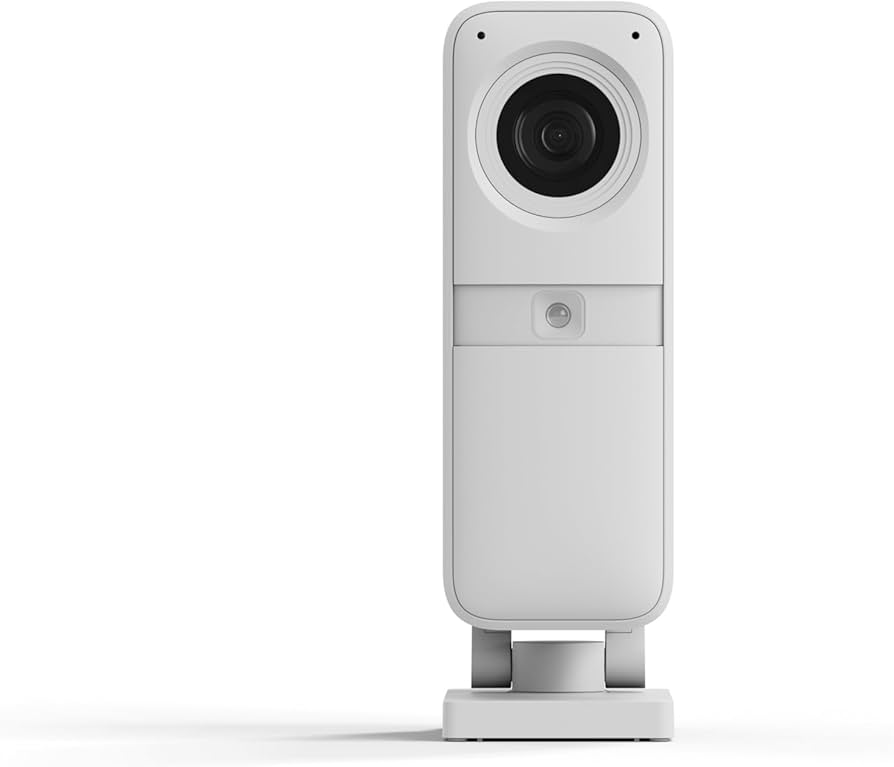
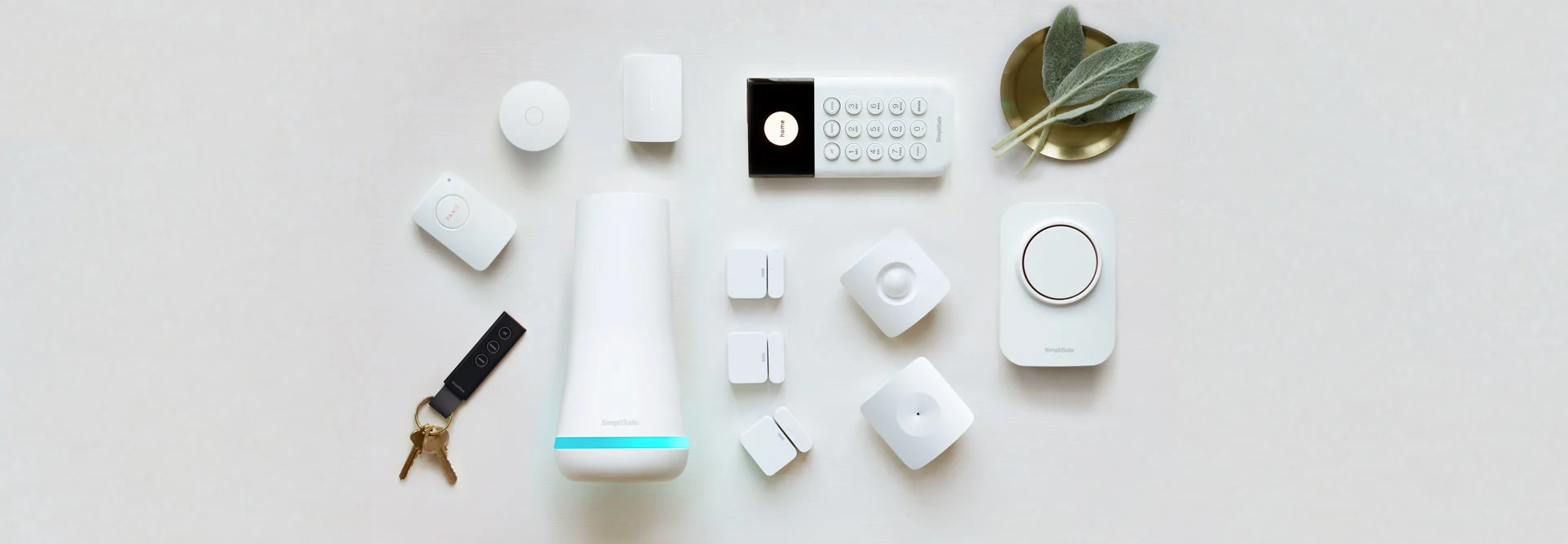
When shopping for a wireless alarm, the best DIY security system should balance ease of installation with professional-grade reliability. The SimpliSafe 13-Piece Wireless Home Security System with Smart Alarm Indoor Camera is the gold standard for those who want professional-grade security without the professional-grade price tag or contractual headaches. It is a reliable, scalable, and intuitive system that provides genuine peace of mind.
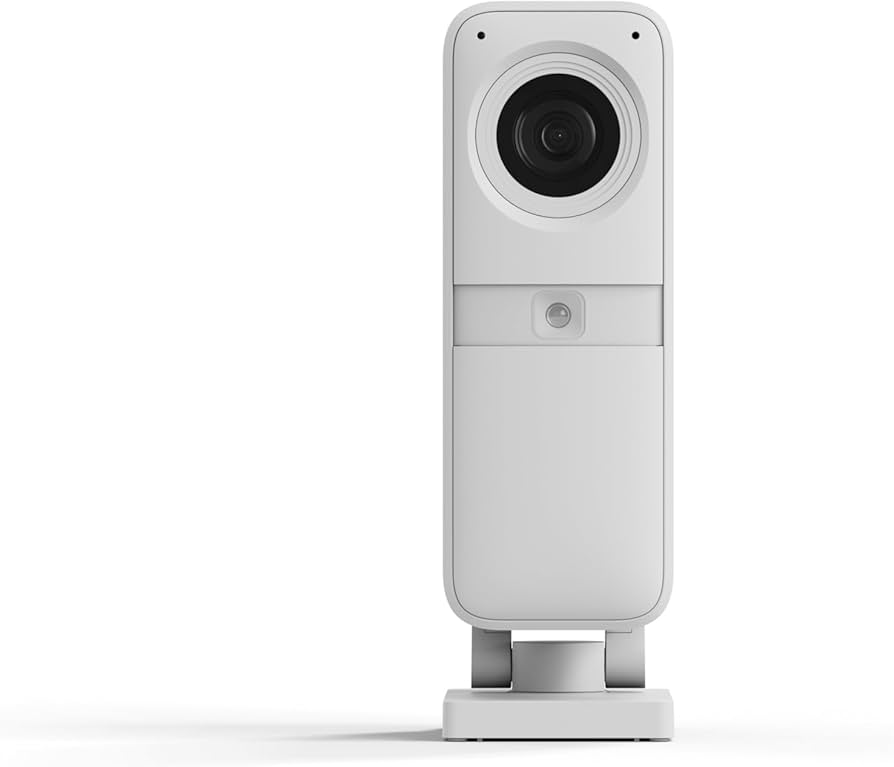
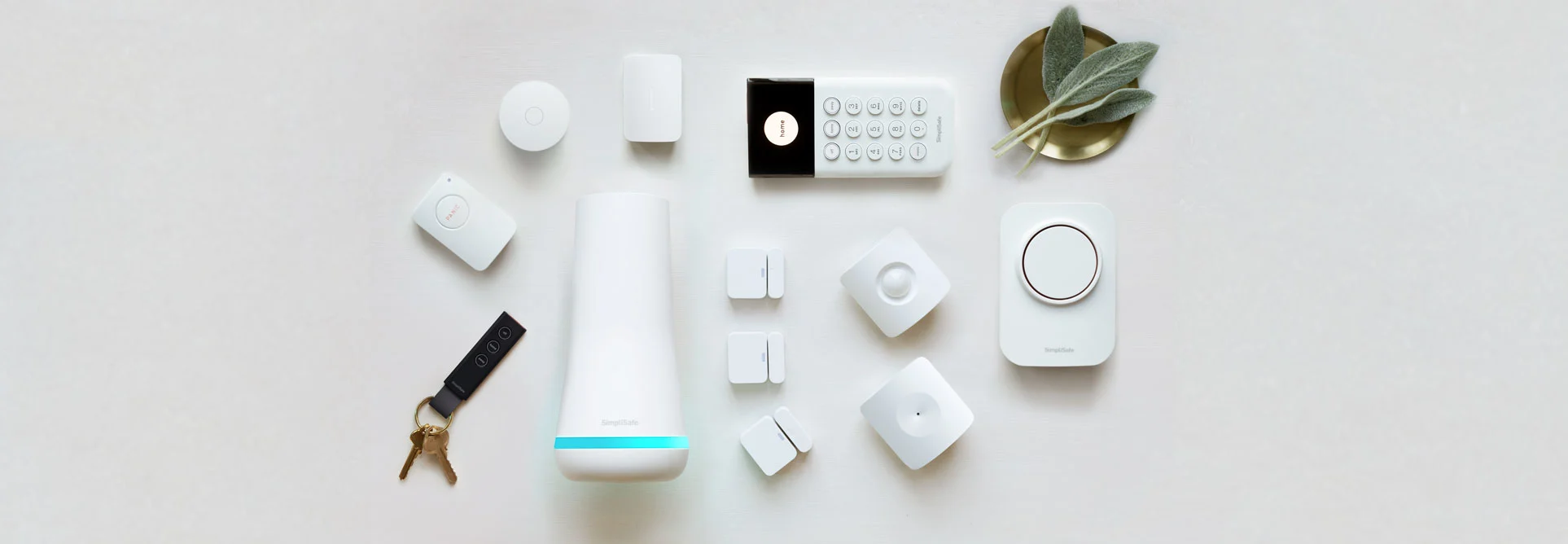
The SimpliSafe 13-Piece Wireless Home Security System (SS3-13PKGCAM) is a top-rated DIY solution by SimpliSafe, offering a comprehensive wireless kit with sensors, a keypad, and a smart camera without the need for hardwiring or long-term contracts. For a detailed performance analysis, read our full SimpliSafe (SS3-13PKGCAM) review.
Best Overall Pick: SimpliSafe 13-Piece Wireless Home Security System with Smart Alarm Indoor Camera
Score: 9.1/10. A polished, easy-to-install DIY security kit that is ideal for renters, homeowners, and first-time buyers who want flexible wireless protection with optional professional monitoring.
SimpliSafe 13-Piece Wireless Home Security System with Smart Alarm Indoor Camera
For a detailed performance breakdown, see our SimpliSafe (SS3-13PKGCAM) Review. The SimpliSafe 13-Piece Wireless Home Security System with Smart Alarm Indoor Camera is designed as a complete DIY home security package rather than a single-device starter kit.
Its core components include the base station, keypad, entry sensors, motion sensors, and an indoor camera, giving most apartments, condos, and small-to-medium homes enough coverage for key doors, windows, and common areas.Unlike traditional security installations that require a technician to drill through your walls and run miles of CAT5 or coaxial cable, this system relies on a proprietary wireless protocol that ensures a stable connection between the periphery sensors and the central hub. This makes it an exceptional choice for those who value speed of deployment and flexibility in placement.
The biggest advantage of this system is its wireless setup. Because the sensors do not require hardwiring, installation is much more approachable for renters or homeowners who do not want to drill into walls or run cables through the house. The sensors utilize high-strength adhesives, meaning you can secure your perimeter in under an hour. The keypad lets you arm and disarm the system from a central location—perfect for the front door—while smartphone access gives you remote control and live camera viewing when you are away.
The included Smart Alarm indoor camera is especially useful if you want visual confirmation instead of relying only on sensor alerts. It can stream live footage to your phone, helping you check whether an alert is caused by a real issue, a pet, a family member, or a false trigger. For buyers considering professional monitoring, this camera adds another layer of context; in the event of an alarm, the monitoring center can use the video feed to verify a break-in, which can potentially lead to faster and more accurate emergency response from local authorities.
This package is best for people who want a polished security system without committing to a traditional professionally installed alarm contract. Optional 24/7 monitoring can add emergency response support, while cellular backup helps keep the system operating during internet or power disruptions. If you want outdoor cameras (see the Arlo Pro 4 Spotlight Camera Security Bundle or the Arlo Pro 4 Spotlight Camera 4-Pack Security Bundle for a high-end camera setup), smart locks, or a larger number of sensors (see our Ring Alarm Pro 14-Piece Wireless Home Security System—you may need to expand beyond this kit (perhaps with the SimpliSafe 12-Piece Wireless Home Security System with 24/7 Professional Monitoring or the SimpliSafe 12-Piece Wireless Home Security System with HD Camera) or consider options like the ADT Self Setup 9-Piece Home Security Kit
Related parts & accessories
Pros
- Complete 13-piece kit provides a strong starting point for whole-home coverage.
- Wireless design is renter-friendly and avoids complicated installation.
- Smart Alarm indoor camera adds live video verification from a smartphone.
- Optional professional monitoring is available without a traditional long-term contract requirement.
- Cellular backup helps the system stay useful during internet or power interruptions.
- Expandable platform makes it easier to add more sensors or accessories later.
Cons
- Advanced response features may require a paid monitoring plan.
- Indoor camera coverage does not replace dedicated outdoor cameras.
- Larger homes may need additional entry sensors, motion sensors, or cameras.
- Buyers who want a fully hardwired professional installation may prefer a different type of system.
Technical Specifications
| Specification | Details |
|---|---|
| Model number | SS3-13PKGCAM |
| Category | Home Security Systems |
| System type | Wireless DIY home security system |
| Included camera | Smart Alarm indoor camera with live smartphone viewing |
| Installation | DIY setup with no complex wiring required |
| Monitoring | Optional 24/7 professional monitoring plans |
| Backup features | Cellular backup support for outages |
| Best for | Renters, homeowners, apartments, condos, and small-to-medium homes |
Deep Dive: How the SS3-13PKGCAM Works
Understanding the mechanics of a wireless security system is vital for maximizing its effectiveness. As we detailed in our SimpliSafe (SS3-13PKGCAM) Review, the system operates on a hub-and-spoke architecture. The Base Station serves as the "brain" of the operation, communicating with every sensor and camera in the home. When an entry sensor is tripped (the magnetic contact is broken) or a motion sensor detects infrared heat movement, a signal is sent immediately to the Base Station.
If the system is armed, the Base Station triggers a loud siren to deter the intruder and simultaneously sends a notification to your smartphone via the cloud. If you have opted for professional monitoring, the Base Station transmits this alert to a monitoring center via cellular signal or Wi-Fi. This redundancy is critical; if a burglar cuts your cable internet line, the cellular backup ensures the alarm still reaches the authorities. The hardware is designed to be resilient, with the Base Station containing its own internal backup battery to keep the system active even if the main power grid fails.
The Smart Alarm Indoor Camera integrates directly into this workflow. Rather than being a standalone "nanny cam," it is an integrated security tool. When an alarm is triggered, the camera can be used to provide visual evidence. The system uses a secure, encrypted connection to stream video, ensuring that your private home footage isn't accessible to unauthorized parties. The integration between the sensors and the camera allows for a "verified" alarm event, which is highly valued by emergency dispatchers to prioritize high-risk calls over false alarms.
Furthermore, the wireless protocol used by SimpliSafe is designed for low-power, long-range communication. This ensures that a sensor placed in a far bedroom or a back door still reaches the base station without significant lag. The frequency is chosen to avoid interference from common household electronics, such as microwaves or wireless routers, which can often cause "ghost" triggers in lower-quality DIY systems. This "interference-free" band is a key differentiator between consumer-grade toy alarms and professional-grade DIY hardware.
The communication cycle is bidirectional. Not only do sensors talk to the base, but the base also periodically checks in with the sensors (a process known as "heartbeat" monitoring). If a sensor is tampered with or its battery dies, the base station notices the lack of a heartbeat and alerts the user. This prevents the common issue where a user assumes their home is protected, only to find out months later that a critical window sensor had ceased functioning.
Get a complete professional-grade setup with the SimpliSafe 13-Piece Wireless Home Security System.
Comprehensive Buyer's Guide: Choosing Your Security Setup
Evaluating Coverage Needs
One of the most common mistakes buyers make is underestimating the number of sensors required. While the 13-piece kit is comprehensive, you must map out your "perimeter." Every exterior door and ground-floor window should ideally have an entry sensor. If you are also upgrading your electrical safety, our guide on AFCI vs Standard Circuit Breakers (or check out our guide on replacing circuit breakers safely) can help you secure your home's wiring. For those managing other critical home utilities, seeing how a Waterdrop (G3P800) water system protects your plumbing is a similar approach to whole-home security. These sensors consist of two parts: a sensor and a magnet. When the magnet moves away from the sensor (because the door opened), the circuit is broken, and the alarm triggers.
Motion sensors should be placed in "choke points"—areas where an intruder would naturally have to pass, such as a hallway leading to bedrooms or the main living room area. If you are protecting a basement, you might also consider a Basement Watchdog system (and see our guide to sump pumps for wet basements) for water-related security, as maintaining a dry basement—perhaps with a Wayne ESP25 battery backup sump pump—is as critical as preventing intruders.
Motion sensors in the SS3-13PKGCAM utilize Passive Infrared (PIR) technology, which detects changes in heat signatures. This is more reliable than simple optical motion detection, as it ignores shifting shadows or curtains moving in the wind.Place motion sensors away from heat sources like radiators or direct sunlight, as rapid temperature changes can occasionally trigger false positives in lower-end PIR sensors.
The Role of the Indoor Camera
A camera is not a replacement for sensors, but it is a replacement for guesswork. Sensors tell you that something happened; cameras tell you what happened. For those with pets, the Smart Alarm camera is essential for "visual verification." This prevents the stress of receiving a high-priority alarm notification only to realize the dog knocked over a lamp.
When positioning the camera, consider "high-traffic" intersections. A camera placed in a corner of a main room can often see two or three different entry points. However, avoid placing it too close to a wall, as this creates a blind spot immediately adjacent to the device. The goal is to capture a wide angle of the room to ensure that if someone enters, their movement is captured regardless of which door they used. Because this camera is indoor-only, it is best placed to cover the main entrance or a primary living area that connects to several rooms.
Monitoring: DIY vs. Professional
The flexibility of the SS3-13PKGCAM lies in its monitoring options. Self-monitoring is free and relies on your own availability to check your phone and call 911. This is often sufficient for those who live in a high-density neighborhood where neighbors are likely to hear a siren, or for those who travel infrequently.
Professional monitoring (similar to the high-end services offered by Vivint) is a paid monthly service where a trained dispatcher handles the call for you. This is critical for those who work in environments where they cannot check their phones for hours at a time—such as surgeons, flight crews, or people in high-security facilities. With professional monitoring, the system doesn't just alert you; it alerts a center that can contact you first to verify the alarm and then dispatch emergency services if you don't respond or if you confirm a breach.
It is also worth noting that professional monitoring often provides access to "Advanced" features in the software, such as more granular control over sensor delays or more sophisticated automation rules. For a first-time buyer, starting with self-monitoring to test the placement of sensors and then upgrading to professional monitoring once the system is tuned is a recommended strategy. For those comparing different brands, our Ring Alarm Pro 14-Piece Wireless Home Security System guide offers a useful comparison of professional-grade DIY features, such as those found in
Consider the Eufy Security Alarm for a different approach to DIY monitoring.
(read our detailed Eufy S330 review) or the Vivint Smart Home Security System (see our detailed Vivint review) (see our comprehensive Vivint review).Installation and Setup Process
Installing the SimpliSafe 13-piece system is designed to be intuitive, even for those who are not tech-savvy. The process generally follows four phases to ensure complete coverage and system integrity.
Phase 1: Base Station Placement
The hub should be placed in a central location, ideally near a power outlet and within a decent range of your router. It should be hidden enough that an intruder cannot easily find and disable it, but central enough to maintain a wireless link to all sensors. Placing the base station in a closet or behind a piece of furniture is common, but ensure there is enough airflow to prevent overheating and that the siren can still be heard throughout the home. Avoid placing it directly on top of a wireless router to minimize potential electromagnetic interference.