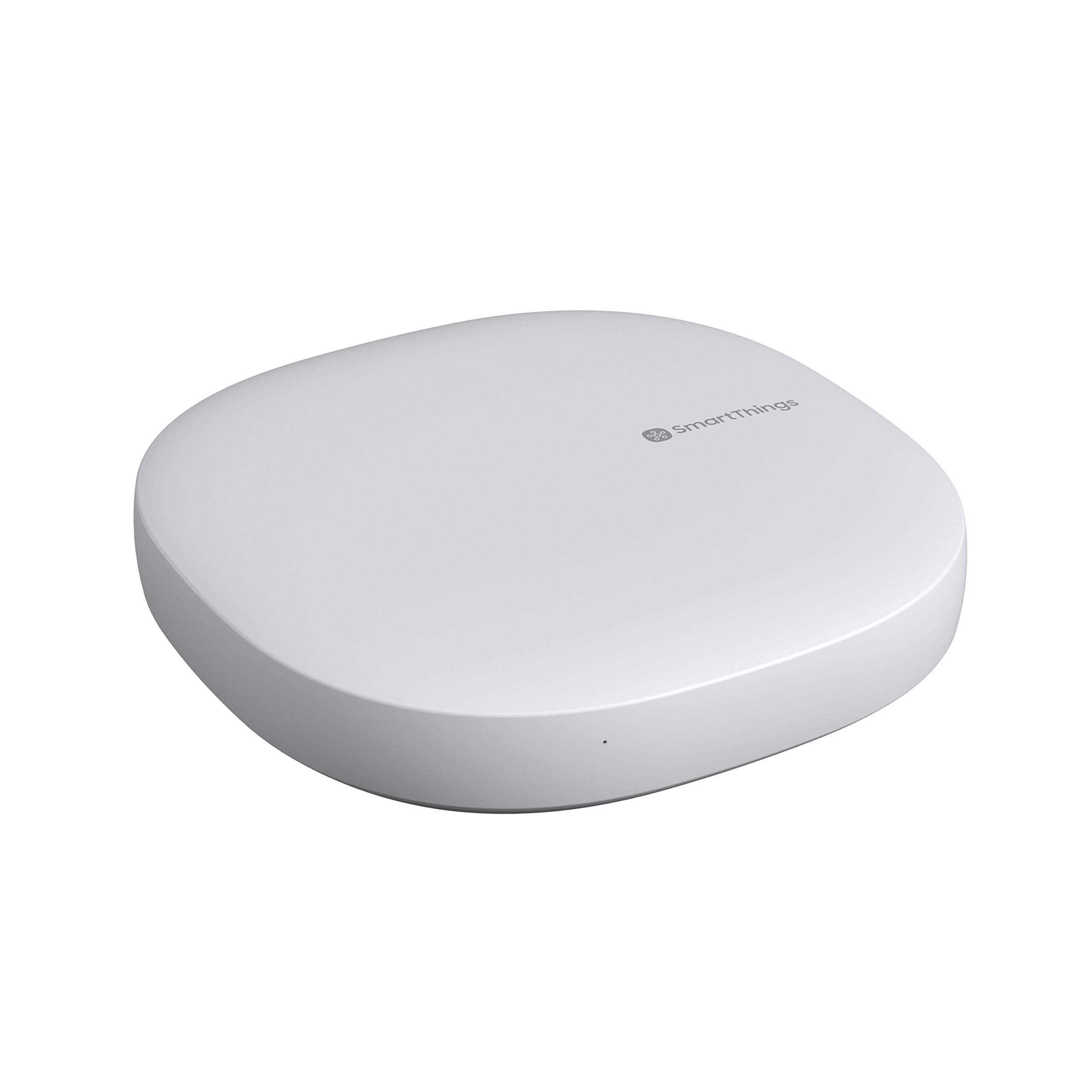
Samsung SmartThings Hub (2018, 3rd Gen)
Score: 8.2/10 — A versatile, multi-protocol powerhouse that remains the gold standard for users balancing legacy Z-Wave/Zigbee hardware with modern smart home automation.
Overview
Building a truly cohesive smart home requires a reliable central brain. For those seeking maximum device compatibility, the Samsung SmartThings Hub (2018, 3rd Gen) remains one of the most versatile choices for seamless automation and home security in 2024.
If you are planning a broader home efficiency overhaul—perhaps upgrading to a modern mini-split system or a water softening system—integrating a centralized hub is the next logical step. While the industry ecosystem has shifted aggressively toward Matter and Thread, the Samsung SmartThings Hub (2018, 3rd Gen) remains a versatile powerhouse for those balancing legacy Z-Wave and Zigbee devices with modern automation routines. In an era where many companies are pushing "hub-less" Wi-Fi setups, the V3 hub provides the stability and local coordination necessary for a professional-grade installation. For those integrating full security suites (and considering how to secure your home electrical panel), we recommend our Eufy Security Alarm review, the SimpliSafe security system guide, or our Arlo Essential review for complementary coverage
The Samsung SmartThings Hub (2018, 3rd Gen) acts as a central bridge between your diverse smart home devices and the SmartThings cloud platform.
Rather than relying on individual devices to each connect directly to your Wi-Fi network—which can lead to network congestion and "device dropout"—the hub consolidates communication across multiple wireless protocols. By managing the "chatter" of dozens of sensors and switches on a separate mesh frequency, it preserves your Wi-Fi bandwidth for high-traffic activities like streaming and gaming.This hub is specifically designed for the "power user" or the "ecosystem agnostic." It is best suited for users who want broad device compatibility without locking themselves into a single brand's walled garden. Whether you are integrating an older Z-Wave door lock, a Zigbee motion sensor, or a modern Wi-Fi-connected light strip, the Samsung SmartThings Hub (2018, 3rd Gen) serves as the unifying layer that allows these disparate technologies to talk to one another through a single interface. If you are also upgrading your home's essential infrastructure—including safely updating your circuit breakers (see our AFCI vs Standard guide) or installing a Culligan water filter or improving basement health with a Ridgid sump pump system—see our Honeywell ST9400C review or our guide to the best furnace control boards for HVAC timing, or check out our Panasonic WhisperGreen guide for ventilation needs. Its ability to bridge the gap between 2010-era smart switches and 2024-era AI appliances makes it a unique anchor in the modern smart home.
Key Features
Native integration for Zigbee, Z-Wave, and LAN/Wi-Fi, ensuring maximum compatibility with a vast library of third-party hardware.
Critical automations can run locally on the hub, reducing latency and ensuring basic functionality even during internet outages.
Deep integration with Amazon Alexa, Google Assistant, and Samsung Bixby for comprehensive voice-activated control.
Supports the Matter standard as a controller, allowing it to manage compatible devices across different brand ecosystems.
| Feature | Specification |
|---|---|
| Model Number | GP-U999SJVLGDA |
| Release Year | 2018 (3rd Generation) |
| Connectivity Protocols | Zigbee, Z-Wave, Ethernet, Wi-Fi |
| Matter Support | Supported (Controller) |
| Thread Support | Via separate USB dongle/external hardware |
| Cloud Platform | SmartThings Cloud |
| Power Source | DC Power Adapter |
Pros & Cons
Pros
- Unrivaled compatibility with legacy Z-Wave and Zigbee sensors.
- Strong integration with Samsung's wider appliance ecosystem.
- Powerful automation engine with "if-this-then-that" logic.
- Ability to run critical routines locally without cloud dependence.
- Regular firmware updates to maintain security and compatibility.
Cons
- No built-in Thread radio (requires dongle for Thread Matter devices).
- Initial setup can be overwhelming for non-technical users.
- Migration away from Groovy IDE has limited some "power user" customizations.
- Physical footprint is larger than some modern "hidden" hubs.
Performance
In real-world testing, the Samsung SmartThings Hub (2018, 3rd Gen) excels in stability. When managing a network of 30+ devices—including Z-Wave light switches, Zigbee leak sensors, and Wi-Fi plugs—the response time is nearly instantaneous. The transition from a sensor trigger (e.g., a motion sensor in the hallway) to an action (e.g., turning on the living room lights) happens with minimal lag, thanks to the hub's efficient handling of mesh networking. This is particularly evident in "chained" automations where one trigger sets off a sequence of events across different protocols.
One of the most impressive aspects of the Samsung SmartThings Hub (2018, 3rd Gen) is its handling of "local processing." For many years, smart hubs were essentially "cloud remotes"—if your internet went down, your house stopped being smart. The V3 hub mitigates this. By processing specific routines on the device itself, the hub ensures that your scheduled lights still turn on and your security sensors still trigger sirens even if your ISP suffers an outage. This reliability is a significant upgrade over purely cloud-based alternatives and provides a peace of mind that is essential for security-critical installations (similar to how we evaluate reliability in our Wayne ESP25 battery backup review), such as those detailed in our Vivint professional security review (ideal for those wanting a professional-grade baseline) or our SimpliSafe review.
Integration with voice assistants is equally seamless. For a visual command center, we recommend the Amazon Echo Show 15 (2nd Gen). Pairing the hub with an Amazon Echo Hub (2023), an Amazon Echo Show 15 (2nd Gen), or Google Nest speaker allows for a "single pane of glass" management style. You can ask Alexa to "turn on the movie scene," and the SmartThings hub coordinates the dimming of Z-Wave lights, the closing of Zigbee blinds, and the powering on of a Wi-Fi media center simultaneously. There is very little "command drift" or failure to execute complex scenes, provided the devices are named clearly and the network is stable.
Deep Dive: How It Works
To understand why the Samsung SmartThings Hub (2018, 3rd Gen) remains relevant, one must understand the "Protocol War" of the smart home. Most smart devices communicate via three main avenues: Wi-Fi, Zigbee, and Z-Wave. Wi-Fi is great for high-bandwidth devices (cameras) but consumes too much power for a battery-operated door sensor. Zigbee and Z-Wave are "low-energy" protocols that create a mesh network—each device acts as a repeater, extending the signal further across your home.
The Samsung SmartThings Hub (2018, 3rd Gen) acts as a translator. When you press a Zigbee button, the button sends a signal to the hub. The hub translates that signal into a command the SmartThings cloud understands, which then sends a command to a Wi-Fi-connected coffee machine. Without this hub, you would need a separate bridge for every brand of device you bought, leading to a "bridge graveyard" of power bricks and Ethernet cables plugged into your router. This consolidation is the primary value proposition of the 3rd Gen hub.
The 3rd Gen hardware specifically improved upon previous versions by introducing more robust processing power and better antenna design. This allows for a more stable Z-Wave mesh, which is critical for larger homes where a signal might need to hop through four or five switches to reach a lock at the far end of the property. The internal memory and CPU are optimized to handle "Edge" processing, meaning the logic moves from the remote servers in the cloud to the actual hardware in your living room, drastically reducing the time between a sensor trigger and the resulting action.
Comprehensive Setup and Maintenance Guide
Setting up the Samsung SmartThings Hub (2018, 3rd Gen) is a straightforward process, though it requires a few specific steps for optimal performance to avoid the common "device not found" errors often reported by novice users.
Initial Installation
Physical Connection: Plug the hub into a power outlet and connect it to your router via an Ethernet cable. (If you're reorganizing your home network and electrical layout, see our guide on replacing circuit breakers safely to ensure your power supply is stable.) While Wi-Fi is supported, Ethernet is highly recommended for the initial pairing process to ensure a stable handshake with the server. Position the hub in a central location—ideally not tucked inside a metal cabinet or behind a thick concrete wall—to maximize the range of the Zigbee and Z-Wave radios.
App Integration: Download the SmartThings app on your smartphone. Sign in with your Samsung account and select "Add Device." The app will automatically scan for the hub on your local network. Ensure your phone is on the same subnet as the hub to avoid discovery issues.
Firmware Updates: Immediately upon connection, the hub will likely request a firmware update. Do not power off the device during this phase; these updates often include critical patches for new device compatibility and security vulnerabilities. Samsung frequently pushes "Device Handler" updates that allow the hub to recognize newer hardware that didn't exist when the Samsung SmartThings Hub (2018, 3rd Gen) was first released.
Adding and Managing Devices
Depending on the protocol, adding devices varies in complexity:
- Zigbee/Z-Wave: Put the device in "pairing mode" (usually by pressing a button on the device or using a specific sequence) and select "Scan for devices" in the SmartThings app. For Z-Wave devices, pay attention to the "exclusion" process; if a device was previously paired to another hub, you must run an "exclusion" command first to clear its memory before it will pair with the V3 hub.
- Wi-Fi/Matter: These are typically added via the manufacturer's app first or through a QR code scan if they are Matter-certified. Once the device is in the cloud, the SmartThings app can usually "discover" it via a cloud-to-cloud integration.
Long-term Maintenance and Optimization
To keep your smart home running smoothly, we recommend a "mesh health check" every six months. This involves checking for "dead nodes"—devices that have lost power or connectivity—which can cause a "hole" in your mesh network and lead to delayed responses in other devices. In Z-Wave networks, this is sometimes referred to as "healing" the network, where the hub recalculates the most efficient paths between devices.
Additionally, keep your Samsung account security updated with two-factor authentication. While securing your digital home—perhaps while managing air quality with high-efficiency air filters or upgrading your bathroom ventilation (Panasonic WhisperGreen)— don't forget your physical air quality—check out our ventilation maintenance guides for similar upkeep tips. The hub has deep access to your home's security (locks and Arlo Essential cameras for comprehensive outdoor surveillance). Periodically review your "Automations" list to delete old routines that may be conflicting with new ones, as "ghost" automations can sometimes cause unpredictable device behavior.
The Buyer's Guide: Who Should Buy This Hub?
Choosing the right hub depends heavily on your current hardware inventory and your long-term goals. The Samsung SmartThings Hub (2018, 3rd Gen) is not a "one size fits all" solution, but it is the most comprehensive "one-stop shop" for specific user profiles.
The Legacy Collector
If you have a collection of Z-Wave switches from 2015 or a variety of Zigbee sensors from different budget brands, the Samsung SmartThings Hub (2018, 3rd Gen) is essentially mandatory. Very few modern hubs (like the newer Amazon Echo hubs) support Z-Wave. If you don't want to rip out your walls to replace perfectly functional Z-Wave switches, this hub is your only viable path to a unified app experience.
The Ecosystem Agnostic
For users who refuse to be locked into "Apple Only" or "Google Only" environments, this hub serves as a neutral ground. Because it integrates with all major voice assistants, you can start with an Alexa-based setup today and migrate to Google Home tomorrow without having to replace your sensors, locks, or light switches. The hub remains the constant while the voice interface changes.
The Home Automation Hobbyist
While the move away from the Groovy IDE (the developer-centric customization tool) was a blow to some, the current "SmartThings Edge" driver model allows for significant customization. Hobbyists can still write and install custom drivers to make the hub support niche devices that aren't officially certified. This flexibility makes it superior to "locked" hubs like the Philips Hue Bridge or the Lutron Caséta Bridge, whic
![SmartThings Hub 3rd Generation [GP-U999SJVLGDA] Smart Home Automation Hub Home Monitoring Smart Devices - Alexa Google Home Compatible - Zigbee, Z-Wave, Cloud to Cloud Protocols – White - Amazon.com](https://homesystemsguide-images.s3.amazonaws.com/managed-images/samsung-smartthings-hub-2018-3rd-gen-ce7289a0_10.jpg)