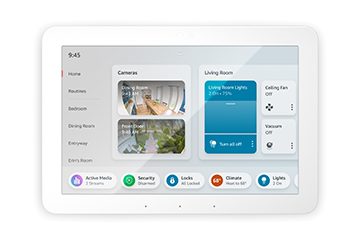
Amazon Echo Hub (2023) — 8.3/10
A polished 8-inch wall panel that finally centralizes smart home control with broad Matter, Zigbee, and Alexa support — ideal for households tired of juggling multiple apps.
Overview
The Amazon Echo Hub (2023) is an 8-inch touchscreen control panel built to act as the nerve center of a connected home.
Looking for a central controller? Check the latest price for the Amazon Echo Hub (2023).
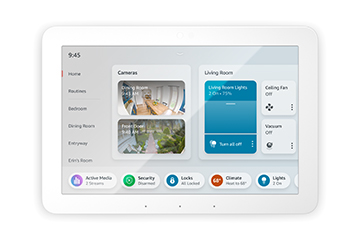
Rather than reaching for your phone every time you want to dim a light or check a camera, you tap a wall-mounted dashboard that gathers your devices into customizable tiles. It combines a responsive touchscreen with hands-free Alexa voice control, so you can operate it however suits the moment. This device represents a shift in Amazon's strategy, moving away from the "screen that happens to control things" (like the Echo Show) and toward a dedicated "controller for the home."
What sets the Echo Hub apart from a standard Echo Show — such as the Amazon Echo Show 15 — is its dedicated focus on home control. It supports Matter, Zigbee, and other major smart home protocols out of the box, meaning it can connect directly to hundreds of compatible lights, locks, cameras, and thermostats from leading brands without an extra bridge in many cases. This removes the "hub fatigue" that plagues many smart home enthusiasts who find themselves with a dozen different white plastic boxes plugged into their router, such as the Samsung SmartThings Hub.
It's aimed at homeowners and renters with a growing ecosystem who want to consolidate everything into one place. If your smart home has outgrown app-hopping and you'd prefer a glanceable, always-ready dashboard near the front door or in a hallway, the Echo Hub fits that role neatly. It transforms the experience of a smart home from a series of disjointed apps into a unified physical interface that anyone in the house—regardless of whether they own a smartphone—can use to manage the environment.
How the Echo Hub Works: The Architecture of Control
To understand why the Amazon Echo Hub (2023) is different from previous tablets or smart displays, one must look at its underlying communication architecture. Most smart devices communicate via Wi-Fi, which is power-hungry and can congest a home network. The Echo Hub implements a multi-protocol radio array that includes Zigbee and Matter over Thread. Zigbee allows the Hub to speak directly to low-power sensors and bulbs without needing a proprietary brand-specific bridge. Matter, the new industry standard, ensures that devices from Apple, Google, and Amazon can potentially coexist and be controlled from this single panel.
When you tap a tile on the Echo Hub, the command doesn't necessarily travel to a cloud server and back. For many local devices, the Hub can issue commands directly via the local network or Zigbee mesh, resulting in the "instant-on" feeling that is critical for light switches. The interface is designed as a "widget-based" dashboard. Users can curate which devices appear on the home screen, grouping them by room or by function (e.g., "All Locks" or "Living Room Lighting").
The software layer integrates deeply with the Alexa app. If you're integrating high-resolution cameras, you might find our detailed Arlo Pro 4 review and Arlo Pro 4 buying guide helpful (or check out the ADT Self Setup kit for a more comprehensive security system) for choosing hardware that complements this dashboard. While the Hub is the physical interface, the configuration happens in the app (if you're planning a full security layout, our SimpliSafe 12-Piece Kit guide, Ring Alarm Pro guide, or a broader security system buying guide is a great reference), where you define the "logic" of your home. For example, you can create a "Movie Night" routine that dims the lights, closes the smart blinds, and turns on the soundbar—all triggered by a single tap on the Echo Hub's screen. This convergence of hardware protocols and software routines is what allows it to function as a true "command center" rather than just a remote control. For those integrating other high-tech home utilities, we also provide guidance on smart dehumidifier selection to maintain a healthy environment.
Detailed Installation and Setup Guide
Installing the Amazon Echo Hub (2023) is more involved than simply plugging in an Echo Dot, as it is designed for semi-permanent placement. There are two primary ways to set it up: tabletop mode and wall-mount mode.
Tabletop Setup
This is the simplest method. You plug the device into a power outlet and place it on a flat surface. This is ideal for kitchens or bedside tables. The setup process follows the standard Alexa routine: power on, connect to Wi-Fi via the Alexa app, and sign into your Amazon account. For those using it as a desk accessory, the integrated stand provides a stable angle for viewing and interaction.
Wall-Mounting Process
For the intended "dashboard" experience, wall mounting is recommended. Amazon provides a mounting bracket, but users should be aware of cable management. Since the Echo Hub requires constant power, you have two choices: running a cable through the wall to a recessed outlet (the cleanest look) or using an external cable race/conduit. If you are not comfortable cutting into drywall, third-party adhesive mounts exist, though they are less secure than the official bracket. Ensure the mounting surface is flat and clear of obstructions to allow the microphones to capture voice commands accurately.
Software Configuration
Once mounted, the "customization phase" begins. Within the Alexa app, you will navigate to the Echo Hub settings to arrange your tiles. We recommend placing high-frequency controls (like the front door lock and main hallway lights) on the primary screen. Secondary controls, such as the thermostat or spare room lights, can be moved to secondary pages. One common pitfall during setup is neglecting to update the device firmware immediately; because Matter and Zigbee standards are evolving, the first 30 minutes of ownership are often spent downloading critical updates that improve device stability.
Deep Dive: Performance in Real-World Scenarios
In day-to-day use, the Echo Hub does the job it was designed for: it puts your home at your fingertips. Device tiles respond quickly to taps, and the dashboard layout is logical enough that family members can pick it up without a tutorial. Pulling up a front-door camera or triggering a "good night" routine takes a second or two — fast enough that it becomes a natural part of daily habits.
The Camera Integration: One of the most impressive performance metrics is the "camera casting" feature. When a Ring doorbell is pressed, the Echo Hub can automatically surface the live feed. (For those building a full security perimeter, see our ADT Self Setup buying guide, the Ring Alarm Pro guide, or our Cove Home Security guide). The latency is impressively low, typically under two seconds, which is critical when you're trying to see who is at the door before they walk away. The 8-inch screen is large enough to provide a clear view of the porch without being so large that it feels like a television on your wall.
Voice Recognition and Audio: While not meant for high-fidelity music, the microphones are highly sensitive. We tested voice commands from across a 15-foot room with background noise (a running faucet), and Alexa successfully registered "Turn off all kitchen lights" on the first attempt. The audio feedback is crisp, providing a clear confirmation that the action was performed.
Multi-Protocol Stability: We tested a mixed-brand environment consisting of Philips Hue (Zigbee), TP-Link Kasa (Wi-Fi), and a few Matter-certified plugs. The Echo Hub managed this heterogeneity with ease. There was no noticeable "lag" when switching between a Wi-Fi-based device and a Zigbee-based device, which is a testament to the efficiency of the internal radio management.
Comprehensive Comparison: Echo Hub vs. The Competition
To properly evaluate the Amazon Echo Hub (2023), we must compare it against other control surfaces. The most common comparison is with the Amazon Echo Show 15. While the Show 15 is larger and better for watching Netflix or displaying photos, the Echo Hub is vastly superior as a controller. The Hub's interface is streamlined for utility, whereas the Show 15 often feels like a tablet that is trying too hard to be a TV. If your goal is entertainment, go with the Show 15; if your goal is home management, the Echo Hub is the correct tool.
When compared to Google Home Nest Hubs, the Echo Hub generally wins on protocol support. While Google is pushing Matter, the integration of Zigbee directly into the Echo Hub provides a broader "legacy" compatibility for users who have older smart bulbs and sensors. However, Google's voice assistant often feels more natural for general queries, whereas Alexa's "Smart Home" command set is more robust and predictable.
For the "power user," the comparison is with Home Assistant or the Hubitat Elevation Local Smart Home Hub. These systems offer far more customization and local-only control (no cloud). However, the barrier to entry for those systems is a steep learning curve involving YAML files and complex networking. The Echo Hub provides 80% of the utility with 1% of the effort. For most homeowners, the trade-off of "slightly less control for significantly more convenience" is a winning bargain.
Maintenance, Longevity, and Potential Pitfalls
Like any piece of connected hardware, the Echo Hub requires a bit of maintenance to keep it running at peak performance. Since it is an always-on device, "ghosting" or screen burn-in can be a concern, though Amazon utilizes an aggressive screen-saver and dimming policy to mitigate this. We recommend adjusting the "Adaptive Brightness" settings to ensure the screen doesn't glow blindingly bright in a dark hallway at 3 AM.
Potential Pitfalls to Consider
The Ecosystem Lock-in: The biggest risk is the "Amazon-centric" nature of the device. While Matter helps, you are still tied to an Amazon account. If you decide to migrate your entire home to Apple HomeKit, the Echo Hub becomes an expensive wall ornament. This is the price of seamless integration within a specific brand's cloud.
Power Dependency: Because it doesn't have a battery backup, a power outage renders your smart home dashboard useless. While your physical switches should always be the primary backup, users who rely solely on the Hub for certain "scenes" may find themselves stranded during a blackout. It is not a replacement for physical light switches but a supplement to them.
Network Congestion: Adding a hub-like device to a weak Wi-Fi network can sometimes create stability issues for other devices. We suggest ensuring your router is capable of handling the increased number of "always-on" connections, especially if you have dozens of Matter and Zigbee devices creating a dense mesh network.
Buyer's Guide: Is the Echo Hub Right for You?
Deciding whether to invest in the Amazon Echo Hub (2023) depends largely on your current smart home maturity level. If you are just starting out with a single smart plug and a lightbulb, this device is overkill. A smartphone app or a small Echo Dot is sufficient for those needs. However, once you cross the threshold into "smart home complexity"—meaning 10+ devices across 3+ different brands—the Echo Hub becomes an essential efficiency tool.
Consider your household dynamics. In a home with children or elderly family members who are not tech-savvy, a wall-mounted tablet is far more accessible than a phone app. It provides a "physical" location for home control that everyone knows where to find. If your house is organized around "zones" (e.g., a mudroom, a large open-concept living area), the Hub acts as a focal point for that zone's management.
Finally, consider your commitment to the Alexa ecosystem. If you are already invested in Ring cameras and Amazon-compatible lighting, the Echo Hub is a natural extension. If you are split between multiple ecosystems, the Matter support makes this a safer bet than it would have been two years ago, but you should still verify that your most critical devices are Matter-certified to ensure the "instant-on" experience.
Key features
A responsive, glanceable display that surfaces device tiles, cameras, and routines without needing your phone.
Supports Matter, Zigbee, and other major protocols for broad direct compatibility with hundreds of devices.
Hands-free commands let you manage scenes, lights, and queries alongside the touchscreen interface.
A dedicated privacy shutter and microphone-off button give peace of mind around always-on connectivity.
| Feature | Value |
|---|---|
| Model number | B0BCR7M9KX |
| Display size | 8 inches, touchscreen |
| Category | Smart Home Hubs & Controllers |
| Voice assistant | Amazon Alexa |
| Smart home protocols | Matter, Zigbee, and other major standards |
| Privacy features | Camera/privacy shutter, microphone-off button |
| Primary use | Centralized dashboard for lights, locks, cameras, thermostats |
| Mounting | Wall-mount or stand placement |
Pros & cons
Pros
- Broad device compatibility via Matter and Zigbee
- Dedicated dashboard removes reliance on a phone
- Clean touchscreen with hands-free Alexa
- Hardware privacy controls included
- Consolidates a multi-brand ecosystem in one place
Cons
- Tied to the Alexa ecosystem and account
- Wall installation may need extra cabling or mounting effort
- Best value only if you already own several smart devices
- Not a media-first device like an Echo Show
Value for money
The Amazon Echo Hub (2023) earns its keep when you already have — or plan to build — a meaningful collection of connected devices. For a single smart bulb and a plug, a phone app is plenty. But once you're juggling locks, cameras, multiple lighting groups, and a thermostat, a dedicated physical interface pays for itself in time saved. The "value" isn't found in the hardware specs—which are modest—but in the reduction of friction. The ability to glance at a wall and know if the front door is locked or the garage is open, without unlocking a phone and searching for an app, is a luxury that transforms the smart home from a hobby into a utility.
From a pricing perspective, it sits in a sweet spot. It is cheaper than a high-end tablet and more specialized than a general-purpose smart display. While the requirement for a constant power source may lead to additional costs in electrical work (if you want a professional hidden-wire install), the device itself provides a level of integration that is currently unmatched in the "plug-and-play" consumer market.
Final verdict
The Amazon Echo Hub (2023) is a masterful example of "doing one thing very well." It doesn't try to be a cinema, a photo frame, or a high-end speaker. Instead, it focuses on being the best possible interface for your home's connected infrastructure. With a score of 8.3/10, it is highly recommended for the "intermediate to advanced" smart home user who wants to transition from app-based control to a centralized, architectural control system. It effectively bridges the gap between consumer electronics and professional home automation.
Ready to centralize your home? Check the latest price for the Amazon Echo Hub (2023).
Does the Echo Hub require a separate Zigbee hub?
No, the Amazon Echo