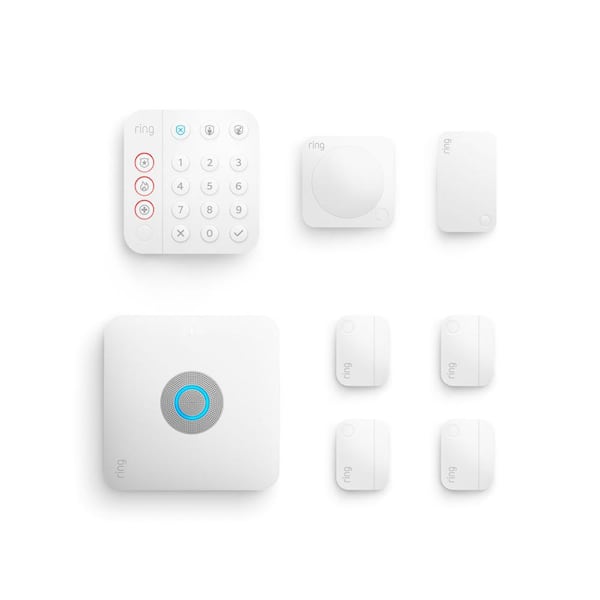
The Ring Alarm Pro 8-Piece Security System with Built-in eero Wi-Fi 6 Router (model 4K1S8-0EN0) is a gold standard smart home security system for those seeking convergence, blending a professional-grade security hub with high-performance networking. Designed for the modern smart home, it eliminates the need for separate networking and security hardware, providing a resilient, expandable, and easy-to-manage ecosystem that protects your home while powering your connectivity.
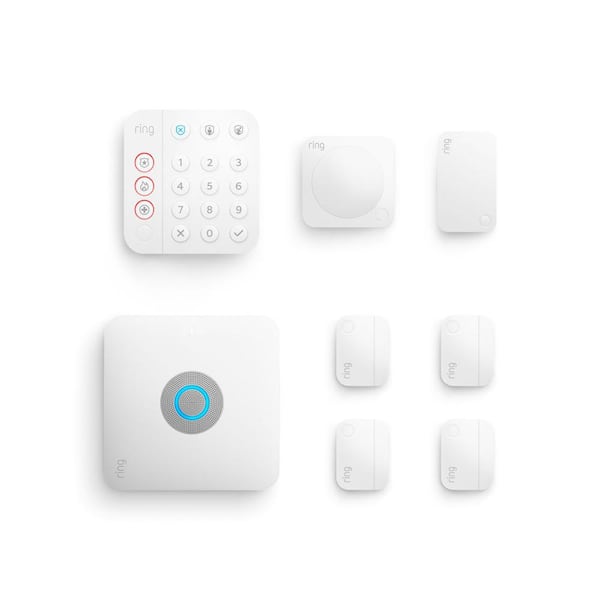
Best Overall: Ring Alarm Pro 8-Piece Security System
Score: 9.2/10. A strong all-in-one smart home security kit that combines expandable Ring alarm protection with built-in eero Wi-Fi 6, making it ideal for households that want security and networking in one hub.
Ring Alarm Pro 8-Piece Security System with Built-in eero Wi-Fi 6 Router
Ring Alarm Pro 8-Piece Security System with Built-in eero Wi-Fi 6 Router (model 4K1S8-0EN0) represents a shift in how we think about home infrastructure.
For years, homeowners had to balance a separate router for internet and a separate base station for security. This hybrid approach merges both into a single, sleek device, effectively turning your security hub into the heartbeat of your home's digital life. Just as a battery backup sump pump protects your physical foundation (see our Basement Watchdog BW1033 guide or Wayne ESP25 review for storm protection), this system protects your digital one. By integrating eero's renowned mesh Wi-Fi technology, Ring ensures that your security sensors and your streaming devices are operating on a stable, high-speed foundation.The 8-piece configuration is meticulously curated to provide a comprehensive baseline of protection. If you're comparing different kit sizes, you might first consider the Ring Alarm Pro 14-Piece Kit, or you might also want to check out our SimpliSafe 12-Piece Wireless Home Security System or the SimpliSafe 13-Piece Wireless Home Security System (see our detailed SimpliSafe review) to see how it stacks up. 8-piece kits are generally designed for smaller properties. It includes the central Base Station, a convenient Keypad for manual control, a Motion Detector for interior surveillance, multiple Contact Sensors for doors and windows, and a Range Extender to ensure signals penetrate thick walls or reach distant rooms. For the majority of apartments and mid-sized homes, this kit covers the primary vulnerabilities, allowing users to secure the most likely points of entry without needing to purchase additional components immediately. For those looking at high-end bundles, see our detailed Vivint (VPK-2GIG-GO2) review.
What truly elevates the 4K1S8-0EN0 is its resilience. Most DIY systems are vulnerable to a simple internet outage or a severed cable line. The Ring Alarm Pro mitigates this risk through its built-in cellular backup (available via the Ring Protect Pro subscription). This means that even if your ISP goes down or a malicious actor cuts your internet, the system can still alert you and the monitoring center. Furthermore, it introduces a critical feature for video surveillance: local encrypted storage. During an outage, supported Ring cameras can save footage directly to the base station (similar to how high-end systems like the Arlo Pro 4 Spotlight Camera Security Bundle
Related parts & accessories
This system is designed for the "prosumer"—the homeowner who wants the ease of DIY installation but the peace of mind associated with professional-grade equipment. Because it utilizes Wi-Fi 6, it is future-proofed for the next generation of smart home devices, handling higher device densities and providing better throughput than older Wi-Fi 5 systems. Whether you are upgrading from a legacy wired alarm or starting your smart home journey from scratch, this kit provides a scalable path toward total home automation and security. For those also looking to secure their basement against floods, our Ridgid SP-650C review is a great companion for total home protection, especially when paired with a high-capacity dehumidifier to prevent mold.
Pros
- Combines a home security base station with an eero Wi-Fi 6 router
- Strong fit for smart homes with multiple connected devices
- 8-piece kit covers the basic security needs of many homes
- Optional Ring Protect Pro can add 24/7 professional monitoring
- Cellular backup and encrypted local video storage improve outage resilience
- Expandable with additional Ring Alarm sensors and compatible Ring devices
Cons
- Best features require an optional subscription
- May be more system than buyers need if they only want a simple alarm
- Large homes may need extra sensors or eero expansion
- Most appealing if you are comfortable building around the Ring ecosystem
Detailed Technical Specifications
| Spec | Ring Alarm Pro 8-Piece Security System |
|---|---|
| Model number | 4K1S8-0EN0 |
| Category | Home Security Systems |
| Security type | DIY smart alarm system with optional professional monitoring |
| Networking | Built-in eero Wi-Fi 6 router |
| Included components | Base station, keypad, motion detector, contact sensors, and range extender |
| Subscription option | Ring Protect Pro for professional monitoring, cellular backup, and enhanced features |
| Local video resilience | Up to 3 GB of encrypted local video storage during an internet outage |
| Best for | Smart homes that want security and Wi-Fi routing in one hub |
Deep Dive: How the Ring Alarm Pro Ecosystem Works
To fully appreciate the value of the Ring Alarm Pro, one must understand the engineering behind its "layered defense" strategy. Most security systems operate on a single plane of communication, but the 4K1S8-0EN0 manages three distinct layers: the Sensor Layer, the Networking Layer, and the Resilience Layer.
The Sensor Layer (Z-Wave Connectivity)
A common misconception is that the sensors in the 8-piece kit connect via Wi-Fi. In reality, they utilize Z-Wave, a low-power wireless communication protocol. This is a strategic choice for several reasons. First, Z-Wave is incredibly energy-efficient, allowing a small coin-cell battery in a contact sensor to last for years. Second, it operates on a different frequency than Wi-Fi, meaning your security system won't compete for bandwidth with your Netflix stream or Zoom call. Finally, Z-Wave creates a "mesh" network; the Range Extender included in the kit allows signals to "hop" from one device to another, effectively extending the reach of the base station to the furthest corners of your property.
The Networking Layer (eero Wi-Fi 6)
By integrating eero technology, Ring has solved the "clutter" problem of the modern home office. The built-in Wi-Fi 6 router is not a stripped-down version of a router; it is a full-featured eero device capable of handling the high-density traffic of a smart home. Wi-Fi 6 (802.11ax) introduces technologies like OFDMA and MU-MIMO, which allow the router to communicate with multiple devices simultaneously more efficiently. For the Ring ecosystem, this is vital. High-definition cameras generate massive amounts of data; by having the router integrated into the security hub, the system can prioritize security traffic, ensuring that a motion trigger is transmitted instantly without being delayed by other network activity.
The Resilience Layer (The Fail-Safe)
The most critical failure in any DIY security system is the "Single Point of Failure"—usually the internet connection. The Ring Alarm Pro transforms this vulnerability into a strength through its Resilience Layer. When paired with a Ring Protect Pro subscription, the base station utilizes a built-in cellular chip. If the primary internet cable is cut or the ISP experiences an outage, the system automatically switches to cellular data to send alerts to the user's phone and the professional monitoring center.
Simultaneously, the system activates "Local Video Storage." In a standard setup, if the internet goes down, your cameras stop recording because they can't reach the cloud. The Ring Alarm Pro allocates up to 3 GB of encrypted storage on the base station itself. Compatible cameras will divert their streams to this local storage until the internet is restored, at which point the footage is uploaded to the cloud. This ensures that a sophisticated intruder cannot "blind" your system simply by cutting the exterior internet line.
Buyer's Guide: Is the 8-Piece Kit Right for Your Home?
Choosing the right hardware configuration is the most important step in your security journey. The 8-piece kit (4K1S8-0EN0) is designed as a "foundation." It is not intended to be an all-inclusive solution for a mansion, but rather a robust starting point that can be scaled. To determine if this kit meets your needs, you must conduct a "vulnerability audit" of your living space.
Scenario A: The Urban Apartment or Townhome
For a one- or two-bedroom apartment, the 8-piece kit is often an ideal, complete solution. In this environment, you can secure the front door, a balcony or patio door, and a few key windows with the provided contact sensors. The motion detector can be placed in the main corridor to catch any movement between rooms. Because apartments have smaller footprints, the integrated eero Wi-Fi 6 router will typically provide 100% coverage without needing additional mesh nodes, making this a "set it and forget it" installation.
Scenario B: The Suburban Single-Family Home
In a standard 3-bedroom, 2-bathroom suburban home, this kit serves as a strategic anchor. You will likely utilize the contact sensors on the most probable entry points (front door, back door, and perhaps a garage entry). The motion detector is best placed in a central hub, such as a hallway leading to bedrooms. However, most homeowners in this scenario will eventually find they need more sensors to cover every ground-floor window.
The Ring Alarm Pro 8-Piece Security System includes a Range Extender that becomes a critical asset here
, especially if the base station is located in a basement or a far-end office, as it ensures sensors in the attic or garage remain connected.Scenario C: The Tech-First Smart Home
If you are currently managing an aging Wi-Fi 5 router and are contemplating a security upgrade, the 4K1S8-0EN0 is a "two birds, one stone" solution. It eliminates the "cable nest" of separate networking and security hubs. For the user who already owns several Ring cameras, the synergy here is unmatched. The integrated eero router optimizes the bandwidth for Ring's video streams, reducing latency and improving the "time to alert." It converts your home network from a collection of disparate devices into a unified infrastructure focused on both connectivity and safety.
Installation and Setup Walkthrough
One of the primary advantages of the Ring Alarm Pro is the elimination of professional installation fees. The system is designed for a "consumer-first" setup process, which can be completed in about an hour. The process is broken down into three distinct phases (for those comparing DIY setups, see our ADT Self Setup 9-Piece Home Security Kit for a comparison of DIY installation times.).
Phase 1: Networking the Hub
Before you can set the alarm, you must establish the network. This is done via the eero app. You will connect the Ring Alarm Pro base station to your modem using the provided Ethernet cable. The app will then guide you through naming your SSID (network name) and setting a secure password. It is vital to place the hub in a central, open location. Placing it inside a metal cabinet or behind a concrete pillar will degrade both the Wi-Fi 6 signal and the Z-Wave range for your sensors.
Phase 2: Sensor Deployment
Once the hub is online, the Ring app allows you to "pair" each sensor. This is a simple process of pressing a button on the device and confirming it in the app. When pla