We may earn a commission from qualifying purchases made through links on this page, at no extra cost to you.
If your smart home has outgrown a single app, a dedicated smart home control panel can centralize your entire ecosystem. The Amazon Echo Hub (2023) is an Alexa-powered 8-inch wall-mountable dashboard designed to manage lights, locks, cameras, and thermostats across a multi-brand setup. This guide explores its performance, integration capabilities, and whether it's the right choice for your connected home.
Top Pick: Amazon Echo Hub (2023)
Score: 8.7/10
The Amazon Echo Hub is the best all-in-one wall panel for consolidating a growing multi-brand smart home, thanks to broad Matter and Zigbee support and a responsive touchscreen dashboard.
TL;DR: The Echo Hub is a centralized 8-inch control panel with Alexa, a touchscreen dashboard, and built-in support for Matter, Zigbee, and other major protocols. It's ideal for homeowners who want to manage a multi-device setup without reaching for a phone—and it includes a microphone-off button for hardware-level voice privacy.
Amazon Echo Hub (2023)
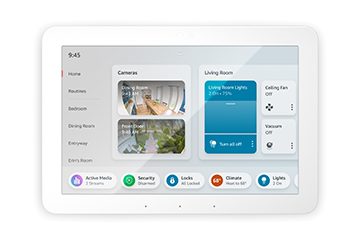
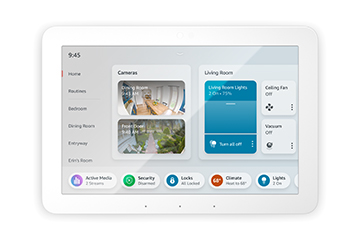
The Amazon Echo Hub (2023) is built around an 8-inch responsive touchscreen designed to live on a wall or stand as the nerve center of your connected home. Rather than juggling separate apps, you get a single customizable dashboard of tiles and controls for lights, locks, cameras, smart thermostats, and more. This device shifts the smart home experience from a "mobile-first" approach to a "stationary-first" approach, providing a permanent digital switchboard for the entire family.
Looking to centralize your home? Check the latest price for the Amazon Echo Hub (2023).
Connectivity is the standout feature. The Hub functions as a smart home controller with support for Matter, Zigbee, and other major protocols, making it broadly compatible with hundreds of devices across leading brands. By integrating the Matter standard, the Echo Hub bridges the gap between ecosystems, allowing users to control devices that were previously locked into specific proprietary apps. That means many of your existing accessories can connect directly to the Hub instead of relying on a separate, clunky bridge or bridge-hub combo.
Alexa voice control is baked in, so you can issue commands hands-free while still having a visual interface for granular adjustments. The dashboard surfaces camera feeds (like those from the Arlo Pro 4), scenes, and routines, and you can group devices by room for quicker access—perfect for managing a comprehensive system like the ADT Self Setup 9-Piece Kit. If you're still weighing your security options, our SimpliSafe 12-Piece Kit guide offers a great comparison of DIY alternatives. For households that have accumulated gear over time—perhaps a mix of Philips Hue bulbs, Ring cameras (see our Ring Alarm Pro 14-Piece Buying Guide), and Nest thermostats—this consolidation is the core appeal.
Privacy gets dedicated hardware attention through a microphone-off button that addresses concerns about always-on listening. This physical disconnect ensures that the device is not recording when you require total privacy. It is best suited to homeowners looking to simplify control of a growing ecosystem without depending on a smartphone or an extra hub.
Pros
- Broad compatibility via Matter, Zigbee, and other protocols
- Single 8-inch dashboard replaces multiple apps
- Hands-free Alexa voice control plus touch interface
- Dedicated microphone-off button for voice privacy
- Wall- or stand-mountable as a fixed control point
Cons
- Less useful for homes with few connected devices
- Best experience leans into the Alexa ecosystem
- Fixed-location panel rather than a portable display
| Specification | Detail |
|---|---|
| Model number | B0BCR7M9KX |
| Display | 8-inch responsive touchscreen |
| Voice assistant | Alexa |
| Protocols | Matter, Zigbee, and other major smart home standards |
| Privacy controls | Microphone-off button |
| Category | Smart Home Hubs & Controllers |
| Best for | Consolidating a multi-brand smart home |
We may earn a commission from qualifying purchases made through links on this page, at no extra cost to you.
Understanding the Ecosystem: How the Echo Hub Works
To understand the value of the Amazon Echo Hub, one must understand the "fragmentation problem" of the modern smart home. Most users start by buying a single smart bulb or plug. Over time, they add a smart lock from one brand, a doorbell from another, and a thermostat from a third. This leads to "App Fatigue," where a user must open four different applications just to prepare their home for bed.
The Echo Hub solves this by acting as a Universal Control Plane. Instead of operating as just another speaker, it serves as a visual gateway. Through its support of Matter, the Hub can talk to devices regardless of whether they are "Made for Amazon" or "Works with Google Home," provided they adhere to the Matter standard. This standardization allows a device from a smaller startup to coexist perfectly with a device from a global conglomerate.
Matter is an industry-unifying standard. If you see the Matter logo on a new smart plug or light switch, you can be confident it will integrate with the Echo Hub without needing a proprietary bridge.
The Zigbee radio is equally important. Many high-end lighting systems (like older Hue or IKEA Tradfri setups) use Zigbee to create a mesh network. Because the Echo Hub has a built-in Zigbee coordinator, it can often replace the proprietary hub that comes in the box with those lights, reducing the number of power plugs used in your router area. This doesn't just save space; it reduces the number of points of failure in your network.
From a software perspective, the Hub utilizes a "Widget" philosophy. You can pin your most-used devices to the home screen. For example, a "Front Door" widget might show a live feed from your Ring camera (or a high-res alternative like the Amazon Echo Show 15) and a toggle for the smart lock, allowing you to see who is at the door and unlock it without navigating through a menu. This reduces the "cognitive load" of managing your home, turning a complex digital system into a simple physical interface.
The device also integrates deeply with Alexa's Routine engine. A Routine is essentially an "If This, Then That" sequence. For instance, a "Good Morning" routine triggered by a tap on the Hub could simultaneously open the smart blinds, start the coffee machine, read the weather forecast aloud, and turn on the kitchen lights. By centering this on a touch panel, the Hub becomes the "master switch" for the entire household's daily habits.
Deep Dive: Buyer's Guide for Smart Control Panels
When shopping for a smart home controller, the hardware specs (screen size, resolution) are secondary to the communication protocols. A beautiful screen is useless if it cannot talk to your locks. To make an informed decision, you must analyze your existing hardware and your future growth plans.
1. Protocol Support (The "Language" of the Hub)
There are four primary languages your devices speak. Understanding these is critical for avoiding the frustration of buying a hub that doesn't "speak" to your devices:
- Wi-Fi: Common for cameras and high-bandwidth devices. High power draw, but easy to set up. Most Hubs, including the Echo Hub, manage Wi-Fi devices via cloud-to-cloud integration or local network discovery.
- Zigbee: Low power, creates a mesh. Ideal for sensors and bulbs. The Echo Hub excels here, acting as the "brain" that coordinates these low-energy signals.
- Matter: The new gold standard. It allows devices to work across different brands (Apple, Amazon, Google) using a common language over Wi-Fi or Thread. This is the future of smart home interoperability.
- Z-Wave: A professional-grade protocol common in security systems. It operates on a different frequency than Zigbee to avoid interference. Note: The Echo Hub does not support Z-Wave.
If your home is built on Z-Wave, the Echo Hub will be a great secondary dashboard, but you will still need a primary Z-Wave hub (like Hubitat or SmartThings) to manage those specific devices. You can then link that hub to Alexa, allowing the Echo Hub to act as the visual remote for the Z-Wave system.
2. Placement and Mounting
Unlike a tablet, a control panel is meant to be a permanent fixture. The Echo Hub is designed for "high-traffic" areas. The best locations include:
- The Kitchen: For managing timers, shopping lists, and checking who is at the door while cooking. This is often the primary "command center" for families.
- The Mudroom/Entryway: For a "Leaving Home" routine that locks all doors and turns off all lights with one tap as you head out.
- The Living Room: As a central point for controlling the home theater and ambient lighting, allowing guests or children to adjust settings without needing a phone.
3. Privacy vs. Convenience
Many users are hesitant to put a microphone-enabled device in every room. The Echo Hub addresses this with a physical kill-switch for the microphone. When engaged, the hardware is disconnected, meaning no software glitch can accidentally activate the mic. For those who prioritize privacy, this is a non-negotiable feature. It ensures that while the device can still act as a touch-controlled light switch, it cannot "listen" to conversations in the room.
4. Screen Real Estate and UI
The 8-inch screen is a strategic middle-ground. It is large enough to show a multi-column dashboard with camera feeds, but small enough to not feel like a giant television mounted on your wall. The responsive nature of the screen means that lag is minimized, which is essential for "instant" actions like turning off a light. If a hub takes three seconds to respond to a touch, the user will revert to using a physical switch.
Setup and Installation Guide
Installing the Echo Hub is straightforward, but there are a few considerations to ensure it functions as a true "command center" rather than just another gadget on the counter.
Step 1: Power and Placement
While the Echo Hub can sit on a counter, mounting it to a wall provides the most "integrated" feel. Ensure you are placing it near a power outlet. If you are wall-mounting, check if you have an existing electrical box or if you'll need to run a cable through the wall to avoid unsightly wires hanging down the wallpaper. Using a cable management kit or a recessed outlet box can make the installation look professional and seamless.
Step 2: The Alexa App Configuration
Once plugged in, use the Alexa app on your smartphone to find the device. The Hub will automatically scan for nearby Matter and Zigbee devices. We recommend "Naming by Room" (e.g., "Kitchen Light" instead of "Light 1") to make voice commands more intuitive. This is particularly important when you have multiple devices of the same type across different floors.
Step 3: Customizing the Dashboard
Don't stick with the default layout. Spend 10 minutes customizing your tiles. Put your most-used "Routines" (like "Goodnight" or "Movie Mode") in the center of the screen. This reduces the friction of using the device, making it more likely that your family will actually use it instead of their phones. You can organize tiles by priority: security at the top, lighting in the middle, and climate control at the bottom.
Use the "Camera" widget for your doorbell. You can set the Hub to automatically bring up the camera feed when the doorbell is pressed, giving you an instant visual of your visitor without any manual navigation.
Step 4: Integration with Other Echo Devices
The Echo Hub doesn't have to work alone. You can link it to other Echo speakers in your home to create a coordinated system. For example, you can trigger a routine on the Hub that plays a specific announcement on all speakers in the house. This creates a "whole-home" experience where the Hub is the brain and the other speakers are the nervous system.
Long-Term Maintenance and Troubleshooting
Smart hubs are not "set and forget" devices; they require occasional attention to maintain peak performance. Because they sit at the intersection of your network and your physical hardware, they can occasionally encounter "digital friction."
Managing Ghost Devices
Over time, as you replace old bulbs or add new sensors, you may end up with "ghost devices" in your Alexa app—items that are listed but no longer exist. Periodically audit your device list in the app to remove these, as they can occasionally cause routines to lag or fail. A "clean" device list ensures that the Hub's dashboard remains responsive and accurate.
Handling Connectivity Drops
If a Zigbee device stops responding, the issue is often "interference" rather than a hub failure. Zigbee operates on a similar frequency to 2.4GHz Wi-Fi. If you notice a light in the far bedroom is flickering or unresponsive, consider adding a "Zigbee Repeater" (which is usually any mains-powered Zigbee device, like a smart plug) halfway between the Hub and the problematic device. This strengthens the mesh network and ensures signal stability.
Software Updates and Stability
Amazon pushes updates to Echo devices automatically. However, if the touchscreen feels sluggish or a specific widget stops updating, a manual restart (unplugging and plugging back in) can clear the system cache and restore responsiveness. Always ensure your Wi-Fi router is operating on a stable channel, as a crowded 2.4GHz band can lead to "command lag," where a touch on the Hub takes several seconds to activate a light.
Screen Care and Cleaning
Because the Hub is a touch interface, it will naturally accumulate fingerprints and dust. To avoid scratching the screen or damaging the capacitive layer, use a dry microfiber cloth. Avoid using harsh chemical cleaners or ammonia-based glass cleaners, which can strip the oleophobic coating and make the screen more prone to smudges over time.
Comparison: Echo Hub vs. The Competition
To decide if the Echo Hub is right for you, it helps to see how it stacks up against other common smart home control strategies. Not every "hub" is created equal; some are designed for entertainment, while others are designed for industrial-grade automation.
| Feature | Amazon Echo Hub | Echo Show 15 | Hubitat Elevation | Samsung SmartThings |
|---|---|---|---|---|
| Primary Purpose | Control Panel | Entertainment/Display | Local Automation | General Ecosystem |
| Interface | 8" Touchscreen | 15" Touchscreen | Web/App Based | App Based |
| Local Control | Partial (Matter/Zigbee) | Cloud-Heavy | Full Local | Hybrid |
| Z-Wave Support | No | No | Yes | Yes |
| Mounting | Wall/Stand | Wall/Stand | Small Box/Hidden | Small Box/Hidden |
As seen above, the Echo Hub is a specialized tool. If you want a giant screen for watching Netflix and seeing photos, the Amazon Echo Show 15 is the better choice. If you are a "power user" who wants your home to work even when the internet is down, the Hubitat Elevation Local Smart Home Hub is the superior (though more complex) choice. If you need Z-Wave for professional-grade sensors, Samsung SmartThings Hub remains the standard.
The Echo Hub occupies a unique niche: the "User-Friendly Command Center." It doesn't offer the extreme local-processing power of a Hubitat, but it offers an interface that a child or a visiting grandparent can understand immediately. It trades absolute technical flexibility for accessibility and aesthetic integration.
Common Pitfalls to Avoid
Many buyers make a few common mistakes when integrating a hub like the Echo Hub. Avoiding these will save you hours of frustration and potential hard