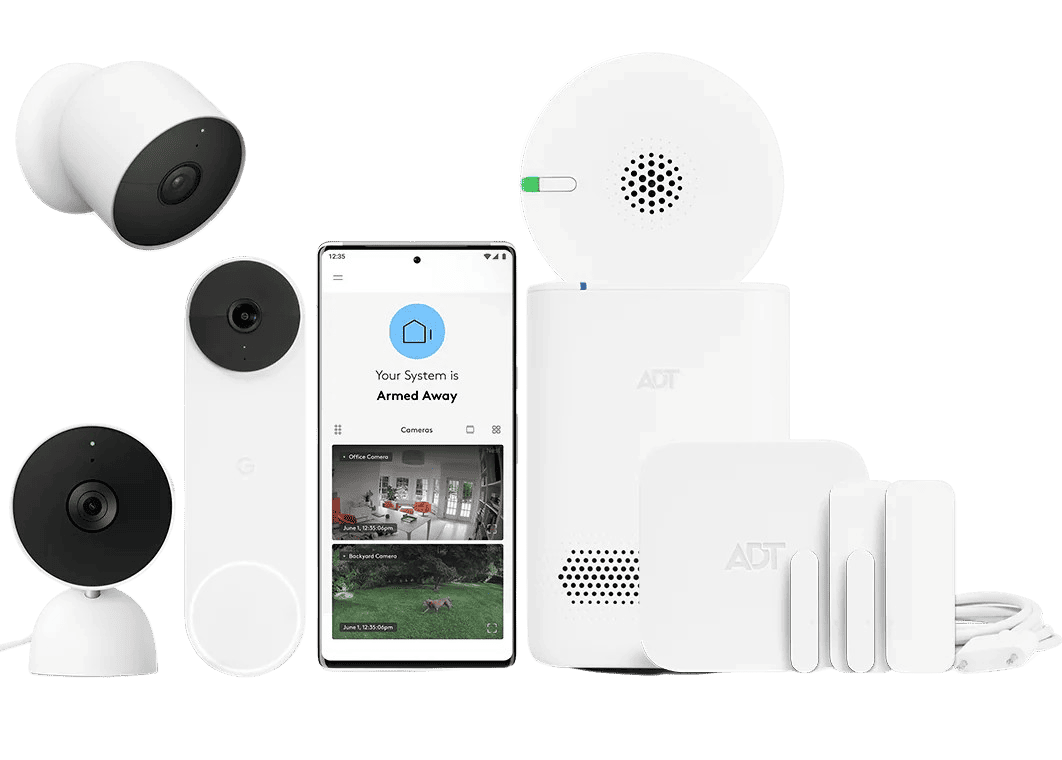
ADT Self Setup 10-Piece Wireless Security System (ADTSS10KIT)
Score: 8.4/10 — A flexible DIY wireless security kit that suits renters and homeowners who want ADT-backed protection with optional professional monitoring.
We may earn a commission from qualifying purchases made through links on this page.
Overview
The ADT Self Setup 10-Piece Wireless Security System is a DIY-friendly security solution that combines professional-grade hardware with the flexibility of self-installation, making it ideal for homeowners and renters seeking scalable protection. If you are comparing different DIY brands, our SimpliSafe review provides a great baseline for comparison.
Traditionally, ADT was synonymous with professional installation, long-term contracts, and technician visits. This specific system flips that model on its head, offering a wireless, DIY-centric approach that puts the control back in the hands of the homeowner or renter. If you're still deciding on a system, our Eufy Security Alarm (S330) review offers a great comparison for smaller homes.At its core, the ADTSS10KIT is designed to bridge the gap between low-cost, local-only alarm systems and high-end professionally monitored security. By utilizing a central hub and a suite of wireless sensors, users can secure their perimeters and interior spaces without drilling through walls or running unsightly cables. It is specifically engineered for those who want the reliability and brand trust of ADT but prefer the speed and flexibility of a "plug-and-play" installation process.
The system is particularly appealing for individuals in transitional living situations, such as renters who cannot make permanent modifications to their property, or new homeowners who want a scalable security foundation—perhaps starting with something smaller like the ADT Self Setup 7-Piece Home Security System or our Eufy Security Alarm (S330) review—that can expand as their needs grow. While the hardware provides the physical security, the true value lies in its compatibility with ADT's professional monitoring ecosystem, allowing users to transition from self-monitoring to 24/7 professional oversight with a simple plan change.
Key features
The ADT Self Setup 10-Piece Wireless Security System (ADTSS10KIT) eliminates the need for technician appointments, allowing for immediate deployment on your own schedule.
Includes a central hub and a diverse array of sensors designed to cover doors, windows, and interior motion zones across multiple rooms.
Full compatibility with ADT's renowned 24/7 professional monitoring plans, providing a safety net beyond simple mobile alerts.
Wireless components use non-permanent mounting options, making it ideal for apartments, condos, and rental properties.
Designed as a starter foundation, the ADTSS10KIT allows users to add more sensors and components as their security requirements evolve.
Combines perimeter monitoring (doors/windows) with interior movement detection to create a layered defense strategy.
| Product Name | ADT Self Setup 10-Piece Wireless Security System (ADTSS10KIT) |
| Model Number | ADTSS10KIT |
| Category | Home Security Systems |
| Installation Type | DIY Self Setup |
| Connectivity | Wireless / Hub-based |
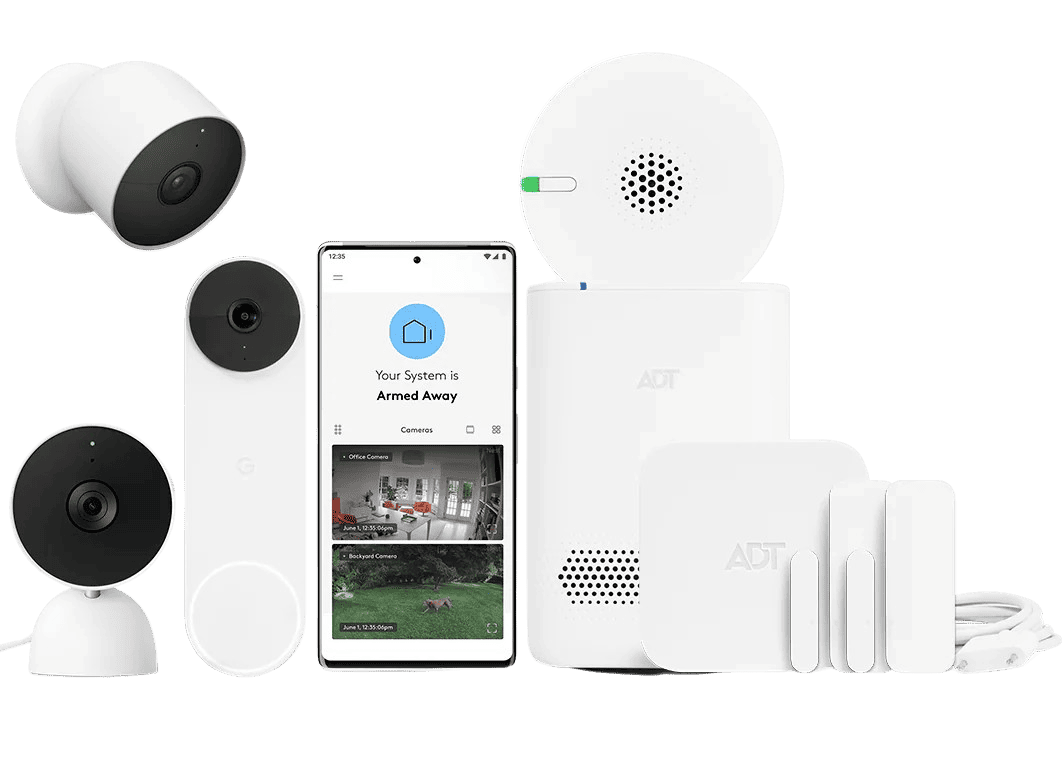
| Included Components | Hub, Door/Window Sensors, Motion Sensors, Keypad/Controller |
| Professional Monitoring | Optional (ADT 24/7 Plans) |
| Best For | Renters, New Homeowners, DIY Enthusiasts |
| System Scalability | High (Expandable) |
Pros & cons
Pros
- Fast, technician-free installation saves time and setup fees.
- Wireless design ensures no damage to walls, making it perfect for rentals.
- Access to ADT's professional monitoring infrastructure.
- 10-piece count provides meaningful coverage for medium-sized homes.
- Scalable design allows for gradual expansion of the security perimeter.
- Strong brand reliability and customer support ecosystem.
Cons
- Professional monitoring requires a recurring monthly subscription.
- DIY installation relies on the user's ability to optimize sensor placement.
- Lacks the extreme durability of hardwired, industrial-grade systems.
- Some advanced smart-home integrations may be locked behind specific plans.
- Battery replacement for wireless sensors is a long-term maintenance task.
Performance
In real-world application, the ADT Self Setup 10-Piece Wireless Security System (ADTSS10KIT) excels in deployment speed.
For most users, the transition from unboxing to a fully armed system takes less than an hour. The wireless signal strength is robust, typically covering a standard two-story home without the need for signal repeaters, provided the hub is placed in a central location.The sensor responsiveness is near-instant. Much like the high-end detection found in the Arlo Pro 4 Spotlight Camera Security Bundle (see our Arlo Essential review), door and window contacts trigger alerts immediately upon a break in the magnetic field, and the motion sensors are tuned to ignore small pets while still picking up human-sized movement. This balance is critical for reducing "nuisance alarms" that can lead to users ignoring their security system.
One of the standout performance aspects is the integration with the ADT app. The interface is intuitive, allowing users to arm or disarm the system from anywhere in the world. When paired with a professional monitoring plan, the performance shift is noticeable; the peace of mind knowing that a dispatcher is monitoring the signal removes the burden of "constant checking" from the user.
Deep Dive: How the ADTSS10KIT Works
The ADT Self Setup 10-Piece Wireless Security System operates on a hub-and-spoke architecture. The central hub acts as the "brain" of the system, communicating via wireless signals with all the sensors distributed throughout the home. When a sensor is triggered—such as a door opening or a motion detector sensing movement—the sensor sends an encrypted signal to the hub, which then triggers the alarm and notifies the user via a smartphone app or an external monitoring center.
The setup process is driven by a guided mobile application. For a deeper look at professional vs DIY options, you might find our Vivint review useful for understanding high-end integration.
For those comparing different DIY approaches, you may also find our SimpliSafe review helpful. Users first plug in the hub and connect it to their home network. From there, each sensor is paired to the hub individually. Because the components are wireless, they can be adhered to surfaces using industrial-strength adhesive strips or small screws, meaning the system can be repositioned as the user discovers the best coverage points.In terms of logic, the system supports multiple "modes." For instance, "Stay" mode typically armors the perimeter (doors and windows) while disabling interior motion sensors so the inhabitants can move freely. "Away" mode arms everything. This flexibility ensures that the system doesn't trigger false alarms during normal daily activities while remaining vigilant when the property is vacant.
Wireless Frequency and Interference Management
One of the technical strengths of the ADTSS10KIT is its use of a dedicated wireless frequency that is separate from the congested 2.4GHz band used by most home Wi-Fi routers. By utilizing sub-GHz frequencies for sensor-to-hub communication, the system reduces the likelihood of signal "collisions" or dropped packets. This is why the sensors can often communicate through walls and floors more effectively than a standard Wi-Fi camera might.
The system also employs a "heartbeat" check. The hub periodically polls each sensor to ensure it is online and functioning. If a sensor goes offline due to a dead battery or physical damage, the hub flags this in the app, preventing the user from arming the system with "blind spots" without realizing it.
Detailed Installation Guide
While the system is marketed as "Self Setup," a strategic approach leads to better security. Following these steps will ensure the highest level of reliability from your ADTSS10KIT.
1. The Perimeter Audit
Walk through your home and identify every possible entry point. This includes not just the front and back doors, but first-floor windows, sliding glass doors, and garage-to-house entries. Map these on a piece of paper before unboxing to ensure you allocate the 10 pieces efficiently. For example, if you have four ground-floor windows and two doors, you have already used six sensors, leaving four for interior motion detection or additional windows.
2. Hub Placement
Position the central hub in a location where it has a clear "line of sight" (metaphorically speaking) to as many sensors as possible. Avoid placing it inside a cabinet or behind a television, as the metal chassis of electronics can dampen the wireless signal. A central hallway or a living room shelf is typically the ideal spot for a medium-sized home.
3. Sensor Calibration
When installing door/window sensors, ensure the magnet and the sensor are aligned according to the manual's gap specifications. A gap that is too wide may fail to trigger; a gap too small may cause false alarms due to door vibration. Use a ruler to ensure the alignment is precise, as this is the most common cause of system failure in DIY setups.
4. Motion Zone Optimization
Place motion sensors in high-traffic "choke points" (like a main hallway or the living room entry). Avoid facing them directly toward a window or a heat source (like a radiator), as rapid temperature changes can sometimes trigger false positives. Position sensors at a height of roughly 7 feet to capture the broadest field of view while minimizing pet interference.
5. The Walk-Test
Once installed, use the "test mode" in the app to trigger every sensor individually. This ensures that each component is communicating correctly with the hub before you arm the system for the first time. If a sensor fails to report, reposition it slightly closer to the hub or check for physical obstructions.
Common Installation Pitfalls to Avoid
Many DIY users make the mistake of placing sensors in a perfectly symmetrical pattern rather than a strategic one. For example, putting a sensor on every single window in a room is often redundant if a single motion sensor covers the entire area effectively. We recommend prioritizing "entry points" (doors) first, then "high-risk windows" (ground floor), and finally "interior bottlenecks."
Another common error is neglecting the "entry delay" window. If you place the keypad too far from the front door, you may find yourself triggering the alarm because you couldn't reach the disarm button in time. Ensure the controller is located within a few steps of your primary entry point, or utilize the mobile app for quicker disarming.
Finally, avoid placing sensors on surfaces that vibrate significantly, such as the door to a laundry room containing a washing machine. Constant vibration can occasionally displace the adhesive or cause the magnetic sensor to "flutter," leading to intermittent connectivity warnings in the ADT app.
Maintenance and Longevity
Unlike hardwired systems that last decades without intervention, a wireless system like the ADTSS10KIT requires a proactive maintenance schedule. The primary concern is battery life. While the sensors are designed for long-term use, batteries will eventually deplete.
Most users will find that sensors need battery replacements every 2 to 5 years, depending on the activity level of that specific sensor. A door sensor on a main entrance will deplete its battery far faster than a sensor on a rarely used guest room window. The ADT app typically provides low-battery notifications, but it is a good habit to check sensor health every six months.
Additionally, because the sensors are adhered to surfaces, the adhesive can occasionally wear down over time—especially in high-humidity areas like bathrooms or kitchens. Periodically pressing on the sensors to ensure they are still firmly attached is recommended. If a sensor feels loose, replace the adhesive strip immediately to prevent the sensor from falling and triggering a false alarm.
While securing your entry points is vital, don't forget basement safety; if you're updating your electrical panel for new security hardware, check our guide on AFCI vs Standard Circuit Breakers. Additionally, we've detailed the Ridgid SP-650C sump pump guide and the Wayne ESP25 battery backup to protect your home's foundation from flooding.
Buyer's Guide: Is the ADTSS10KIT Right for You?
Deciding on a security system often comes down to a trade-off between convenience, cost, and professional oversight. The ADT Self Setup 10-Piece Wireless Security System targets a specific middle ground. To determine if this kit fits your lifestyle, consider the following criteria.
The Renter's Dilemma
If you live in a rental, you are likely restricted from drilling holes or running wires. The ADTSS10KIT is specifically tailored for this—much like the approach we saw in our Eufy Security Alarm review. Because it relies on adhesive mounts and wireless communication, you can take the entire system with you when you move. This mobility makes it a superior choice compared to traditional ADT installations, which often involve permanent hardware that requires a technician to remove.
The "Peace of Mind" vs. "Do It Yourself" Balance
Some users are comfortable managing their own alerts via a smartphone, similar to the experience provided by the SimpliSafe 12-Piece Wireless Home Security System with 24/7 Professional Monitoring (see our SimpliSafe review) or the Abode Iota All-in-One Home Security Kit
Related parts & accessories
If you prefer a high-end integrated experience, you might explore our Vivint (VPK-2GIG-GO2) review to see how professional installation differs from DIY.
This flexibility reduces the "buyer's remorse" associated with com