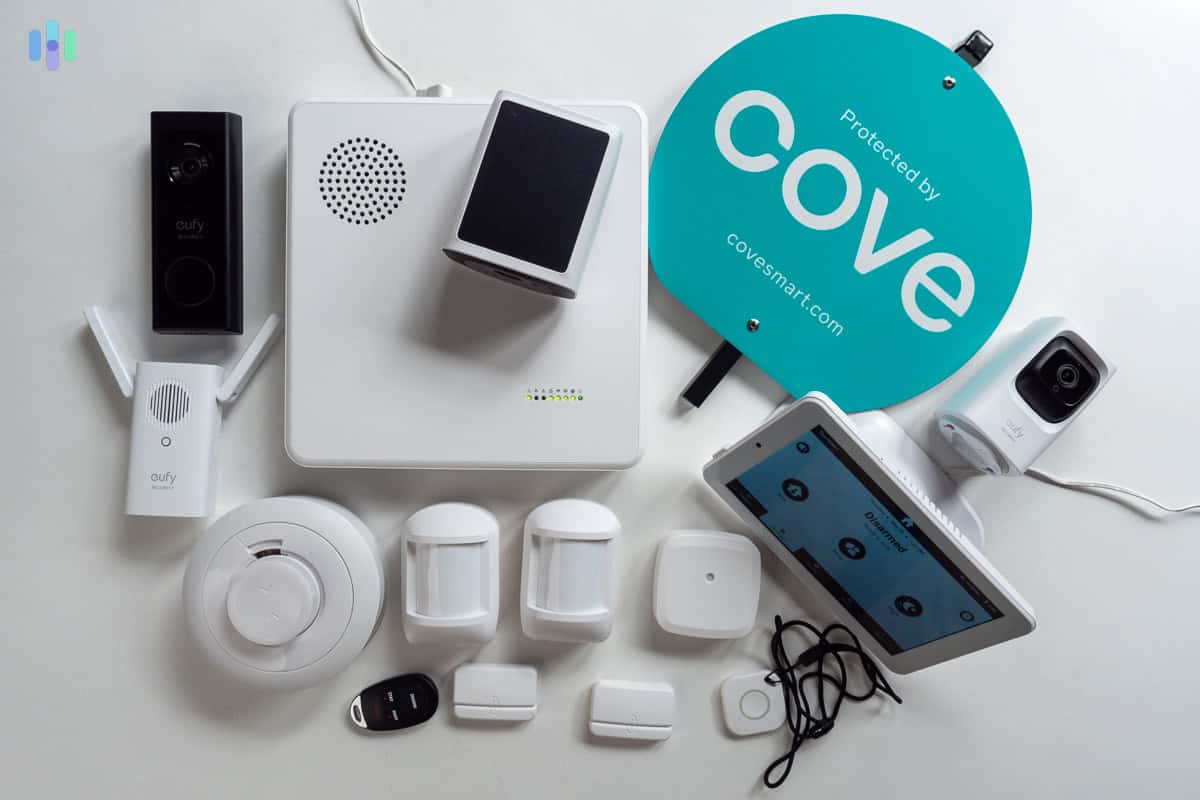
For homeowners and renters seeking a balance of ease and protection, a reliable DIY home security system must be simple to install and backed by 24/7 professional monitoring. The Cove Home Security Complete Package with 24/7 Professional Monitoring (COVEPKG1) is a top-rated DIY solution built around this philosophy: combining a no-tools DIY setup, cellular and Wi-Fi backup connectivity, and expert emergency response. (For those building a fully resilient home, we also recommend checking our Wayne ESP25 review to protect your basement from power outages).
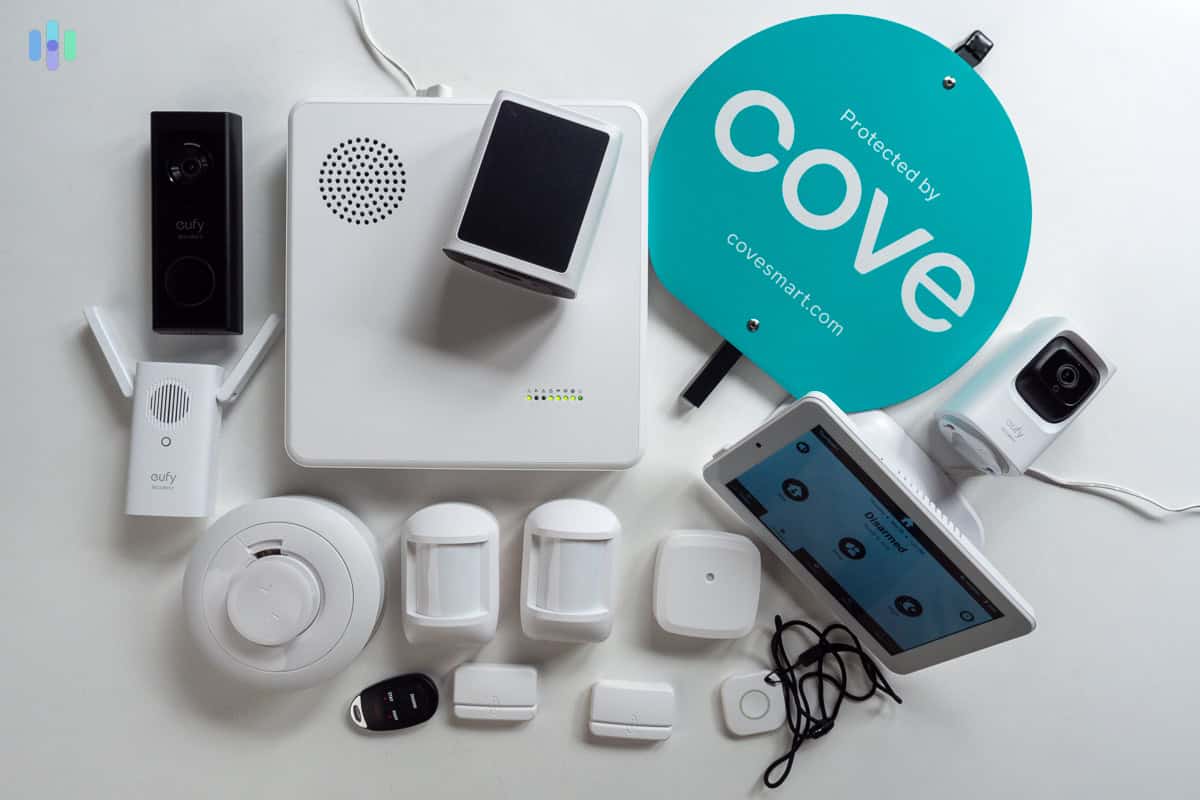
Best Overall Home Security Kit: Cove Home Security Complete Package with 24/7 Professional Monitoring
Score: 9.1/10 — A strong choice for buyers who want professional monitoring, cellular and Wi-Fi connectivity, app control, and a no-tools installation process in one complete home security package.
Cove Home Security Complete Package with 24/7 Professional Monitoring
The Cove Home Security Complete Package with 24/7 Professional Monitoring is designed for people who want a security system that feels more complete than a basic camera or single alarm sensor. Instead of relying only on self-monitoring—where you are the only one receiving alerts—this package includes round-the-clock professional monitoring from trained security specialists who can help dispatch emergency services when needed.
The system includes core security components such as door and window sensors, motion detectors, and a central hub. This configuration allows users to secure the most vulnerable entry points and monitor interior movement from one connected setup. For many homes and apartments, this combination covers the most important security basics without requiring a complex custom installation or invasive wiring.
One of the biggest advantages of the Cove Home Security Complete Package is its connectivity redundancy. The central hub communicates over both cellular and Wi-Fi connections. This is a critical feature because it keeps the system operating even if the home internet connection is interrupted by a service outage or if a malicious actor attempts to disable the router. This "fail-safe" approach ensures that the professional monitoring center remains in contact with the hub regardless of the local network status.
Setup is another key selling point. Because installation requires no tools or professional installer visits, the package is highly practical for renters, condo owners, and homeowners who want to avoid drilling or scheduling expensive appointments. The mobile app adds everyday convenience with real-time alerts, remote arming and disarming, and live system status, allowing the user to manage their home security from anywhere in the world.
| Specification | Cove Home Security Complete Package |
|---|---|
| Model number | COVEPKG1 |
| Category | Home Security Systems |
| Monitoring | 24/7 professional monitoring |
| Included security components | Door/window sensors, motion detectors, central hub |
| Connectivity | Cellular and Wi-Fi communication |
| Installation | DIY setup with no tools or professional installation required |
| App features | Real-time alerts, remote arming/disarming, live system status |
| Best for | Renters, homeowners, apartments, and buyers who want monitored protection without a complex install |
Pros
- Includes 24/7 professional monitoring for emergency response support
- Cellular and Wi-Fi connectivity adds resilience during internet interruptions
- No-tools DIY installation is renter- and homeowner-friendly
- Mobile app supports alerts, remote arming, remote disarming, and system status checks
- Complete package covers essential entry and motion detection needs
Cons
- Professional monitoring typically means an ongoing service commitment
- Buyers with very large homes may need additional sensors beyond the base package
- Not the best fit for someone who wants a fully self-monitored, no-subscription system
Camera coverage is not the main focus of this hardware package; we recommend adding the Arlo Pro 4 Spotlight Camera Security Bundle for visual surveillance. For a more budget-friendly alternative, see our Arlo Essential review.
Related parts & accessories
How the COVEPKG1 Ecosystem Works
Understanding the workflow of the Cove Home Security Complete Package is essential for maximizing its effectiveness. The system operates as a hub-and-spoke model, where the central hub acts as the "brain" and the sensors act as the "eyes and ears." To fully appreciate the value of this system, one must look at the layers of protection it provides, from the physical hardware to the human response team.
The Sensor Layer: Physical Detection
The door and window sensors utilize magnetic contacts. These are divided into two parts: the sensor and the magnet. When the door or window is closed, the magnetic bond is maintained. The moment a door or window is opened, the magnetic bond is broken, triggering an immediate wireless signal to the hub. This is the first line of defense, designed to catch an intruder at the point of entry.
Motion detectors supplement these entry sensors by using PIR (Passive Infrared) technology. Rather than looking for visual movement like a camera, PIR sensors detect heat signatures. When a human-sized heat source moves across the sensor's field of view, it triggers an alarm. This is particularly useful for monitoring large open areas like living rooms or hallways, ensuring that if an intruder enters through a non-monitored point—such as a broken glass pane or an unlocked garage door—they are still detected.
The Communication Layer: Data Transmission
Once the hub receives a signal from a sensor, it processes the state of the system (Armed-Stay, Armed-Away, or Disarmed). If the system is armed, the hub sends an encrypted signal to the Cove monitoring center. This is where the COVEPKG1 differentiates itself from budget DIY kits like the Eufy Security Alarm (see our full Eufy Security Alarm review). Most basic systems rely solely on your home's Wi-Fi. If a burglar cuts your cable line or if your router crashes, a Wi-Fi-only system becomes a paperweight.
The Cove hub employs dual-path communication. It uses Wi-Fi for primary data transmission and a dedicated cellular chip for backup. If the Wi-Fi connection is lost, the system instantly switches to cellular data to alert the monitoring center. This redundancy is the gold standard for security, preventing "single point of failure" scenarios (a concept we also explore in our Wayne ESP25 review for home water protection) and ensuring that your home remains protected regardless of the status of your local internet service provider.
The Human Layer: Professional Monitoring
Unlike DIY systems that only send a push notification to your phone—which you might miss if you are in a meeting, asleep, or in an area with poor reception—the 24/7 professional monitoring service ensures a human agent is alerted the moment a breach occurs. These specialists are trained to verify the alarm and contact the homeowner immediately.
If the agent cannot reach the homeowner, or if the homeowner confirms an emergency, the monitoring center can dispatch local police, fire, or medical services based on the account's emergency contact details. This is vital for households with elderly residents who may not have smartphones, or for frequent travelers who cannot be expected to monitor their phone every second of the day. The transition from "detection" to "dispatch" happens in seconds, which can be the difference between a thwarted robbery and a total loss. (For those upgrading their home infrastructure, we also provide a guide on how to replace a circuit breaker safely at home or learn about AFCI vs Standard Circuit Breakers).
Comprehensive Buyer's Guide: Selecting the Right Security Setup
When shopping for a home security system (such as the ADT Self Setup 9-Piece Home Security Kit with 24/7 Professional Monitoring or other SimpliSafe review)) (reviewed separately) or a SimpliSafe 12-Piece Wireless Home Security System), the market is flooded with "smart" gadgets (some of which we compare in our comprehensive home security comparisons for the Ring Alarm Pro 14-Piece Wireless Home Security System) that claim to provide security. However, there is a significant difference between a "Smart Home" setup and a "Security System." A smart home setup focuses on convenience and visibility; a security system focuses on intrusion prevention and emergency response (as we discuss in our Vivint (VPK-2GIG-GO2) professional security review).
Pro Tip: A smart doorbell can tell you who is at the door, but a monitored security system like the COVEPKG1 ensures that if someone breaks in while you are asleep, emergency services are contacted automatically.
Key Considerations for Buyers
Before purchasing the COVEPKG1 or any other security kit (such as those detailed in our SimpliSafe (SS3-13PKGCAM) review), evaluate your property based on the following four pillars of security (similar to the evaluation found in our SimpliSafe review) to determine if the package meets your specific needs.
1. Entry Point Analysis
Walk through your home and count every ground-floor window and exterior door. This includes the door leading from the garage into the house, which is often a forgotten vulnerability. If you have 12 windows and 3 doors, but the base package only provides 5 sensors, you will have "blind spots." While the COVEPKG1 is a complete starter package, you should plan for additional sensors if you have a larger-than-average home (consider the SimpliSafe 13-Piece Wireless Home Security System with Smart Alarm Indoor Camera (see our detailed review))—
For larger homes with more entry points, we recommend the Cove Home Security System Deluxe Package for expanded coverage.
(which offers expanded coverage for larger homes)—to ensure every entrance is covered.2. Installation Constraints
Consider your tenure in the home. If you are renting, you cannot drill holes into the walls or run wires through the attic without risking your security deposit. Systems that require professional drilling are a poor choice for renters. The COVEPKG1 is ideal here because it uses high-strength adhesive backing for its sensors, meaning it can be installed and removed without leaving permanent damage to the walls or frames.
3. Connectivity Stability
Evaluate your local infrastructure. Do you live in an area prone to power outages or internet flickers? If your Wi-Fi is unstable, a system that lacks cellular backup is a liability. When the internet goes down, a Wi-Fi-only system cannot send alerts to a monitoring center. The cellular backup in the Cove system ensures that the connection to the professional monitoring center is maintained even during a total ISP blackout.
4. Monitoring Requirements
Be honest about your own habits. Ask yourself: "If my alarm goes off at 3 AM, will I actually wake up and call the police?" Many people believe they will respond quickly to a phone notification, but in reality, phones are often on "Do Not Disturb" or placed across the room. Professional monitoring removes the human error from the equation by providing a dedicated team that is paid to be awake and alert 24/7.
Detailed Installation and Setup Walkthrough
One of the most intimidating parts of home security is the fear of a complex installation involving wiring and circuitry. The COVEPKG1 is engineered to remove this barrier, allowing a non-technical user to have a fully functional system running in under an hour. Here is the detailed process for achieving an optimal setup.
Step 1: Strategizing Hub Placement
The central hub is the heart of the system. For the best performance, the hub should be placed in a central location of the home. This is not just for convenience, but for signal strength. Wireless sensors have a maximum range; if you place the hub in the far corner of the basement, a sensor on the second-floor attic window may struggle to maintain a stable connection.
Avoid placing the hub inside a metal cabinet or directly behind a thick concrete wall, as these materials can shield the wireless signals. Plug the hub into a reliable power outlet and connect it to your home Wi-Fi using the provided instructions. Once the hub's status light indicates it is online, you have a stable base to begin adding sensors.
Step 2: Sensor Mapping and Attachment
Now, map out your high-traffic entry points. Start with the front and back doors, then move to the most accessible ground-floor windows. The door/window sensors are installed in two parts: the sensor body and the magnetic contact.
The magnet is placed on the moving part (the door or window sash), and the sensor is placed on the stationary frame. It is critical that the sensor and magnet are aligned correctly—usually within a half-inch of each other when closed. Because the COVEPKG1 uses adhesive-backed sensors, you simply peel the backing and press them firmly into place. Ensure the surface is clean and dry before applying the adhesive to prevent the sensors from falling off over time.
Step 3: Motion Detector Optimization
Motion detectors should be placed in "choke points"—areas where an intruder is forced to walk, such as a main hallway or the entrance to a master bedroom. Mount them at the recommended height (usually around 7 feet) to ensure the PIR sensor has a wide enough field of view to cover the room without being obstructed by furniture.
Step 4: App Integration and Naming
The final step involves downloading the Cove app and syncing the hub. Once the hub is registered to your account, you can "pair" each sensor one by one. The most important part of this process is naming. Instead of leaving a sensor as "Sensor 1," name it "Front Door" or "Kitchen Window." This allows the app to give you precise information during an alert, so you know exactly where a breach has occurred without having to guess.
Maintenance and Long-Term Care
A security system is only effective if it is operational. While the COVEPKG1 is designed for low maintenance, a "set it and forget it" mentality can lead to security gaps. Implementing a simple maintenance schedule ensures the system performs exactly as expected during a real emergency.