Our reviews are independent. We may earn a commission if you purchase through our links, which helps us maintain detailed research for our readers.
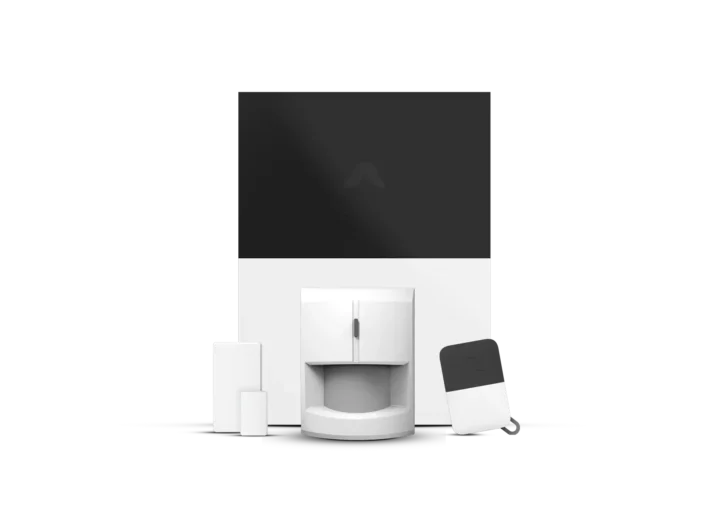
The Abode Smart Security Kit with Home Automation Support is a premier choice for homeowners seeking a professional DIY security system comparison (see our SimpliSafe review for another top DIY option) that blends professional-grade protection with versatile Z-Wave and HomeKit automation. By bridging the gap between Z-Wave, HomeKit, Alexa, and Google Assistant, it transforms from a simple alarm into a central nervous system for the modern home.
Best Overall: Abode Smart Security Kit with Home Automation Support
Score: 9.1/10. An excellent subscription-optional smart security kit for buyers who want flexible home protection, broad automation support, and seamless integration with the largest smart home ecosystems.
Abode Smart Security Kit with Home Automation Support
The Abode Smart Security Kit with Home Automation Support (B0C5S53G71) is engineered for households that view security as one part of a larger residential experience.
Related parts & accessories
Related parts & accessories
Related parts & accessories
Unlike many competitors that lock users into a proprietary ecosystem or demand a monthly fee just to activate the hardware, Abode provides a professional-grade foundation that remains functional under self-monitoring. This makes it an ideal entry point for those who are cautious about long-term recurring costs but unwilling to sacrifice the reliability of a dedicated security hub.
What truly separates this kit from standard DIY alarms is its deep integration capabilities. While most systems support one or two voice assistants, the B0C5S53G71 model is designed to play well with virtually everyone: Amazon Alexa, Google Assistant, and Apple HomeKit are all supported. Furthermore, its native Z-Wave support allows it to act as a primary smart home hub. This means you can link your smart locks, lighting, and thermostats directly to the security system, creating automation "scenes" where locking the door automatically arms the system and dims the lights.
For the tech-savvy user, the kit offers a level of customization that is rare in the consumer security space. You can define complex triggers—for example, if a motion sensor is tripped in the hallway after 11 PM, the system can turn on the living room lights at 20% brightness and send an immediate alert to your smartphone. This convergence of security and automation ensures that the hardware doesn't just alert you to a problem, but actively manages your home's environment based on the security state.
Core Specifications
- Model: B0C5S53G71
- Connectivity: Z-Wave, Wi-Fi, Ethernet
- Ecosystems: HomeKit, Alexa, Google Assistant
- Monitoring: Self-monitored or Professional
- Installation: DIY / Wireless
Key Features
- Subscription-Optional
- Multi-Protocol Hub
- Custom Automation Engine
- Expandable Sensor Array
- Remote App Control
Pros
- No mandatory monthly fees for basic operation
- Rare triple-threat compatibility (HomeKit/Alexa/Google)
- Z-Wave support allows for massive hardware expansion
- Highly flexible automation rules
Cons
- Initial setup can be complex for non-tech users
- Full professional monitoring requires a paid plan
- Higher upfront cost than basic "budget" alarms
Deep Dive: How the Abode System Works
To understand why the B0C5S53G71 is a preferred choice for automation enthusiasts, one must look at the architecture of the system. At the heart is the Abode Gateway, which serves as the brain of the operation. Unlike a simple Wi-Fi bridge, this hub (similar to the architecture seen in the Ring Alarm Pro 14-Piece Kit) and the Abode Iota All-in-One Home Security Kit
Related parts & accessories
Z-Wave is a mesh networking protocol, meaning each powered device (like a smart plug) acts as a repeater, extending the range of the signal to distant sensors in a large home.
When a sensor is triggered—whether it's a door opening or a motion detector firing—the signal travels via Z-Wave to the hub. The hub then processes this information based on the current mode (Home, Away, or Night). If the system is armed, the hub triggers the siren and sends a push notification via the cloud to the user's mobile device. Because the system supports HomeKit and other ecosystems, this trigger can simultaneously fire off a "Scene" in your Apple Home app, such as flashing all smart bulbs red to alert occupants.
Pro Tip: To maximize the reliability of your Abode system, connect the hub via a hardwired Ethernet cable rather than relying solely on Wi-Fi. This reduces latency and prevents "offline" alerts during minor network fluctuations.
The Subscription Model Explained
One of the biggest points of confusion for buyers is the "subscription-optional" nature of the kit. Here is how the breakdown works for the Abode Smart Security Kit:
- Self-Monitoring (Free): You receive all push notifications on your phone. You are responsible for calling the police or fire department if an alarm triggers. All automation features and app controls remain active.
- Professional Monitoring (Paid): Abode’s monitoring center receives the alert and can dispatch emergency services on your behalf. This typically includes cellular backup, ensuring the system stays online even if your home internet goes down.
Detailed Buyer's Guide: Is This Right For You?
Choosing a security system is an investment in peace of mind—if you're looking for a highly rated alternative, check out our ADT Self Setup 9-Piece Home Security Kit—if you're comparing brands, our Ring Alarm Pro 14-Piece Wireless Home Security System offers another perspective on DIY setups. However, the "best" system is the one that fits your specific living situation and technical comfort level. The Abode Smart Security Kit is specifically targeted at three distinct profiles.
The Smart Home Enthusiast
If you already own Philips Hue lights, August locks, or Ecobee thermostats, the Abode system is a logical choice. For those looking to pair this with a high-end camera system—such as the detailed Arlo Essential review—our Arlo Pro 4 Spotlight Camera Security Bundle is a great resource. Most security systems act as a "walled garden," refusing to talk to other brands. Abode does the opposite; it acts as a bridge. If you enjoy tinkering with IFTTT or creating complex "If This, Then That" logic for your home, the B0C5S53G71 provides the granular control necessary to make your home feel truly intelligent.
The Long-Term Renter
Renters often struggle with security because they cannot drill into walls or hardwire systems. If you're evaluating other DIY options, we've also covered the ADT Self Setup 9-Piece Home Security Kit for a more traditional approach to self-installation. For those seeking another non-destructive option, the SimpliSafe 12-Piece Wireless Home Security System (as detailed in our comprehensive SimpliSafe review) is a popular alternative. Since the Abode kit is primarily wireless and uses adhesive mounts for sensors, it is entirely non-destructive. When it's time to move, you simply pop the sensors off the frames and take the hub with you. The lack of a required contract also means you aren't tied to a service provider if you move to a different city.
The Privacy-Conscious Homeowner
For those who are wary of "Big Tech" having a permanent window into their home via mandatory cloud subscriptions, Abode's ability to operate without a monthly plan is a significant draw. While the app requires internet for remote access, the local Z-Wave communication between sensors and the hub ensures that your basic security perimeter is managed locally.
Avoid if: You are looking for a "plug-and-play" system that requires zero configuration. While the hardware installation is easy, the automation engine has a learning curve that may frustrate users who just want a basic "on/off" alarm.
Installation and Setup Process
Setting up the Abode Smart Security Kit with Home Automation Support is designed to be a DIY process, but doing it correctly requires a strategic approach to sensor placement.
Step 1: Hub Placement
Position the gateway in a central location of your home. Because Z-Wave signals can be blocked by heavy masonry or metal foil insulation, placing the hub in a hallway or a central living area ensures the best connectivity to all peripheral sensors. Connect the hub to power and your router (preferably via Ethernet).
Step 2: Sensor Pairing
Using the Abode app, you will "add" each device one by one. The process involves putting the sensor into pairing mode and allowing the hub to discover it. We recommend naming your sensors precisely (e.g., "Back Door Sensor" instead of "Sensor 1") to make automation rules easier to manage later.
Step 3: Testing the Perimeter
Before arming the system for the first time, walk through your home and trigger every sensor. Check the app to ensure the notification arrives instantly. If there is a delay, you may need to add a Z-Wave range extender or move the hub slightly.
Step 4: Integrating Third-Party Gear
Once the security perimeter is set, go to the "Integrations" tab in the app. Here you can link your Alexa or Google Home accounts. If you have Z-Wave locks, you can pair them directly to the Abode hub, allowing the system to automatically disarm when you unlock the front door with your key code.
Maintenance and Long-Term Care
A security system is only as good as its weakest battery. To ensure the B0C5S53G71 remains reliable over several years, follow these maintenance guidelines.
| Component | Maintenance Task | Frequency |
|---|---|---|
| Door/Window Sensors | Check battery levels in app | Every 3 Months |
| Motion Sensors | Clean lens with microfiber cloth | Every 6 Months |
| Gateway Hub | Firmware updates via app | As prompted |
| Siren | Test alarm sound (Silent test first) | Quarterly |
While keeping your security system powered, don't forget other critical home backups—see our Wayne ESP25 battery backup guide for essential basement protection. For those updating their electrical infrastructure to support more smart gear, our guide on how to replace a circuit breaker safely (and our comparison of AFCI vs standard breakers) is also highly recommended.
Battery Management: The app will notify you when a sensor battery is low, but we recommend replacing batteries in high-traffic sensors (like the front door) annually regardless of the percentage shown. This prevents the system from triggering "sensor offline" alerts during a critical moment.
Firmware Updates: Abode frequently pushes updates to the hub to improve Z-Wave compatibility and security patches. Ensure your hub is connected to a stable internet connection to receive these automatically.
Comparison: Abode vs. The Competition
When shopping for home security, you will likely encounter three main types of systems—the "Big Box" professional systems, the "Simple DIY" kits, and "Automation-First" hubs. Here is how the Abode Smart Security Kit (B0C5S53G71) compares against common alternatives like the Vivint (VPK-2GIG-GO2) Review, Eufy Security Alarm (S330), ADT Self Setup 9-Piece Home Security Kit or the Cove Home Security System Deluxe Package.
| Feature | Abode (B0C5S53G71) | SimpliSafe | Ring Alarm |
|---|---|---|---|
| Subscription | Optional | Strongly Recommended | Required for Pro features |
| HomeKit Support | Native/Full | None | None |
| Z-Wave Hub | Yes | No | Limited/Proprietary |
| Installation | DIY | DIY | DIY |
| Automation | A |