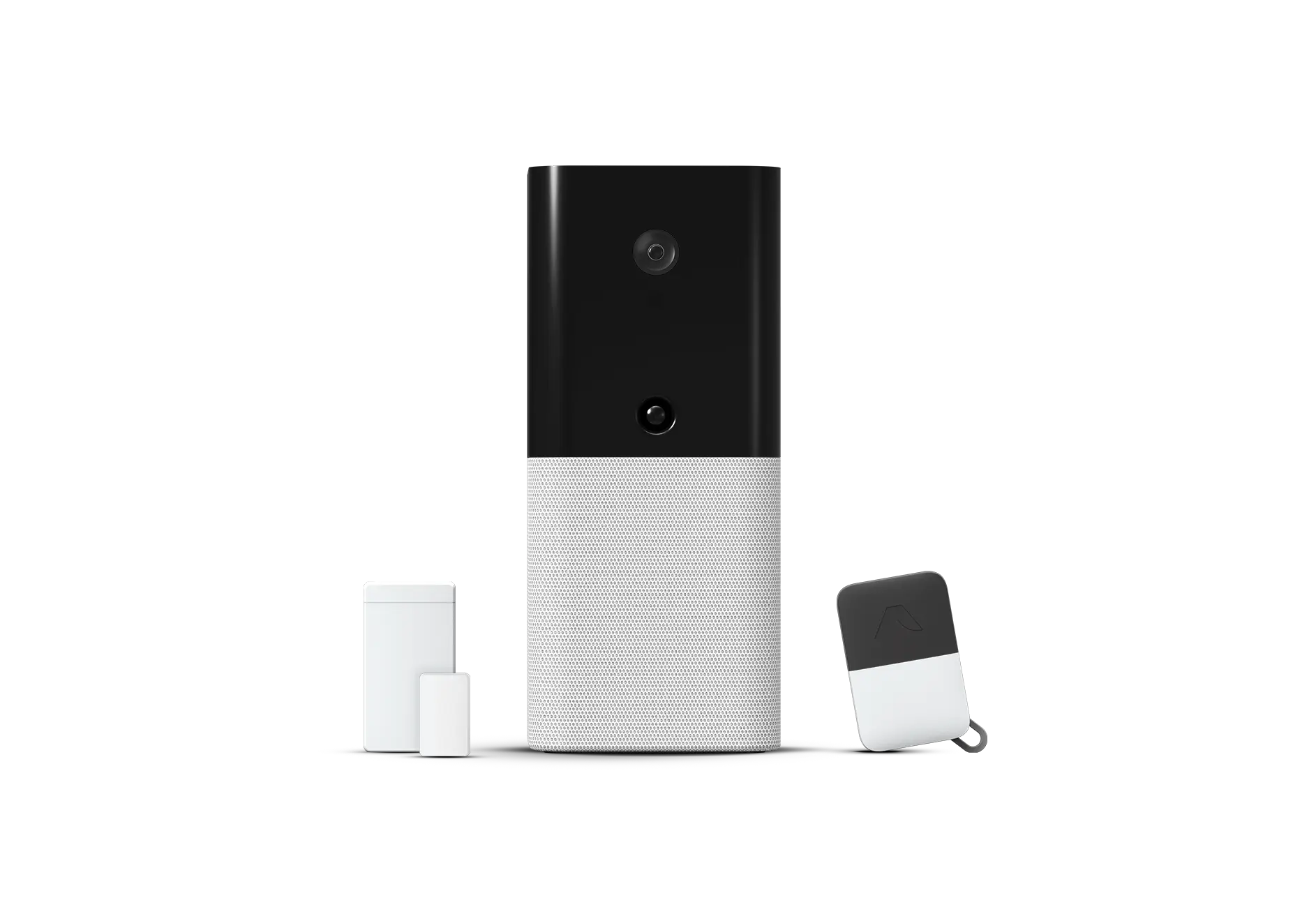
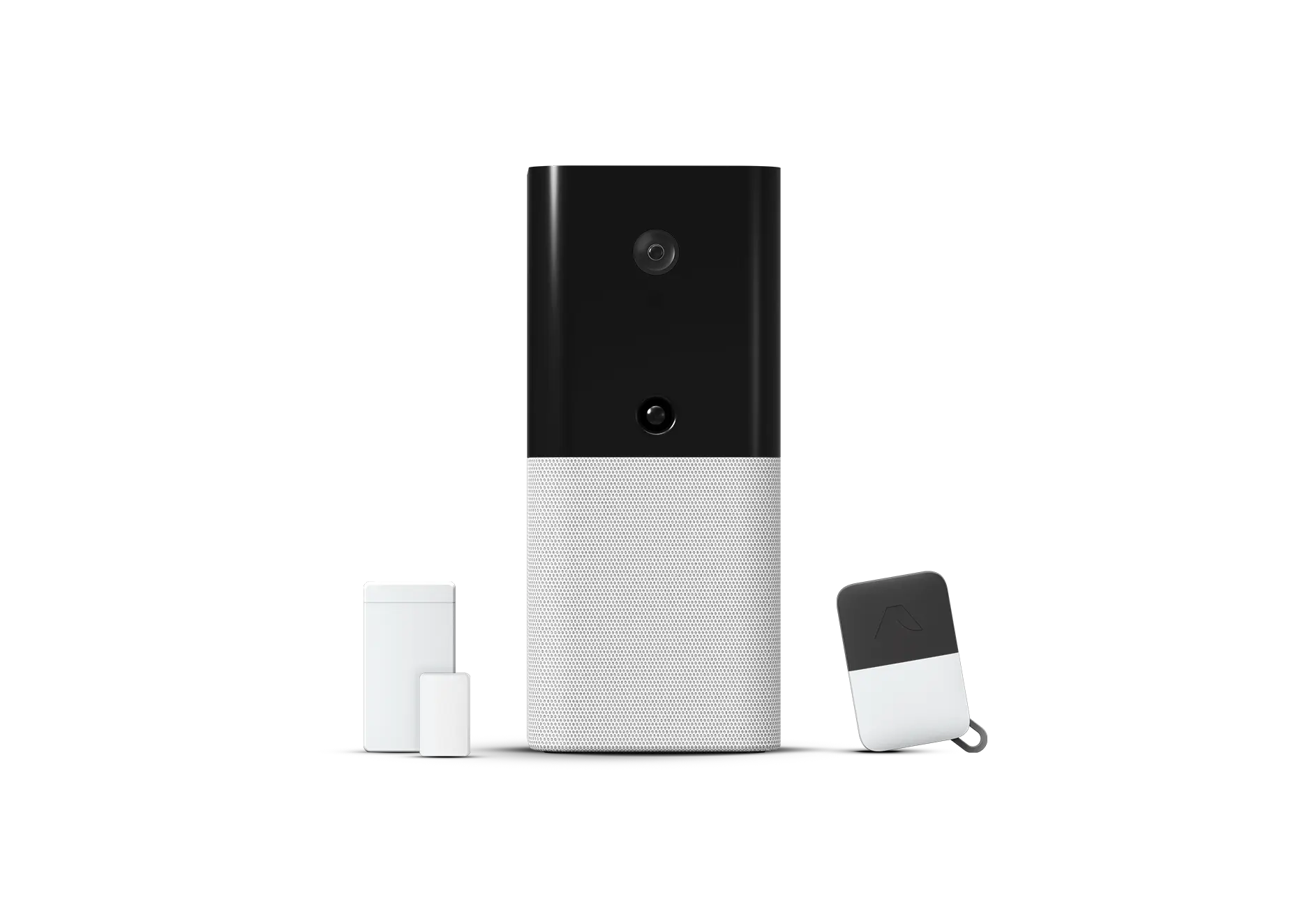
Abode Smart Security Kit with iota All-in-One Security Hub (IOTA-KIT-1)
Verdict: 8.8/10. The Abode Smart Security Kit with iota All-in-One Security Hub is a highly flexible, camera-equipped DIY security starter kit ideal for renters and smart home enthusiasts, offering broad compatibility and optional no-contract professional monitoring.
We may earn a commission from links on this page.
Overview
The Abode Smart Security Kit with iota All-in-One Security Hub is a versatile DIY home security starter kit, blending a smart hub, camera, and motion sensor into one scalable starter kit for homeowners and renters.
Related parts & accessories
Related parts & accessories
Instead of requiring a separate hub, camera, and motion sensor from day one, the central iota hub combines those roles in one compact device. This architectural choice makes the system especially appealing for smaller homes, apartments, entry areas, and first-time security system buyers who want useful coverage without building a complicated setup from scratch.
The kit also stands out because it is not locked into a single smart home ecosystem. Compatibility with Amazon Alexa, Google Assistant, Apple HomeKit, and Z-Wave devices gives the iota starter kit more flexibility than many basic starter kits. If you already use voice assistants, smart lights, locks, or sensors, this system is well positioned to become part of a broader connected home rather than a separate security-only island.
The best fit for this system is someone who wants a DIY system that can start small and grow over time. Professional monitoring is available on a flexible, no-contract basis, so the Abode Smart Security Kit with iota All-in-One Security Hub works for people who want self-monitoring most of the year but prefer professional backup during travel, busy seasons, or higher-risk periods. If you are comparing different starter bundles—such as the Eufy Security Alarm (S330) review—, our Vivint (VPK-2GIG-GO2) review provides context for professionally installed systems, while our SimpliSafe (SS3-13PKGCAM) review guide provides a comparison of larger setups, and our ADT Self Setup 9-Piece Home Security Kit offers another perspective on DIY deployment, while those seeking a balanced alternative might look at the Cove Home Security System Deluxe Package or those seeking a high-end camera-first approach might prefer the Arlo Essential review. Whether you are a renter looking for a non-permanent security solution—perhaps exploring the Ring Alarm Pro 14-Piece Wireless Home Security System for built-in Wi-Fi 6 routing—or a homeowner building a sophisticated automation network (and perhaps protecting their basement with a Wayne ESP25 battery backup sump pump (see also our Ridgid SP-650C buying guide)), the IOTA-KIT-1 provides a stable, scalable foundation.
Key Features
The kit centers on a compact hub that combines a security camera, motion sensor, and smart home controller.
The kit includes door and window sensors to help cover common entry points immediately.
The system can be expanded with additional accessories, such as those found in the Abode Iota All-in-One Home Security Kit, as your home security needs grow.
Related parts & accessories
It supports professional monitoring on a no-contract basis for buyers who want optional backup without a long-term commitment.
It works with Amazon Alexa, Google Assistant, Apple HomeKit, and Z-Wave devices.
It is intended for homeowners and renters who want a practical starter system without a traditional wired security installation.
| Feature | Value |
|---|---|
| Product Name | Abode Smart Security Kit with iota All-in-One Security Hub (IOTA-KIT-1) |
| Model Number | IOTA-KIT-1 |
| Category | Home Security Systems |
| Hub Type | iota All-in-One Security Hub |
| Core Hub Functions | Security camera, motion sensor, and smart home controller |
| Included Security Accessories | Door and window sensors |
| Expandable System | Yes, with additional Abode-compatible accessories |
| Professional Monitoring | Available on a flexible, no-contract basis |
| Voice Assistant Compatibility | Amazon Alexa and Google Assistant |
| Smart Home Compatibility | Apple HomeKit and Z-Wave devices |
| Best For | Renters, homeowners, DIY security buyers, and smart home users |
Pros & Cons
Pros
- Combines a camera, motion sensor, and smart home controller in one compact hub
- Strong smart home compatibility, including Alexa, Google Assistant, HomeKit, and Z-Wave
- Flexible professional monitoring without a long-term contract
- Highly expandable with a wide range of compatible accessories
- Ideal DIY installation flexibility for renters and homeowners
Cons
- Starter coverage may require extra sensors for larger homes
- Hub placement is critical due to integrated camera and motion sensor
- Full value depends on utilizing the broader Abode ecosystem
- Basic alarm users may find some smart home features redundant
Performance
In everyday use, the Abode Smart Security Kit with iota All-in-One Security Hub (IOTA-KIT-1) is built around convenience. The system's integrated design is the main advantage because it reduces the number of separate devices needed to begin monitoring a space. For an apartment, condo, small house, or main living area, having the camera, motion sensor, and controller consolidated into one device makes the system feel more streamlined than a pieced-together setup. For those who prefer a camera-centric approach, our Arlo Essential (VMK4352W) review explores a different strategy.
The built-in motion detection and camera are most useful when the hub is placed where movement matters: a living room, entryway, hallway, or open common area. Placement is important. Because the iota hub is doing multiple jobs, it should be positioned where it has a good view, reliable access to power, and a practical location for smart home control. This requires a bit more strategic planning than a traditional hub that simply sits in a closet.
The sensors included with the Abode Iota All-in-One Home Security Kit provide the Abode Smart Security Kit with iota All-in-One Security Hub with a useful security foundation.
For a small space, the starter accessories may be enough to cover the most important entry points. For a larger home, the real strength is expandability. Adding more compatible sensors over time—similar to the expansion options seen in our SimpliSafe 12-Piece Wireless Home Security System guide—is the better approach than expecting the starter configuration to cover every door, window, room, and detached area immediately.Smart home integration is another performance highlight. The Abode Smart Security Kit with iota All-in-One Security Hub is a better fit for connected homes than many closed security kits because it supports major platforms and Z-Wave devices. That makes it easier to create routines—such as turning on lights when the alarm is disarmed—and build a system that goes beyond simple armed and disarmed states.
How It Works: The IOTA Architecture
The core of the IOTA-KIT-1 is the "All-in-One" philosophy. Traditional security systems typically separate the Brain (Hub), the Eyes (Camera), and the Ears (Sensors). The iota Hub merges the Brain and the Eyes into a single chassis. This minimizes cable clutter and reduces the number of power outlets required during the initial setup phase.
When a door or window sensor is tripped, the hub receives a signal wirelessly. Depending on the system state (Armed-Stay, Armed-Away, or Disarmed), the hub can trigger a siren, send a push notification to your smartphone, or notify a professional monitoring center. Simultaneously, the integrated camera can capture a snapshot or video clip of the activity, providing visual verification of the alert. This synchronization is a critical advantage; instead of checking a separate camera app to see why a sensor went off, the iota hub provides a unified event stream.
Beyond security, the hub acts as a Z-Wave controller. Z-Wave is a mesh networking protocol that allows the hub to talk to a vast array of third-party smart locks, switches, and thermostats. This transforms the security system into a home automation center, allowing you to set "scenes" that trigger based on security events. For example, if a door sensor is triggered while the system is disarmed, the iota hub can signal a Z-Wave light switch to turn on the entryway lights, combining security and convenience in a single automated flow.
Installation and Setup Guide
Setting up the Abode Smart Security Kit with iota All-in-One Security Hub (IOTA-KIT-1) is designed to be a tool-free process, making it highly accessible for non-technical users. Following these steps ensures the system is calibrated correctly for maximum protection.
Step 1: Hub Placement
Begin by identifying a central location for the iota hub. Since the hub contains the motion sensor and camera, avoid placing it behind furniture or in a narrow corner. A mantel, side table, or shelf in the main living area is usually ideal. Ensure it is within reach of a power outlet and has a clear line of sight to the areas you wish to monitor. Avoid placing the hub directly opposite a window where glare from sunlight might trigger false motion alerts or wash out the camera image.
Step 2: App Configuration
Download the Abode app and create an account. The app guides you through the "Add Device" process, where you will scan the QR code on the iota hub to pair it with your network. This step establishes the encrypted connection between your home and the Abode cloud, enabling remote management. During this phase, you will also set up your primary user account and invite any additional family members who need access to the system.
Step 3: Sensor Deployment
The door and window sensors use an adhesive backing. Before sticking them, clean the surface with a dry cloth to ensure a strong bond. Place the sensor on the frame and the magnet on the moving part of the door or window. Ensure the gap between the sensor and the magnet is within the specified range (usually less than an inch) to avoid false "open" alerts. For those who prefer not to use adhesives, optional mounting screws are typically available or can be added for a more permanent installation.
Step 4: Integration and Testing
Once the hardware is placed, use the app to name each sensor (e.g., "Front Door" or "Kitchen Window"). Finally, conduct a "Walk Test." Arm the system and open each sensor to ensure the hub triggers the alarm and the app notifies you. This ensures there are no dead zones in your wireless coverage and that every peripheral is communicating correctly with the iota hub.
Detailed Buyer's Guide: Who Should Buy This?
Choosing a security system involves balancing the need for protection against the desire for convenience. The IOTA-KIT-1 occupies a specific niche in the market. To determine if it is the right choice for you, consider the following profiles:
The Renter
For those in apartments or rental homes, the IOTA-KIT-1 is almost ideal. There is no drilling into walls (thanks to adhesive sensors) and no long-term contracts. If you move, you simply pack the hub and sensors and take them with you. The ability to switch professional monitoring on and off month-to-month means you aren't paying for a service you don't need during a transition period. It provides a professional-grade security feel without the commitment of a permanent installation. For renters who also need to upgrade their home network, our SimpliSafe (SS3-13PKGCAM) review is a great resource.
The Smart Home Enthusiast
If you already own a variety of Z-Wave devices or use Apple HomeKit, this kit is a superior choice to "closed" ecosystems. Most DIY kits only work within their own brand's app, though some high-end camera systems like those in the Arlo Pro 4 Spotlight Camera Security Bundle offer more robust standalone surveillance. Abode's openness allows the security system to act as the trigger for other home automations. For example, you can program the Abode Smart Security Kit with Home Automation Support to automatically arm the Abode system when you lock the door from the outside, or set your smart blinds to close when the system enters "Away" mode.
The "Starter" User
If you are intimidated by complex security installations, the all-in-one nature of the iota hub removes the friction of setup. You don't have to worry about where to put a separate camera and how to sync it with a separate hub. Everything starts in one box. The