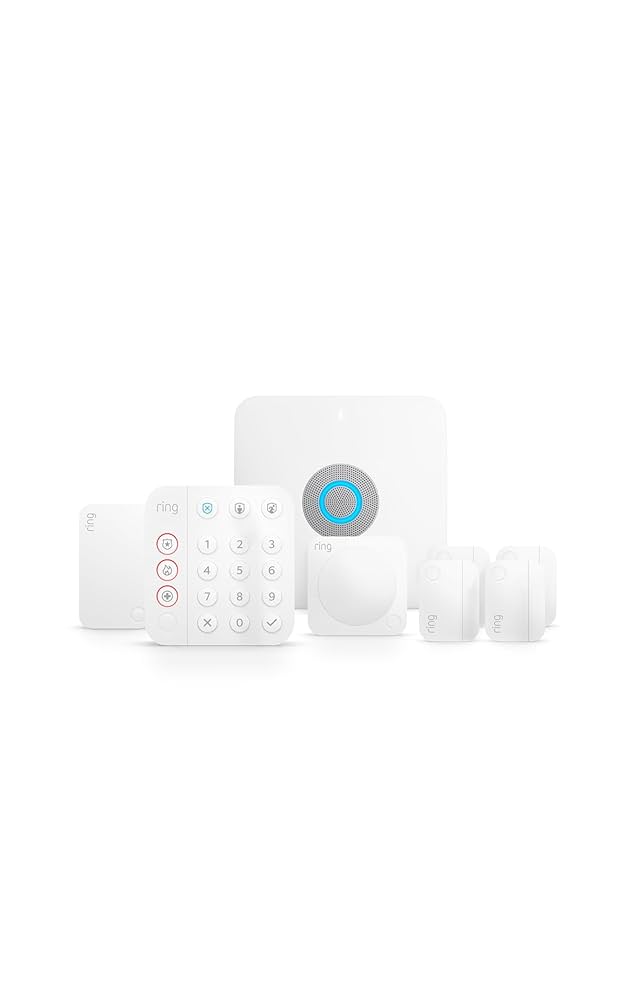
Ring Alarm Pro 8-Piece Kit with Built-in eero Wi-Fi 6 Router
Final Verdict: An exceptional all-in-one security and networking hub that simplifies the smart home, provided you're comfortable with the Ring ecosystem and subscription model.
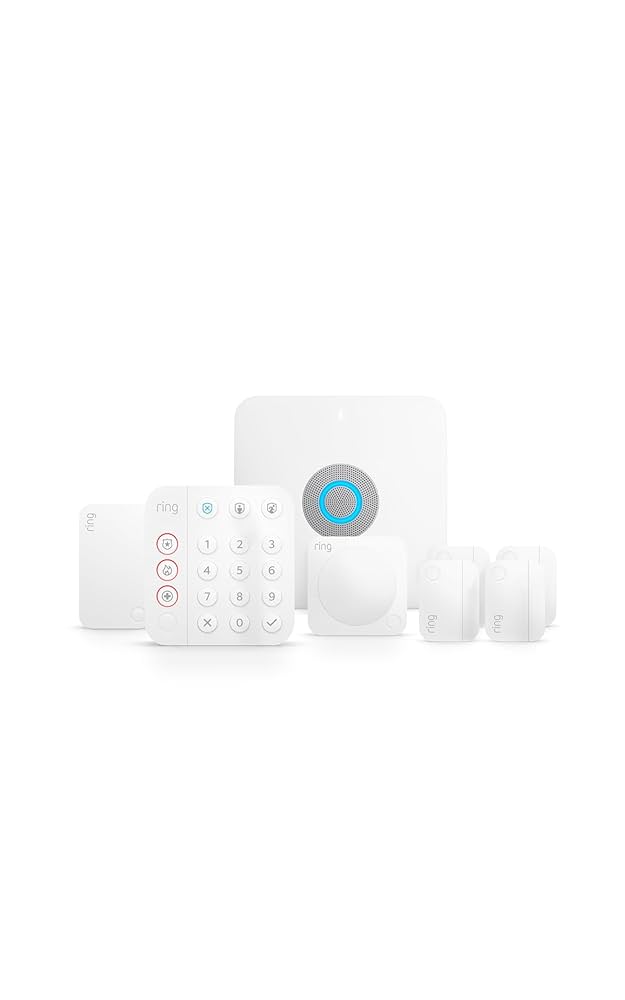
Verdict: An exceptional all-in-one security and networking hub that simplifies the smart home, provided you're comfortable with the Ring ecosystem and subscription model.
Score: 8.7/10 — A smart all-in-one security kit that combines DIY alarm protection with an eero Wi-Fi 6 router, though its best features depend on a subscription.
We may earn a commission from qualifying purchases made through links on this page.
Ring Alarm Pro 8-Piece Kit Overview
The Ring Alarm Pro 8-Piece Kit with Built-in eero Wi-Fi 6 Router is a premium DIY home security solution. It offers an all-in-one approach for homeowners who want to merge their network and security hardware into one streamlined system, combining professional-grade alarm protection with high-speed Wi-Fi 6 networking.
For users wanting to pair this with high-end surveillance, our Arlo Essential review is an excellent companion. For those seeking the best in wireless protection, comparing it against other professional options like the Vivint security system (see our guide on choosing a professional system for more detail) helps clarify whether the integrated router is a priority for your home. If you are comparing this to other top-rated systems, our SimpliSafe review of the SimpliSafe 13-Piece Wireless Home Security System offers a great alternative perspective for those seeking higher-capacity DIY protection. This system simplifies smart home networking for homeowners and renters who want integrated Wi-Fi 6 and professional-grade protection.You can check the current price of the Ring Alarm Pro 8-Piece Kit on Amazon to see if it fits your budget.
By combining your security hub and internet router into one device, it solves the common problem of hardware clutter. If you are weighing this against other DIY options, you might also find our SimpliSafe (SS3-13PKGCAM) review and our Eufy Security Alarm review useful for comparing professional-grade reliability with DIY flexibility (see our Eufy Security Alarm (S330) review). Its main advantage is the integrated eero Wi-Fi 6 router inside the alarm base station, which lets the system act as both your security hub and your home network hub. By merging these two critical infrastructure components, Ring has eliminated the "hub creep" often seen in smart homes where every single service requires its own plastic box and power brick.This makes the Ring Alarm Pro 8-Piece Kit with Built-in eero Wi-Fi 6 Router especially appealing for small to mid-sized homes where simplicity matters.
Instead of managing a separate router, alarm hub, range extender, and monitoring setup, this kit consolidates the essentials into one ecosystem. For those looking to further automate their home environment, our MrCool DIY Mini-Split guide shows how similar DIY installation logic applies to home climate control. The included sensors cover common entry points and motion detection, while the range extender helps keep security devices connected around the home, ensuring that a sensor in a distant garage or basement still reports back to the base station without lag.The biggest caveat is that the most advanced features require an optional Ring Protect Pro subscription. Without it, the Ring Alarm Pro 8-Piece Kit with Built-in eero Wi-Fi 6 Router is still a capable self-monitored alarm and Wi-Fi router, but professional monitoring, LTE backup internet, and expanded security features are where the product becomes more compelling. For those already embedded in the Amazon or Ring ecosystem, this kit represents the logical evolution of their home security strategy.
Key features
The base station doubles as an eero Wi-Fi 6 router, reducing hardware clutter and helping consolidate home networking and security.
The package includes the core components needed to secure key doors, windows, and motion zones in a small to mid-sized home.
With a compatible Ring Protect Pro plan, the system can support professional monitoring for emergency response.
Optional LTE backup internet can help keep compatible devices online during broadband outages when used with the required subscription.
Arming, disarming, alerts, sensor status, and device management are handled through the Ring app.
The system can be expanded with additional Ring Alarm sensors, keypads, cameras, and compatible smart devices.
| Feature | Value |
|---|---|
| Product name | Ring Alarm Pro 8-Piece Kit with Built-in eero Wi-Fi 6 Router (B08HSTJPM5) |
| Model number | B08HSTJPM5 |
| Category | Home Security Systems |
| Kit size | 8 pieces |
| Included components | Base station with built-in eero Wi-Fi 6 router, keypad, contact sensors, motion detector, and range extender |
| Router technology | eero Wi-Fi 6 |
| Monitoring | Self-monitoring included; optional 24/7 professional monitoring with eligible subscription |
| Backup internet | Optional LTE backup internet with compatible Ring Protect Pro plan |
| Local video storage | Available with compatible Ring Protect Pro features and supported Ring devices |
| Best for | Small to mid-sized homes, Ring users, and buyers who want integrated security and Wi-Fi |
| App control | Ring app |
| Expandability | Supports additional Ring Alarm accessories and compatible Ring ecosystem devices |
Pros & cons
Pros
- Combines home security and Wi-Fi 6 routing in one base station
- Strong fit for Ring camera and smart home users
- Good starter kit for small to mid-sized homes
- Optional professional monitoring adds serious security value
- Backup internet support is useful during broadband outages
- Simple app-based setup and everyday control
- Expandable with additional sensors and Ring devices
Cons
- Best features require an ongoing subscription
- Most appealing if you are comfortable using the Ring ecosystem
- Not the cheapest option if you only need a basic alarm
- Included sensors may not be enough for larger homes
- Networking performance depends on home layout and placement
Performance
In day-to-day use, the Ring Alarm Pro 8-Piece Kit feels like a polished DIY security system built around convenience. The keypad gives the system a traditional alarm feel, providing a tactile way to arm and disarm the system without needing to fish a phone out of a pocket. Meanwhile, the Ring app makes it effortless to check sensor status, manage user codes, and receive instant notifications when doors, windows, or motion zones are triggered.
The integrated eero Wi-Fi 6 router is the feature that truly separates this model from standard alarm kits. For those adding high-resolution cameras, checking out our Arlo Essential review (see the Arlo Essential Wire-Free Home Security System for a similar alternative) can help optimize your total security layout. For homes that do not already have a high-end mesh Wi-Fi setup, the built-in router simplifies the network architecture. It is particularly useful for households with multiple Ring cameras, smart locks, and smart displays. Because the router and the alarm hub share the same "brain," there is a perceived increase in reliability; the system is designed to keep the most critical security devices prioritized on the network.
Security coverage from the included components is best suited to a focused setup: front door, back door, a few key windows, and one primary motion-sensitive area. For a small apartment or a modest home, this is sufficient. However, larger homes or properties with many ground-floor entry points will likely need additional contact sensors. The included range extender is a vital piece of the puzzle, helping improve communication between the sensors and the base station, which is critical if the router is tucked away in a closet or a home office.
The subscription-dependent features are a major part of the performance story. With a compatible Ring Protect Pro plan, the system becomes significantly more resilient. Professional monitoring means an actual human is watching your home's status 24/7, which can potentially lower home insurance premiums. More importantly, the LTE backup internet solves a common vulnerability in DIY security: if a burglar cuts your cable line or your ISP has an outage, the system stays online. This level of redundancy is usually reserved for expensive, professionally installed systems, similar to what you'll find in our Vivint (VPK-2GIG-GO2) review, making the "Pro" aspect of this kit very real.
Deep Dive: How It Works
The Ring Alarm Pro 8-Piece Kit with Built-in eero Wi-Fi 6 Router operates on a dual-layered communication strategy. First, the sensors communicate with the base station using Z-Wave technology. Z-Wave is a low-power wireless mesh protocol specifically designed for home automation. This means sensors don't rely on your Wi-Fi to tell the base station a door has opened, which prevents the security system from crashing if your internet goes down.
Second, the base station handles the "external" communication via the built-in eero Wi-Fi 6 router. This provides the high-speed connectivity needed for Ring cameras and your other smart devices. When a sensor is triggered, the Z-Wave signal hits the base station, which then uses the Wi-Fi 6 connection (or LTE backup) to send an immediate alert to your smartphone. This hybrid approach—local Z-Wave for sensors and high-speed Wi-Fi for alerts and video—is why the system feels so snappy and responsive.
If you're looking to streamline your home network and security, the Ring Alarm Pro 8-Piece Kit with Built-in eero Wi-Fi 6 Router is an ideal all-in-one solution.
The "Pro" designation specifically refers to the integration of the eero networking hardware. While standard Ring Alarm systems act as a bridge, the Pro version acts as the gateway. This allows for "internet backup," where the base station can switch to a cellular data connection the moment it detects that the primary broadband signal has been lost. This ensures that the bridge to the professional monitoring center is never broken.
Beyond simple connectivity, the eero integration allows for advanced network management. Through the eero app (which works in tandem with the Ring app), users can create guest networks, prioritize specific devices, and monitor the health of their Wi-Fi signal. Because the hardware is designed for the "Pro" security experience, the router is optimized to maintain a steady heartbeat with the Ring monitoring centers. If you're also upgrading your home's electrical safety, our guide on how to replace a circuit breaker safely is a great resource, reducing the likelihood of "offline" errors that plague some third-party DIY systems.
Detailed Setup and Installation
Installing the Ring Alarm Pro 8-Piece Kit with Built-in eero Wi-Fi 6 Router is designed to be a tool-free experience for the most part. The process begins with the Ring app, which guides the user through a step-by-step wizard. The first step is setting up the eero router. Since the base station is the router, you'll connect your modem to the base station via an Ethernet cable and follow the prompts to create your Wi-Fi network name and password.
Once the network is live, the app prompts you to add each sensor. The contact sensors use an adhesive backing, allowing them to be slapped onto door and window frames in seconds. The motion detector can be mounted with screws or adhesive, and it is recommended to place it in a high-traffic area like a living room or hallway, away from direct heat sources or air vents to avoid false triggers.
The keypad can be placed anywhere within range of the base station (or a range extender). It is an essential part of the setup for those who don't want to use their phones for every "arm/disarm" action. Finally, the range extender should be placed halfway between the base station and any sensors that may be on the edge of the communication zone. The app provides a signal strength indicator for each device, allowing you to fine-tune the placement of the extender for maximum reliability.
For those opting for the Ring Protect Pro subscription, the LTE backup activation is a digital process. Once the subscription is active, the base station automatically configures its internal cellular modem to connect to the nearest supported tower. There is no need to insert a SIM card or manually configure APN settings, making the transition to cellular backup seamless and automated.
Maintenance and Long-Term Care
Maintaining the Ring Alarm Pro 8-Piece Kit with Built-in eero Wi-Fi 6 Router is relatively low-effort, but there are a few critical checkpoints to ensure the system remains reliable over the years.
Battery Replacement: While the sensors are designed to last for years, they do eventually need new batteries. Similarly, for other critical home backups, we recommend checking our Wayne ESP25 review to ensure your basement stays dry during power outages, perhaps by using a