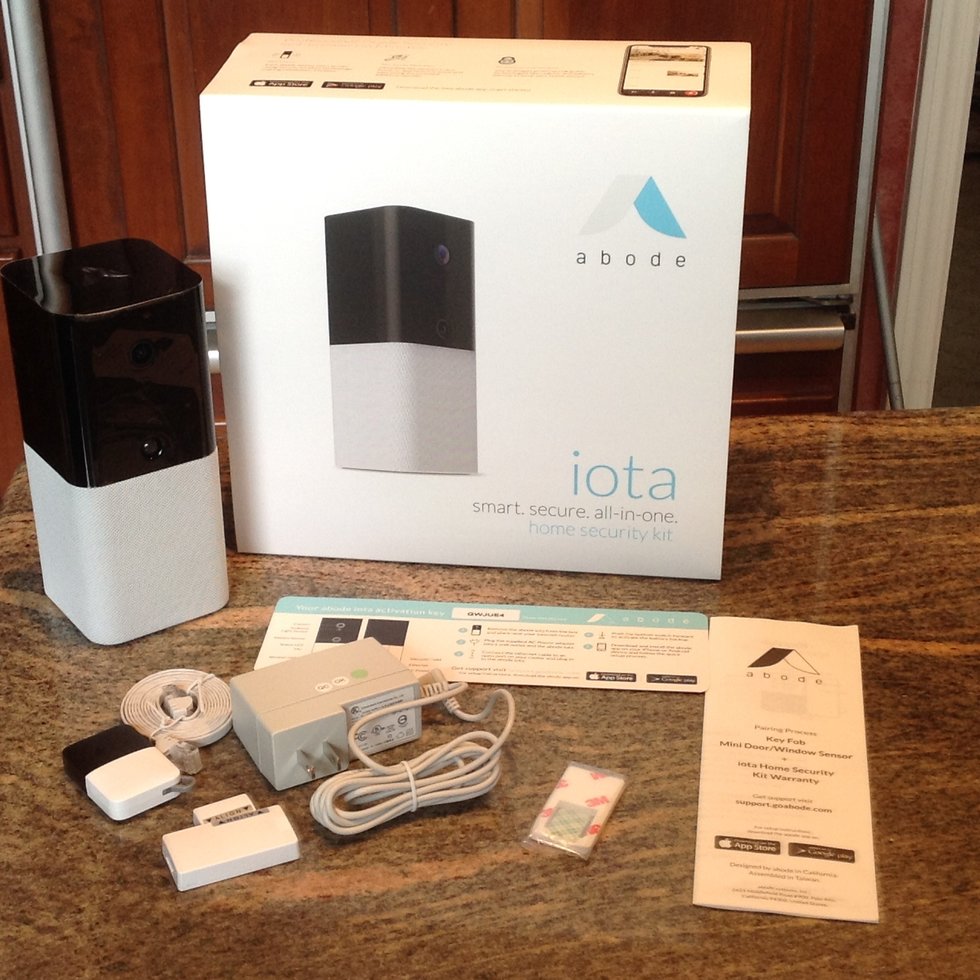
For homeowners and renters seeking a flexible, professional-grade DIY smart home security hub, the Abode Iota All-In-One Smart Security Kit is a top choice for those seeking a comprehensive, no-contract DIY home security solution. By merging a security gateway, 1080p HD camera, and PIR motion sensor into one device, it streamlines home protection. Perfect for renters and smart-home enthusiasts, the Iota offers rare Z-Wave and Zigbee compatibility alongside flexible, no-contract professional monitoring options.
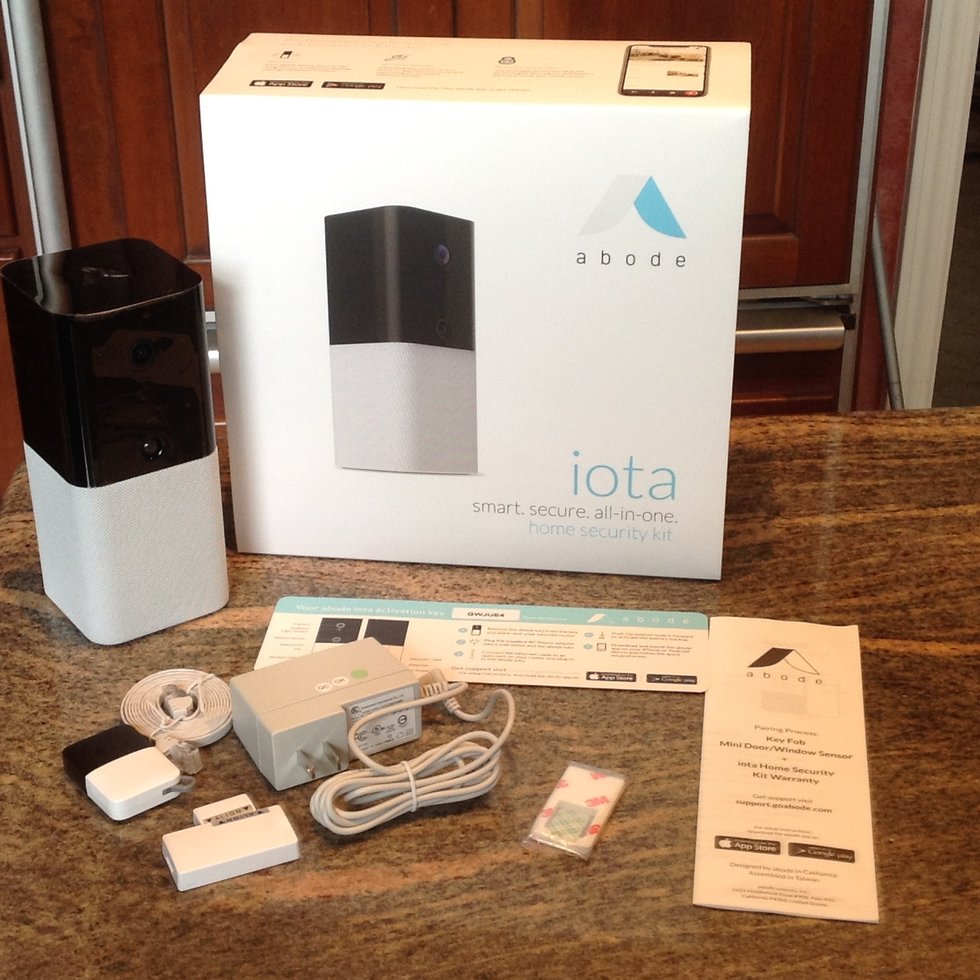
Top Pick: Abode Iota All-In-One Smart Security Kit
Score: 9.2/10 — The most versatile "starter" hub for users who want professional-grade security and wide-ranging smart home interoperability without a complex installation process.
Abode Iota All-In-One Smart Security Kit
The Abode Iota All-In-One Smart Security Kit (model IOTA-1) represents a significant shift in how home security is deployed.
Traditionally, a security system requires a base station, a separate camera for the entryway, and various motion sensors scattered throughout the room. The Iota consolidates these three critical components into one compact hub. This design philosophy makes it an ideal solution for those living in apartments or condos where space is at a premium and drilling holes into walls is either forbidden or undesirable.Beyond its physical form factor, the IOTA-1 serves as a powerful brain for the modern connected home. Unlike many proprietary security systems that lock you into a specific brand's ecosystem, the Iota includes radios for both Z-Wave and Zigbee. This means it can communicate with thousands of third-party devices, from smart locks and light switches to water leak sensors and thermostats. Whether you are building a system from scratch or integrating it into an existing smart home, the Iota acts as a universal bridge that simplifies management.
For those concerned about the commitment of professional monitoring, the Iota offers a refreshingly flexible model. You can opt for complete self-monitoring at no cost, receiving push notifications and live video alerts directly to your smartphone. If your needs change—such as during a long vacation—you can activate a professional monitoring plan on a month-to-month basis. This avoids the dreaded long-term contracts typical of legacy security firms, giving the user total control over their monthly expenditure.
Pros
- True all-in-one form factor reducing clutter and installation time
- Dual Z-Wave and Zigbee support for massive third-party compatibility
- Seamless integration with Apple HomeKit, Amazon Alexa, and Google Assistant
- No-contract professional monitoring options provide maximum flexibility
- Substantial 48-hour battery backup for power resilience
- Highly scalable system supporting up to 160 total devices
Cons
- Integrated camera provides only one angle of view; requires add-ons for full coverage
- Cloud storage for video clips requires a paid subscription
- Limited to 2.4GHz Wi-Fi bands, which may face interference in dense areas
- Local microSD storage is not built-in and requires specific accessories
Disclosure: As an affiliate, we may earn a commission from qualifying purchases made through links in this guide, at no additional cost to you.
Deep Dive: How the IOTA-1 Technology Works
To understand the value of the Abode Iota, one must understand the "Radio Protocol Gap" it fills. Most smart devices use one of three primary languages: Wi-Fi, Zigbee, or Z-Wave. Wi-Fi is fast but power-hungry; Zigbee is efficient and great for mesh networking; Z-Wave operates on a different frequency to avoid interference and is widely used in professional security sensors. The IOTA-1 hub contains all three, allowing it to act as a translator.
When a Z-Wave door sensor is tripped, the Iota hub receives that signal, processes it, and can simultaneously trigger a Zigbee light bulb to turn on and send a Wi-Fi notification to your phone. This level of interoperability is what elevates the Iota from a simple camera to a comprehensive home automation controller. It effectively removes the "walled garden" problem associated with many big-brand security systems.
The onboard camera utilizes a combination of PIR (Passive Infrared) and pixel-based motion detection. PIR sensors detect heat signatures, which prevents the camera from triggering every time a curtain moves in the wind, while the pixel-based analysis ensures that the recording captures the actual event of interest. This dual-layer approach significantly reduces "false positive" notifications, a common frustration with cheaper smart cameras.
Furthermore, the system's encryption standards ensure that the communication between the hub and the sensors remains private. By using Z-Wave's S2 security framework, the Iota prevents "replay attacks" where a hacker might try to intercept and mimic a "disarm" signal. This marriage of convenience and high-level security is a hallmark of the IOTA-1's engineering.
Step-by-Step Installation and Setup Guide
Setting up the Abode Iota is designed to be a "plug-and-play" experience, but following a specific order ensures the most stable connection and optimal coverage.
1. Physical Placement
Place the Iota hub in a central location with a clear line of sight to the area you wish to monitor. Because the camera is integrated, the placement of the hub is the placement of your primary security camera. Avoid placing it directly facing a window, as sunlight can cause "white out" in the video feed and trigger false motion alerts. Ensure it is within reach of a standard AC outlet and on a stable, flat surface to prevent vibration-induced motion alerts.
2. Network Configuration
Download the Abode app and create an account. When connecting the Iota to your network, ensure your smartphone is connected to a 2.4GHz Wi-Fi band. The IOTA-1 does not support 5GHz bands. If your router uses "Smart Connect" (merging both bands into one SSID), you may occasionally need to temporarily disable 5GHz in your router settings to complete the initial handshake. Once the hub is connected to the internet, it will automatically check for the latest firmware updates to ensure system stability.
3. Pairing Peripheral Sensors
Once the hub is online, you can pair additional sensors (like extra motion detectors or door sensors). In the app, select "Add Device." For Z-Wave devices, you will typically enter a "pairing mode" on the sensor itself. The Iota hub will scan the airwaves, identify the device, and assign it a name. We recommend naming devices by their specific location (e.g., "Front Door Sensor") rather than generic terms to make automation easier.
4. Establishing Automations
The real power of the IOTA-1 is in its "If This, Then That" logic. For example: "IF the Front Door Sensor opens AND the time is between 11 PM and 6 AM, THEN turn on the Living Room Zigbee lights and send a High Priority alert." These routines can be configured within the Abode app without requiring any coding knowledge, allowing you to create a home that reacts to your presence and needs.
Maintenance and Long-Term Care
While the Iota is largely a "set and forget" device, a few maintenance steps will ensure the system remains reliable over several years and avoids critical failures during an actual emergency.
How often should I clean the lens?
The integrated camera lens can accumulate dust or fingerprints, which creates a blur in the night vision (IR) feed. Use a dry microfiber cloth to gently wipe the lens every few months. Avoid using harsh chemicals or alcohol, which can strip the lens coating.
How do I handle battery maintenance?
Although the hub has a 48-hour backup, peripheral sensors run on coin-cell or AA batteries. Check the Abode app periodically for "Low Battery" warnings. We recommend replacing all sensor batteries annually, regardless of the app status, to prevent sudden dead zones.
What about firmware updates?
Abode pushes firmware updates automatically. Ensure your hub has a stable internet connection to receive these updates, as they often include critical security patches and new device compatibility. If the hub seems sluggish, a manual power-cycle (unplugging and plugging back in) can often clear the cache and finish a pending update.
How do I fix signal "dead zones"?
If you notice a sensor is "dropping off" the network, it may be due to Z-Wave signal interference from thick walls or large metal objects. Adding a Z-Wave range extender or relocating the hub by a few feet can often resolve these issues.
Comprehensive Buyer's Guide: Is This Right For You?
Choosing a security system is a balance between the level of protection you need and the amount of friction you are willing to tolerate during installation. If you are looking for a more traditional professional setup, you might consider a professional setup like the Vivint VPK-2GIG-GO2 or explore the Ring Alarm Pro 8-Piece Kit for a different DIY approach to home security. Not every home requires a full-scale wired installation, and not every user wants a monthly bill. If you are considering other DIY options, such as the Eufy Security Alarm (S330) review or exploring the SimpliSafe SS3-13PKGCAM for professional-grade DIY, you might find comparing it with the ADT Self Setup 9-Piece Home Security Kit, the Cove Home Security System Deluxe Package, or the Ring Alarm Pro 14-Piece Wireless Home Security System helpful for comparison.
The "Renter's Dilemma"
Renters often face a conflict: they want security, but they cannot install wired cameras or drill holes for sensors. The IOTA-1 solves this by being a single-point-of-failure (and success). By placing one device on a shelf, you get the brain of the system and the primary visual deterrent. When it's time to move, you simply unplug the hub and peel off any adhesive-backed sensors, leaving the property undamaged. This "non-destructive" approach is the primary reason the Iota leads its class in the rental market. For those transitioning to a permanent home, a more robust, network-integrated system like the Ring Alarm Pro 14-Piece Wireless Home Security System may be a better long-term fit.
Scaling from Basic to Advanced
A common mistake buyers make is purchasing a massive 20-piece kit when they only have a one-bedroom apartment. The Abode ecosystem is designed for modular growth. You can start with the Iota kit, and as you move to a larger home, you can add specialized components.
- Keypads: For those who prefer a physical interface over a smartphone app, such as those compatible with the Abode Iota All-in-One Home Security Kit, especially for children or elderly family members.
Related parts & accessories
- Door/Window Sensors: Using the Abode Iota All-in-One Home Security Kit sensors to secure every single entry point and create a "perimeter" alarm.
Related parts & accessories
- Outdoor Cameras: Adding an Arlo Pro 4 Spotlight Camera Security Bundle to extend the "visual perimeter" beyond the hub's internal camera, allowing you to see who is at the door before they enter.
- Smart Locks: Using the Abode Iota All-in-One Home Security Kit lock accessories to create a fully automated entry system.
Related parts & accessories
Evaluating Monitoring Costs
When calculating the Total Cost of Ownership (TCO), consider that "free" self-monitoring puts the burden of vigilance on you. If you are asleep and a sensor trips, you will get a notification, but the police will not be called unless you manually dial 911. Professional monitoring removes this burden, but it adds a monthly fee. The Iota's advantage is the lack of a contract; you can pay for professional monitoring in July and August when you travel, then switch back to free self-monitoring in the winter. This elasticity is rare in the security industry.
Potential Pitfalls and Troubleshooting
No system is perfect. Here are the most common "gotchas" users encounter with the Abode Iota and how to avoid them.
Modern routers often use a feature called "Band Steering" that forces devices onto 5GHz. While optimizing your network is key, ensuring your home's electrical foundation is stable is equally important—see our guide on how to replace a circuit breaker safely to avoid power surges that can damage smart hubs. If the Iota fails to connect during setup, go into your router settings and create a separate 2.4GHz SSID specifically for your smart home devices. This is the #1 cause of setup failure for new users.
The "Single Point of View" Trap
Because the Iota has a built-in camera, some users assume they no longer need other cameras. Remember that a camera cannot see through walls. While the Iota can tell you that someone entered the house (via sensors), it can only show you who it is if they walk directly in front of the hub. For complete coverage, always pair the Iota with an Arlo Pro 4 Spotlight Camera Security Bundle for complete outdoor coverage (see our detailed Arlo Pro 4 bundle guide for more details) or an indoor camera in a high-traffic area (see our Arlo Essential review for a more basic alternative).
Cloud vs. Local Storage
If you are sensitive about your video footage being stored on a server, be aware that the Iota is primarily a cloud-first device. While some local options exist via accessories, the most seamless experience requires the Abode cloud subscription. If you require 100% local, NVR-based recording with no internet dependency for storage, this system may not be the right fit for your specific privacy requirements.
Interference in Dense Urban Areas
In high-rise apartments, the 2.4GHz spectrum is often crowded. If you experience "lag" in your live feed or missed notifications, consider switching your Wi-Fi channel to 1, 6, or 11 (non-overlapping channels). This can significantly improve the stability of the hub's connection to the cloud.
Technical Specifications
| Feature | Specification |
|---|