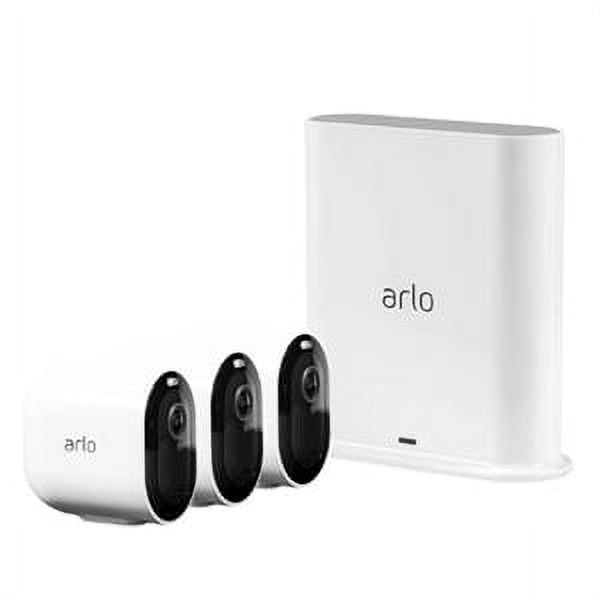
Choosing the right home security system starts with identifying your specific needs—whether it's monitoring entry points, remote check-ins, or receiving smart alerts without complex wiring. The Arlo Essential Wire-Free Home Security System (3-Camera Kit) stands out as a premier DIY solution for homeowners seeking flexible, battery-powered outdoor surveillance and intuitive app-based monitoring without the hassle of professional wiring.
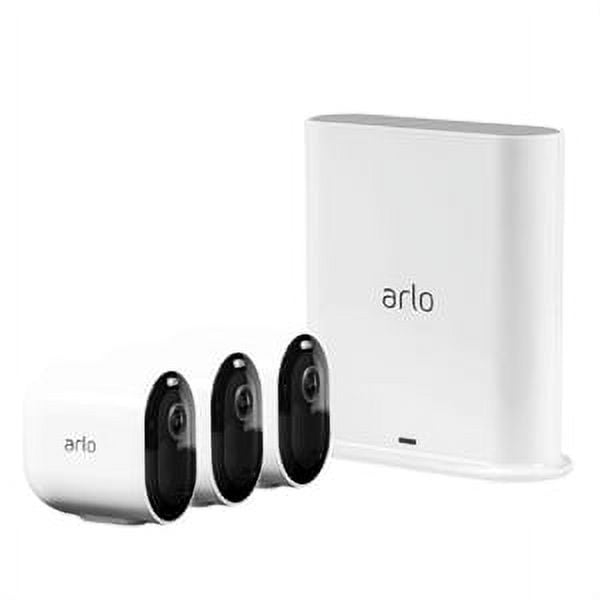
Looking for a single camera? Check out the Arlo Essential.
Related parts & accessories
Best Overall: Arlo Essential Wire-Free Home Security System (3-Camera Kit)
Score: 8.7/10. A strong DIY choice for flexible outdoor home security, offering three wire-free 1080p cameras with color night vision, motion alerts, two-way audio, and weather-resistant design.
Arlo Essential Wire-Free Home Security System (3-Camera Kit)
The Arlo Essential Wire-Free Home Security System is designed for homeowners who want to cover multiple outdoor areas without running cables or scheduling a professional installation (see our Vivint (VPK-2GIG-GO2) review). With three battery-powered cameras included, the kit is well suited for common security zones such as the front door, driveway, backyard, side gate, or detached garage. By removing the need for professional wiring, Arlo has lowered the barrier to entry for comprehensive home monitoring.
Related parts & accessories
Each camera records in 1080p HD, which is a practical resolution for everyday home monitoring. It is sharp enough for checking packages, visitors, pets, and general activity around your property, while avoiding the larger storage and bandwidth demands of higher-resolution systems. The built-in spotlight and color night vision help preserve more detail after dark compared with basic black-and-white night footage, allowing you to distinguish the color of a vehicle or the clothing of a visitor during nighttime events.
The wire-free setup is one of the biggest reasons to consider this system. Because the cameras are battery-powered and connect over Wi-Fi, placement is more flexible than with hardwired security cameras. That makes the kit especially appealing for renters, homeowners who do not want to drill extensive cable runs, or anyone starting with a security system they may expand later. You can mount them on siding, eaves, or freestanding posts with minimal effort.
The Arlo app brings the system together with remote live viewing, real-time motion alerts, and two-way audio. That combination makes it useful not only for security, but also for everyday convenience: greeting a visitor, checking whether a delivery arrived, or responding to movement around the home while you are away. The integration of a dedicated app allows for customized motion zones, reducing the number of "false" alerts triggered by swaying trees or passing traffic.
Pros
- Three-camera kit covers more areas than a single-camera starter system.
- Wire-free battery-powered design keeps installation simple.
- 1080p HD video is suitable for everyday home monitoring.
- Color night vision and built-in spotlight improve nighttime visibility.
- Two-way audio and app alerts make it easy to respond remotely.
- Weatherproof construction supports outdoor placement.
Cons
- Battery-powered cameras require periodic recharging or battery management.
- Wi-Fi performance depends on signal strength at each mounting location.
- 1080p is practical, but not as detailed as 2K camera systems (see the Arlo Pro 4 Spotlight Camera Security Bundle or check our detailed Arlo Essential review and our Arlo Pro 4 Spotlight Camera 4-Pack Bundle for a detailed look at 2K resolution).
- Advanced cloud features may depend on a subscription service plan.
| Specification | Arlo Essential Wire-Free Home Security System |
|---|---|
| Model number | VMK4352W |
| Camera count | 3 outdoor cameras |
| Video resolution | 1080p HD |
| Power | Battery-powered, wire-free design |
| Connectivity | Wi-Fi with Arlo app control |
| Night viewing | Color night vision with built-in spotlight |
| Audio | Two-way audio |
| Outdoor use | Weatherproof housing for rain, heat, and cold |
| Best for | DIY outdoor home security across multiple areas |
Disclosure: We may earn a commission from qualifying purchases made through our links.
Deep Dive: How the Arlo Essential System Works
Understanding the technical operation of the Arlo Essential VMK4352W is key to maximizing its efficiency. Unlike traditional CCTV systems that require a Digital Video Recorder (DVR) and coaxial cables, this system operates on a wireless IP (Internet Protocol) framework. Each camera acts as an individual node that communicates directly with your home Wi-Fi network, utilizing the 2.4GHz band for maximum penetration through exterior walls.
The Trigger and Capture Process
The "essential" part of this system is the motion-activated recording. The cameras utilize Passive Infrared (PIR) sensors to detect heat signatures moving across the field of view. This is fundamentally different from "pixel-based" motion detection, which can be fooled by a tree blowing in the wind or a change in light. PIR sensors look for the thermal energy emitted by humans or animals. When a heat signature is detected, the camera wakes from its low-power standby mode and begins recording a clip to the cloud.
This event-based recording is what preserves battery life; if the cameras recorded 24/7, the batteries would deplete in a matter of days. The system is optimized to launch the recording instantly, though there can be a fractional second of latency between the sensor trigger and the video stream starting—a common characteristic of all battery-powered wireless cameras.
Night Vision and Lighting Technology
Most entry-level security cameras rely solely on Infrared (IR) LEDs to see in the dark. IR LEDs cast an invisible beam of light that reflects off surfaces, resulting in the classic "ghostly" black-and-white images. While effective for seeing shapes, IR vision makes it impossible to identify the color of a vehicle or a person's clothing.
The VMK4352W differs by incorporating a built-in, high-intensity LED spotlight. When motion is detected at night, the spotlight can be triggered to illuminate the area. This serves a dual purpose: it acts as a powerful visual deterrent to intruders, who are often surprised by the sudden light, and it allows the camera to switch from IR mode to full-color recording. This provides critical evidence that is often missing from budget security setups.
Connectivity, Cloud Storage, and Encryption
Since these cameras are designed for the modern smart home, they rely heavily on the Arlo Cloud. When a clip is recorded, it is encrypted locally on the device before being uploaded to Arlo's secure servers. This ensures that the data is protected during transit. The cloud-first approach means that even if a sophisticated thief manages to physically steal or destroy a camera, your footage is already safely stored and accessible via your smartphone.
The two-way audio utilizes a built-in microphone and speaker. While these cameras protect your exterior, don't forget your basement's safety; we recommend ensuring your drainage is secure, perhaps by reviewing a Basement Watchdog BW1033 review, check out our Wayne ESP25 Battery Backup Sump Pump review or the Ridgid SP-650C buying guide for interior peace of mind.
This creates a full-duplex communication channel, meaning you can speak and listen in real-time. This is particularly useful for instructing delivery drivers where to leave a package or warning a trespasser that they are being recorded.
Comprehensive Buyer's Guide: Is This System Right For You?
Investing in a security system is a balance between the level of protection you need and the amount of maintenance you are willing to perform. If you are debating between a detailed camera-only setup guide and a full sensor array (such as the Ring Alarm Pro 14-Piece Kit with Built-in eero Wi-Fi 6 Router), our SimpliSafe (SS3-13PKGCAM) Review provides a detailed comparison of hybrid systems, similar to the approach seen in our Eufy Security Alarm (S330) review. To determine if the Arlo Essential 3-Camera Kit is the right fit, consider the following environmental and technical factors.
Pro Tip: Consider your Wi-Fi signal strength before mounting. Because these cameras are placed outdoors, the signal must pass through exterior walls (which may be made of brick, stucco, or concrete), which can degrade the connection. Consider a Wi-Fi extender if your router is located far from the perimeter of your home.
Evaluating Your Property Layout
A three-camera kit is a strategic starting point for most residential properties. To maximize coverage, you should avoid overlapping views and instead focus on "choke points"—areas where an intruder must pass to enter or exit the property. For a standard suburban home, the most effective deployment usually follows this pattern:
- Camera 1 (The Front Door/Porch): This is the primary interface for guests and delivery services. It allows you to monitor arrivals and greet visitors without opening the door.
- Camera 2 (The Driveway/Garage): This area is critical for protecting high-value assets like vehicles and monitoring the main point of entry for cars and equipment.
- Camera 3 (The Backyard/Side Gate): This provides coverage for the "blind spots" where intruders often attempt to enter undetected, away from the street's view.
The Trade-off: Battery vs. Hardwired
The "Wire-Free" aspect is the primary selling point, but it comes with a trade-off in terms of maintenance. Battery-powered systems are vastly easier to install—you don't need to drill holes for cables or hire an electrician. However, they require a charging schedule. Depending on the frequency of motion alerts and the length of the recorded clips, you may need to bring the cameras down for charging every few months.
Environmental factors also play a role. Lithium-ion batteries are sensitive to temperature. In extremely cold climates, you may notice the battery draining faster than in the summer. For those who want the convenience of wire-free installation but the permanence of power, Arlo often sells optional solar charging accessories that can keep the batteries topped off indefinitely, making the Arlo Essential Wire-Free Home Security System even more low-maintenance.
Resolution Needs: 1080p vs. Higher Specs
Many buyers wonder if 1080p is "enough" when 2K and 4K options exist. For most residential needs, the answer is yes. 1080p (Full HD) provides clear imagery of faces, general activity, and body types. It is the industry standard for a reason: it balances clarity with file size.
Higher resolutions provided by systems like the Arlo Pro 4 Spotlight Camera Security Bundle
Related parts & accessories
Installation and Setup Walkthrough
The VMK4352W is designed for the "non-technical" user. To ensure the best performance and the least amount of frustration, follow this structured setup process.
Step 1: App Integration and Pairing
Before drilling any holes or climbing ladders, start inside your home. Download the Arlo app and create your account. It is highly recommended to sync the cameras to your Wi-Fi while you are sitting in the same room as your router. This ensures the pairing process is successful and the firmware is updated before the cameras are mounted in potentially "dead" Wi-Fi zones.
Step 2: Determining Mounting Height
Proper placement is the difference between a useful video and a useless one. For optimal motion detection and image quality, mount your cameras between 7 and 10 feet above the ground.
- Too High: If mounted 15+ feet up, you will mostly see the tops of heads, and the PIR sensors may not trigger as effectively for humans.
- Too Low: If mounted below 6 feet, the cameras are easier for intruders to tamper with, obstruct, or simply reach and remove.
Step 3: Physical Mounting and Angling
The kit includes mounting hardware. Depending on your surface (wood, vinyl, or brick), you may need a power drill and appropriate wall anchors.
Related parts & accessories