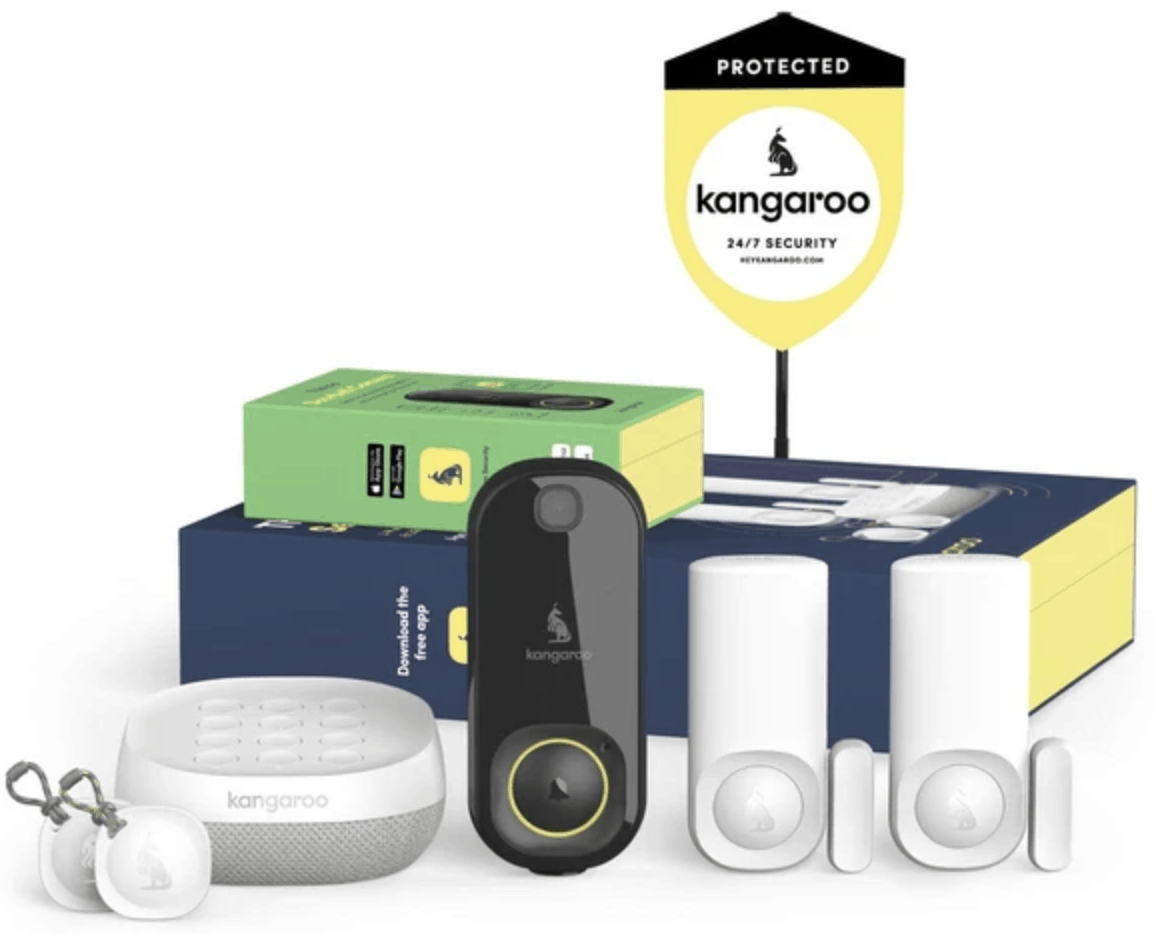
For those seeking a low-cost, non-permanent security setup, finding a balance between price and protection is key. The Kangaroo Home Security + Privacy Package offers a streamlined, budget-friendly approach, combining motion and entry sensors with camera visibility and the flexibility of optional professional monitoring. This guide explores why this specific bundle is an ideal entry point for renters and budget-conscious homeowners. For those comparing high-end DIY options, our Vivint (VPK-2GIG-GO2) review provides a useful benchmark for professional-grade hardware.
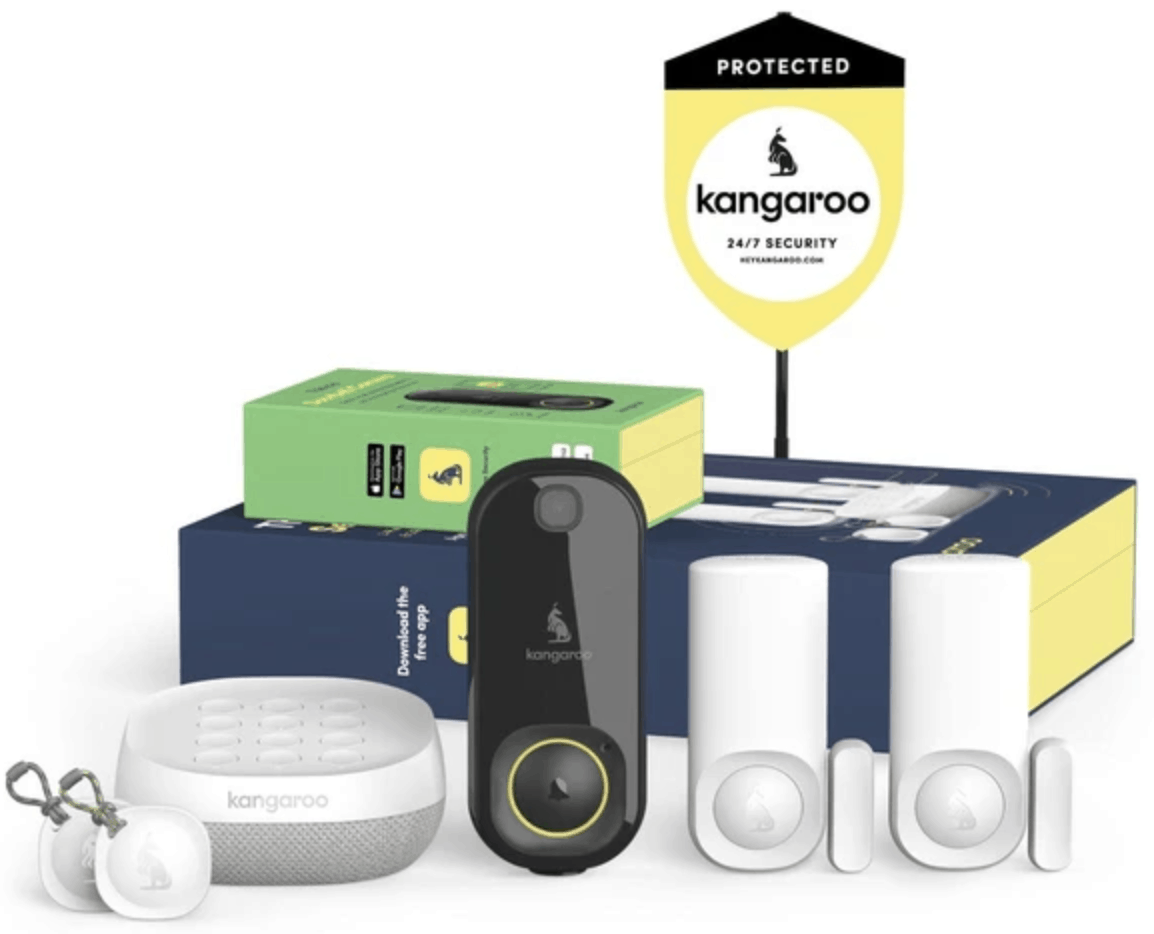
Best Overall Budget Security: Kangaroo Home Security + Privacy Package
Score: 8.6/10. A budget-friendly home security package with motion, entry, and camera-based coverage plus optional professional monitoring, best for buyers who want essential protection without a high upfront commitment.
Kangaroo Home Security + Privacy Package Review
The Kangaroo Home Security + Privacy Package is designed around the essentials: detecting activity, monitoring entry points, and giving you camera-based awareness when something happens.
Instead of positioning itself as a premium, whole-estate security platform, it focuses on the core features most people actually need for apartments, condos, townhomes, and modest single-family homes. For many, the barrier to home security is either the high cost of hardware or the restrictive long-term contracts of legacy security firms; Kangaroo eliminates both by offering a modular, affordable hardware set with a flexible service model.Its biggest advantage is accessibility. The package is a sensible choice for buyers who want home security but do not want a complex installation, a large equipment bill, or an immediate long-term monitoring commitment. The inclusion of motion, entry, and camera sensors gives it broader coverage than a single-device setup, while still keeping the system approachable for first-time users. Because the sensors are designed for easy placement, users can secure their most vulnerable points—like the front door or a ground-floor window—in minutes rather than hours. For those protecting a basement, we also recommend ensuring your water management is secure by reading the Wayne ESP25 Battery Backup Sump Pump review or the corresponding Wayne ESP25 review to prevent water damage during storms. For those seeking higher-end DIY alternatives, our Eufy Security Alarm (S330) review explores systems with more advanced automation.
The privacy angle is also a central pillar of this specific bundle. A camera-enabled security product can be useful, but many shoppers are understandably cautious about putting cameras inside the home. This package is best understood as a security-first system for people who want visibility when needed while remaining mindful of privacy expectations in everyday use. By combining "blind" sensors (like entry and motion) with a camera, users can create a tiered security perimeter where cameras are only placed in high-traffic or critical areas, while sensors handle the rest of the home's interior.
Buyers should view the optional professional monitoring as a flexibility feature rather than a requirement. If you are comfortable responding to alerts yourself and have a reliable smartphone connection, self-monitoring may be enough for your needs. However, if you are frequently traveling, sleep heavily, or live in an area where rapid response is critical, the ability to add professional monitoring transforms the system from a simple alert tool into a comprehensive safety net. This "opt-in" nature ensures that you only pay for the level of service that matches your current lifestyle.
Pros
- Extremely affordable entry point for comprehensive home security
- Multi-layered protection including motion, entry, and camera sensors
- High flexibility with optional professional monitoring services
- Non-permanent installation makes it an ideal choice for renters
- Comprehensive enough to outperform standalone smart cameras
Cons
- Lacks the advanced complexity of high-end professional installations
- Camera placement requires careful planning to balance security and privacy
- Not designed for very large properties or multi-building estates
- Ongoing costs apply if professional monitoring is activated
| Spec | Details |
|---|---|
| Catalog Product | Kangaroo Home Security + Privacy Package |
| Model / SKU | B07XVS9WPZ |
| Category | Home Security Systems |
| Core Coverage | Motion, entry, and camera sensors |
| Monitoring Style | Self-monitoring with optional professional monitoring |
| Best For | Budget-conscious buyers, renters, apartments, and small homes |
How the Kangaroo System Works: A Technical Deep Dive
To understand the value of the Kangaroo Home Security + Privacy Package (similar to the Arlo Pro 4 Spotlight Camera Security Bundle covered in our Arlo Essential review), it is helpful to understand the interaction between its three primary components: the entry sensors, the motion sensors, and the camera. Unlike traditional wired systems that require drilling through walls and running cables to a central panel, the Kangaroo system utilizes a wireless mesh approach that communicates directly with your home Wi-Fi network and the Kangaroo app.
Entry Sensors: These consist of two parts—a sensor and a magnet. When the door or window opens, the magnetic bond is broken, triggering an immediate alert. These are the "first line of defense." Because they are low-power and battery-operated, they can be placed on any opening without needing a power outlet. They are particularly effective for those who want to know the moment a perimeter is breached without needing a camera pointed at every single window. In a typical setup, these are placed on the front door, back door, and any ground-floor windows that are not visible from the street.
Motion Sensors: While entry sensors tell you where someone entered, motion sensors tell you where they are. These sensors use passive infrared (PIR) technology to detect heat signatures moving across a room. By placing these in central hallways or living areas, you can track movement patterns within the home. In a budget-friendly setup, motion sensors act as a fail-safe for any entry points that might have been missed—such as a glass pane being broken rather than a door being opened. They are strategically designed to ignore small pets while remaining sensitive to human-sized movements.
The Camera Integration: The camera serves as the "verification" layer. In many budget systems, you get an alert that "something happened," but you don't know if it was a burglar or just a pet. The Kangaroo camera allows you to visually verify the event. When an entry sensor is tripped, the user can quickly switch to the camera feed to see the real-time situation. This reduces false-alarm anxiety and provides critical evidence if an actual intrusion occurs. The camera communicates via Wi-Fi, allowing for instant streaming and cloud storage for event clips.
The App Ecosystem:
The heart of the system is the mobile application. For more on choosing the right setup for your home, see our Eufy Security Alarm (S330) review for a professional-grade comparison, such as the ADT Self Setup 9-Piece Home Security Kit.
Looking for a professional-grade DIY start? Check out the ADT Self Setup 9-Piece Kit.
This is where the "Privacy" part of the package name becomes relevant. The app allows users to manage notifications, view live streams, and toggle monitoring settings. The integration of all three sensor types into one interface means you aren't jumping between different apps to secure your home. The logic is simple: Sensor trips → Phone alerts → User checks camera → User decides to call authorities or activate professional monitoring.
Comprehensive Buyer's Guide: Choosing Your Security Level
Selecting a security system is not a one-size-fits-all decision. If you are just starting your search, we recommend reading our SimpliSafe (SS3-13PKGCAM) review to understand the benchmarks of professional-grade DIY hardware. If you are comparing different DIY options, such as the Abode Iota All-in-One Home Security Kit
Related parts & accessories
For another ultra-budget alternative, consider the Wyze Home Monitoring Starter Kit.
Evaluating Your Living Situation
If you live in a rental apartment, your priorities are likely portability and non-destructive installation. Heavy-duty systems that require bolting into the wall or wiring into the electrical panel are not viable. The Kangaroo Home Security + Privacy Package is ideal here because it relies on adhesives and wireless connectivity. When you move, you simply peel off the sensors and take them with you, leaving no permanent damage to the property. This makes it a "portable security" solution that grows with your living situation. If you are looking for a system with more robust professional monitoring options from the start, you might also consider the Cove Home Security System Deluxe Package, the SimpliSafe 12-Piece Wireless Home Security System, or the Ring Alarm Pro 14-Piece Kit for added network reliability.
For small homeowners, the focus often shifts to "gap coverage." You might already have a deadbolt or a fence, but you want a digital layer of protection. This package fills that gap by providing a low-cost way to monitor a few key entry points—similar to the ADT Self Setup 7-Piece Home Security System—without the intimidation of a $1,000+ professional installation fee. It provides a deterrent and a notification system that complements physical security measures.
Deciding Between Self-Monitoring and Professional Monitoring
This is the most critical decision for any Kangaroo buyer. Self-monitoring means the system sends a push notification to your phone. You are the dispatcher. This is free and efficient if you are always near your phone and have a reliable data connection. It is perfect for those who primarily want "awareness"—knowing when a child comes home from school or if a window was left open during a storm.
Professional monitoring is a paid service where a third-party center monitors your alerts. For those looking for a more comprehensive 13-piece alternative with integrated cameras, the SimpliSafe 13-Piece Wireless Home Security System (see our detailed SimpliSafe review) is a strong competitor. If an alarm goes off and you don't respond, they can dispatch emergency services. This is essential for:
- People who travel frequently and may be in different time zones, where a 3 AM alert might be slept through.
- Individuals who work in "dead zones" (like hospitals or secure facilities) where phone reception is spotty or phone use is restricted.
- Those who want the peace of mind that someone is watching their home 24/7, ensuring that a missed notification doesn't lead to a delayed emergency response.
Privacy Considerations and Camera Placement
The "Privacy" aspect of this package is not just a marketing term; it is a strategy. To get the most out of this system without feeling like you are living in a surveillance state, follow these placement guidelines:
The "Choke Point" Strategy: Place your camera in a hallway or entry foyer. This ensures that anyone entering the home is captured on video, but the camera does not peer into bedrooms or bathrooms. This creates a "gatekeeper" effect where the camera only watches the transition from outside to inside.
Sensor-First Zones: In bedrooms, private offices, or nurseries, rely solely on the entry and motion sensors. You will get the alert that someone entered the room, but you maintain your visual privacy. This allows you to secure the entire perimeter of your home without having cameras in every room.
Angle Management: Use the app to ensure the camera is angled toward the door or a specific high-value area, not toward the center of the living room where family activities occur. This minimizes the amount of "lifestyle data" recorded while maximizing the "security data" captured.
Step-by-Step Setup and Installation Guide
One of the primary reasons the Kangaroo Home Security + Privacy Package earns a high score for budget buyers is the lack of "installation friction." You do not need a toolkit, a technician, or a degree in electrical engineering. Here is the recommended workflow for a successful setup.
Phase 1: The Digital Foundation
Before peeling any adhesives, start with the app. Download the Kangaroo app and create your account. Ensure your home Wi-Fi is stable and that you have your password handy. The system relies on a consistent 2.4GHz connection (the standard for most smart home devices). It is recommended to set up the main hub or camera first, as this often establishes the network that the other sensors will lean on. Verify that your smartphone's notification settings are set to "Critical" or "Priority" so that security alerts can break through "Do Not Disturb" modes.
Phase 2: Strategic Sensor Placement
Walk through your home and identify "high-risk" zones. Do not just place sensors randomly; think like an intruder to find the most likely points of entry.
- Front and Back Doors: These are the most common entry points. Apply the entry sensors here. Ensure the magnet and sensor are aligned within the distance specified in the manual to avoid "false open" alerts. Clean the surface with rubbing alcohol before applying the adhesive for a permanent bond.
- Ground Floor Windows: If you have a window that is hidden from street view or is easily accessible via a porch, it is a prime target. Place an entry sensor here.
- The Main Arteries: Place the motion sensor in the main hallway or the living room. The goal is to create a "tripwire" that an intruder must cross to get deeper into the home. Avoi