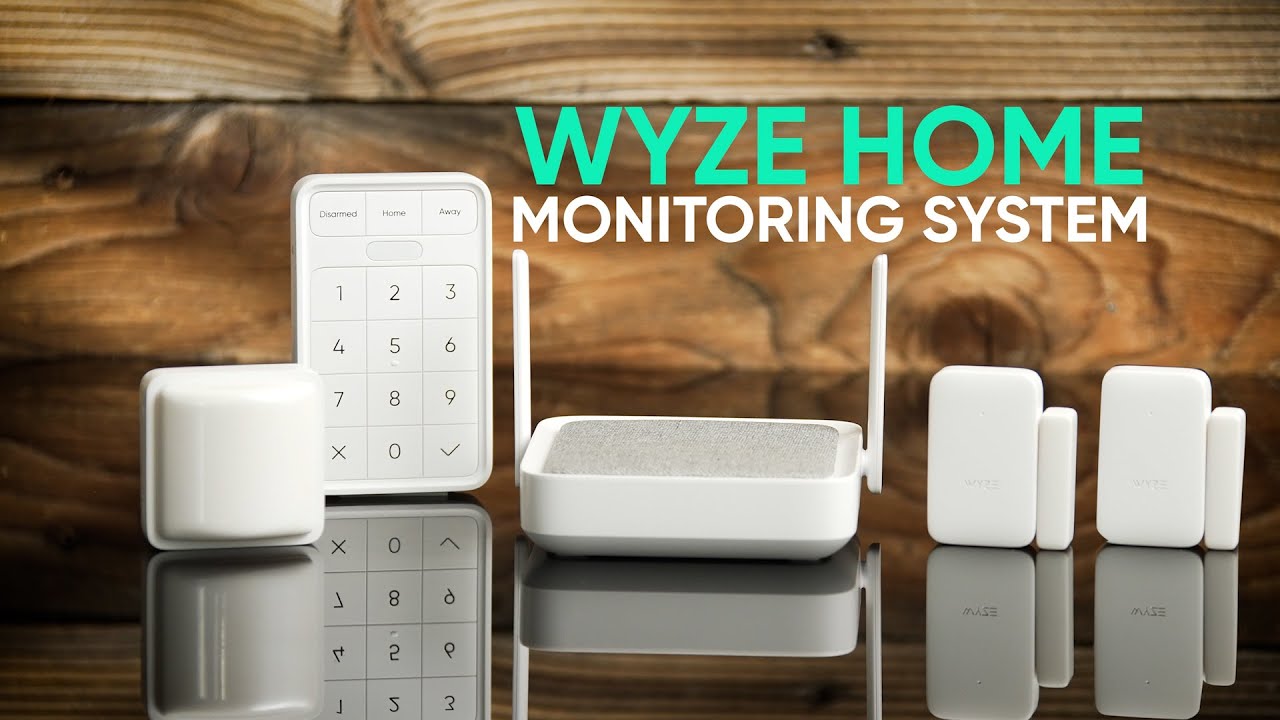
The Wyze Home Monitoring Starter Kit (WYHMS1) is an affordable DIY home security solution that combines a central hub with essential sensors for quick deployment. It is specifically designed for those who prioritize budget and ease of installation over complex hardwired infrastructure, making it an ideal choice for renters and first-time homeowners. If you are comparing high-performance DIY setups, our Vivint review or exploring SimpliSafe self-setup options offers a deeper look at higher-capacity options like the Ring Alarm Pro 14-Piece Kit with Built-in eero Wi-Fi 6 Router. For those optimizing their whole-home environment, see our guide to home ventilation.
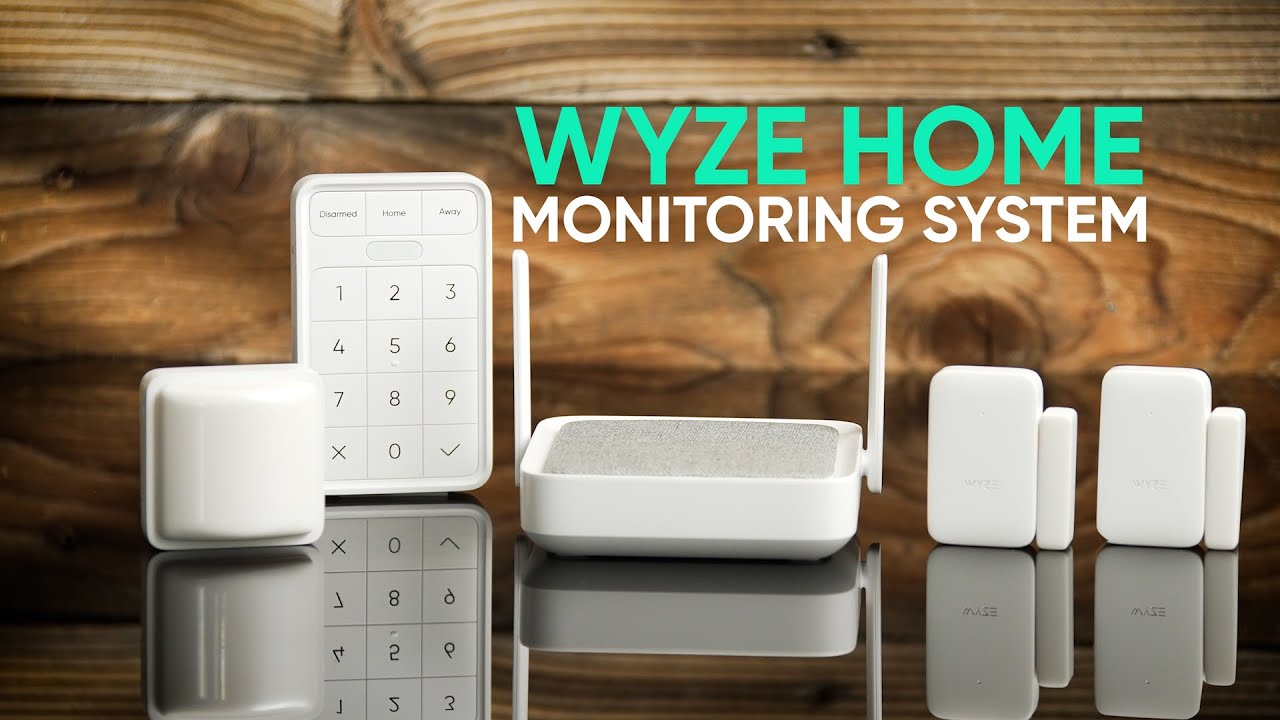
Top Pick: Wyze Home Monitoring Starter Kit
Score: 8.7/10. An excellent budget-friendly DIY security starter kit for renters, first-time buyers, and smaller homes that want app-based alerts with optional professional monitoring.
Wyze Home Monitoring Starter Kit
The Wyze Home Monitoring Starter Kit is built for people who want a practical home security system without professional installation, complicated wiring, or a long contract.
It focuses on the essentials: entry sensors, motion detection, app control, and optional professional monitoring at a lower ongoing cost than many traditional security systems. By leveraging a wireless ecosystem, Wyze removes the friction typically associated with home alarms, making the "security threshold" much lower for the average consumer.This system operates via a central hub that acts as the brain of the operation, communicating with various sensors placed around the home. When a sensor is triggered—such as a door opening while the system is armed—the hub sends an immediate notification to the user's smartphone. This real-time connectivity allows users to monitor their property from anywhere in the world, providing peace of mind whether they are at work, traveling, or simply in another room.
The kit is particularly effective for apartments, condos, and small homes. Because the sensors are adhesive-backed and wireless, they do not require drilling into walls or running cables through ceilings, which is a critical advantage for renters who must adhere to strict lease agreements regarding property modifications. The flexibility of the system allows users to start small and scale their security as their needs grow or as they move into larger residences.
While the value proposition is strong, it is important to recognize that this is a "starter" kit. For those with expansive floor plans, multiple stories, or numerous ground-floor entry points, a more comprehensive system like the Ring Alarm Pro 14-Piece Kit or the Arlo Pro 4 Spotlight Camera 4-Pack Security Bundle (detailed in our Arlo Essential (VMK4352W) review) may be more appropriate. The included number of sensors may not provide total coverage. However, the modular nature of the WYHMS1 means that adding more sensors is a straightforward process, allowing the system to evolve from a basic apartment setup into a comprehensive home security network.
Pros
- Budget-friendly entry point for home security
- True DIY installation with no professional tools required
- Ideal for renters due to non-permanent mounting
- Robust smartphone integration for remote arming/disarming
- Flexible monitoring options without long-term contracts
- Covers essential entry and motion basics effectively
Cons
- Initial sensor count may be insufficient for large homes
- Requires a stable internet connection for full functionality
- Professional monitoring requires a recurring subscription
- Not a replacement for high-end hardwired security systems
- Heavy reliance on the mobile app for system management
This guide contains affiliate links to products. We may earn a commission if you make a purchase through these links, at no additional cost to you.
Technical Specifications
| Specification | Wyze Home Monitoring Starter Kit |
|---|---|
| Model Number | WYHMS1 |
| Category | Home Security Systems |
| Installation Type | DIY Wireless Setup |
| Core Components | Central Hub, Door/Window Sensors, Motion Sensors |
| App Control | Real-time alerts, remote arming/disarming |
| Monitoring | Optional 24/7 Professional Monitoring |
| Best For | Renters, Apartments, Small Homes, Budget Setups |
How the Wyze Security System Works
Understanding the mechanics of the Wyze Home Monitoring Starter Kit is key to maximizing its effectiveness. If you are upgrading other parts of your smart home, you might also find our Panasonic WhisperGreen Select review useful for evaluating home ventilation quality.
The system relies on a Hub-and-Spoke architecture. The Hub serves as the central command center, connecting to your home Wi-Fi network. The sensors—which include magnetic contact sensors for doors and windows and PIR (Passive Infrared) sensors for motion—communicate with the hub using a low-power wireless protocol.When a door opens, the magnetic bond between the sensor and the magnet is broken, triggering a signal to the hub. The hub then processes this event based on the current state of the system: Disarmed, Home, or Away. In "Away" mode, any trigger will typically set off the siren and send a push notification. In "Home" mode, the system may only monitor perimeter sensors (doors/windows) while ignoring interior motion sensors, allowing you to move freely inside while remaining protected from outside intrusion.
The integration with the Wyze app is the primary interface for the user. Unlike old-school security systems that rely on a physical keypad mounted to a wall, the WYHMS1 uses your smartphone as the primary controller. This allows for dynamic adjustments, such as changing the arming delay or adjusting sensor sensitivity, all from a digital dashboard.
Sensor Logic and Triggering
The door and window sensors utilize a "reed switch." This is a simple electrical switch operated by a magnetic field. When the magnet (attached to the door) moves away from the sensor (attached to the frame), the circuit opens. This state change is what the Hub interprets as an "event." Because these sensors are binary (either open or closed), they are incredibly reliable for perimeter security.
Motion sensors, on the other hand, use PIR technology. These sensors don't "see" images; instead, they detect changes in infrared radiation (heat) moving across their field of view. This is why placing them away from heat vents or direct sunlight is crucial to prevent false positives. When a warm body moves past the sensor, it triggers the Hub.
Connectivity and Data Flow
The Hub acts as a bridge between the low-energy wireless frequency used by the sensors and your home's high-speed Wi-Fi. This dual-layered approach is intentional. If every sensor were on Wi-Fi, they would drain their batteries in days. By using a proprietary low-power frequency to talk to the Hub, the sensors can last for months or years on a single coin-cell battery, while the Hub handles the heavy lifting of internet communication.
Detailed Buyer's Guide: Is This Right For You?
Choosing a security system is about balancing the perceived risk with the cost of mitigation. If you are starting from scratch, checking out our SimpliSafe review can help you determine the right number of sensors for your layout. The Wyze Home Monitoring Starter Kit targets a specific segment of the market: the "conscious beginner." If you have never owned a security system before, you might consider the Eufy Security Alarm (detailed in our Eufy Security Alarm (S330) review) or the Abode Iota All-in-One Home Security Kit
Related parts & accessories
Evaluating Your Space
Before purchasing, conduct a "Security Walkthrough" of your home. Mark every point of entry that a person could reasonably use to enter your living space. This includes front and back doors, side doors, garage-to-house entries, ground-floor windows (especially those hidden by landscaping), and sliding glass doors leading to balconies or patios.
If your total number of critical entry points exceeds the sensors provided in the starter kit, you should budget for additional sensor packs. The WYHMS1 is designed to be expandable, meaning you aren't locked into a static configuration. For a standard one-bedroom apartment, the starter kit is usually sufficient. For a three-bedroom house, you will likely need to expand the sensor array to ensure no "blind spots" exist in your perimeter. For a detailed look at comprehensive coverage, see our SimpliSafe (SS3-13PKGCAM) review, or ADT Self Setup 9-Piece Home Security Kit for a professional-grade alternative.
Comparing Monitoring Levels
One of the most confusing parts of home security is the difference between Self-Monitoring and Professional Monitoring. With the Wyze system, you have a choice:
Self-Monitoring (Free): When a sensor is triggered, your phone pings. You are responsible for checking your cameras, calling the police, or alerting neighbors. This is ideal for those who are always connected to their phones and live in low-risk areas.
Professional Monitoring (Subscription): The system is linked to a monitoring center. If an alarm goes off and you don't dismiss it, a professional dispatcher will contact you or call emergency services on your behalf. This is critical for those who may be in meetings, sleeping, or in areas with poor cell reception.
Environmental Considerations
Consider the environment where the sensors will be placed. If you are securing a damp basement area, you might also want to ensure your equipment is protected; see our Wayne ESP25 guide or the Basement Watchdog BW1033 review or our guide to the best submersible utility pumps for maintaining critical home infrastructure. While the WYHMS1 is designed for indoor use, many users place sensors on doors that face the elements. Ensure that your installation protects the sensors from direct rain or extreme moisture, as the adhesive and internal circuitry are not waterproof. For high-traffic areas, the physical durability of the plastic casing is sufficient, but avoid placing motion sensors in areas where pets (like large dogs) may trigger them frequently.
Step-by-Step Installation and Setup
The "DIY" promise of the Wyze Home Monitoring Starter Kit is its strongest selling point. The setup process can be broken down into four primary phases to ensure a seamless transition from box to protected home.
1. Hub Configuration
Start by plugging in the Hub and downloading the Wyze app. Follow the in-app prompts to connect the Hub to your 2.4GHz Wi-Fi network. Because the Hub is the gateway for all other devices, ensure it has a strong signal. If you have a large home, you may need to move the Hub closer to the center of the house to avoid range issues with far-flung sensors.
2. Sensor Placement
Clean the surfaces of your doors and windows with rubbing alcohol to ensure the adhesive sticks firmly. For door/window sensors, place the larger sensor on the frame and the smaller magnet on the moving part of the door or window. Ensure the gap between the two is less than an inch when closed. For motion sensors, place them in "choke points"—areas where an intruder would naturally have to pass, such as a hallway leading to bedrooms or the main living room entrance.
3. App Integration
Each sensor must be paired with the Hub. In the app, you will select "Add Device" and follow the pairing sequence. It is highly recommended to rename each sensor immediately (e.g., "Front Door," "Kitchen Window") so that notifications are clear and actionable. "Sensor 1 triggered" is far less useful than "Back Door opened" when you are away from home.
4. Testing and Calibration
Once installed, put the system in "Test Mode." Walk through your home and open every protected door and window to ensure the Hub registers the event. Test the motion sensors by walking through the room at a normal pace. This prevents "false alarm" frustration during the first actual use of the system and confirms that your sensor placement is optimal.
Long-Term Maintenance and Common Pitfalls
While the WYHMS1 is largely "set and forget," a few maintenance tasks are necessary to ensure the system doesn't fail when you actually need it. Neglecting these basics can lead to a false sense of security.
Battery Management
The sensors run on small batteries. While these are designed to last for months or even years, the app will notify you when a battery is running low. Do not ignore these alerts; a dead sensor is a hole in your security perimeter. We recommend keeping a stock of compatible replacement batteries on hand to avoid downtime.
Adhesive Degradation
Over time, especially in humid environments or on textured surfaces, the factory adhesive may weaken. Periodically check that sensors are still firmly attached. If a sensor becomes loose, it may trigger a "false open" alarm. Using high-quality 3M replacement tape is a common and effective fix for sensors that have come loose.
Connectivity Troubleshooting
Because the system relies on Wi-Fi, any router reboot or internet outage can temporarily disconnect the Hub. While the Hub may have local sirens, the smartphone alerts require an active internet connection. To mitigate this, consider a router with a built-in battery backup (UPS) to keep your security hub online during brief power flickers.