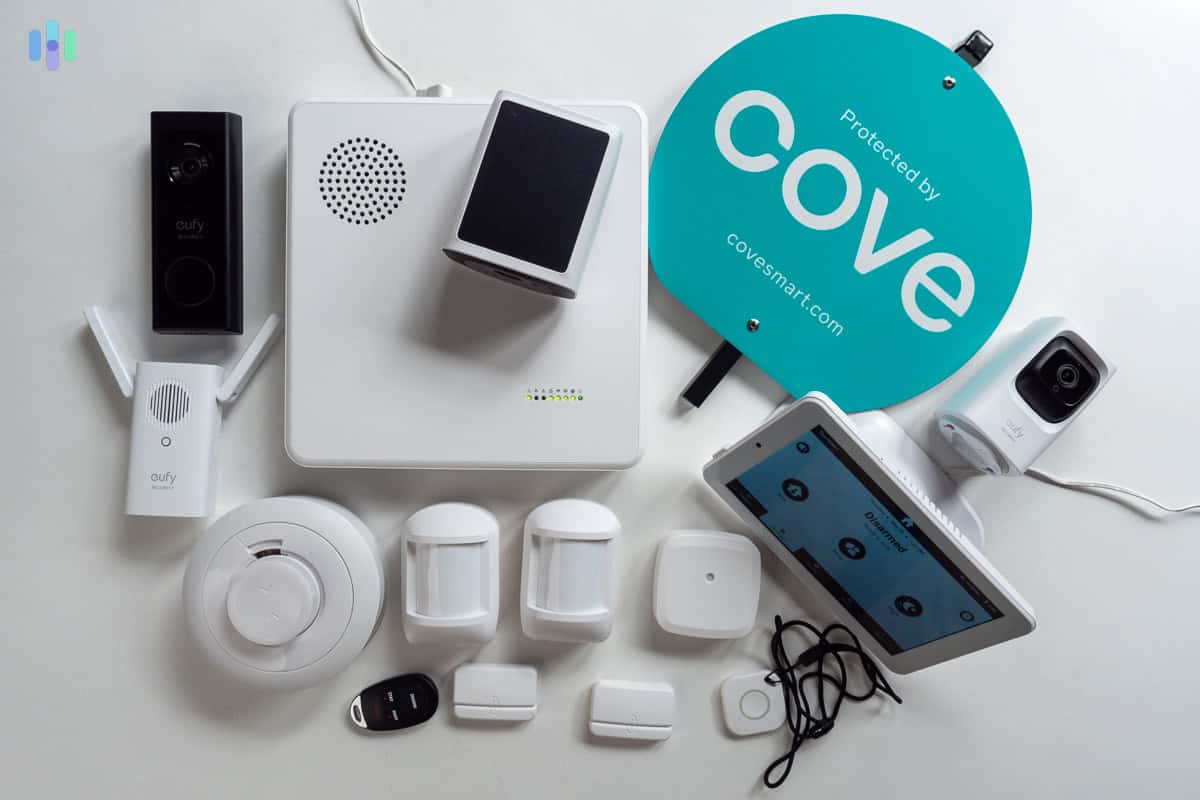
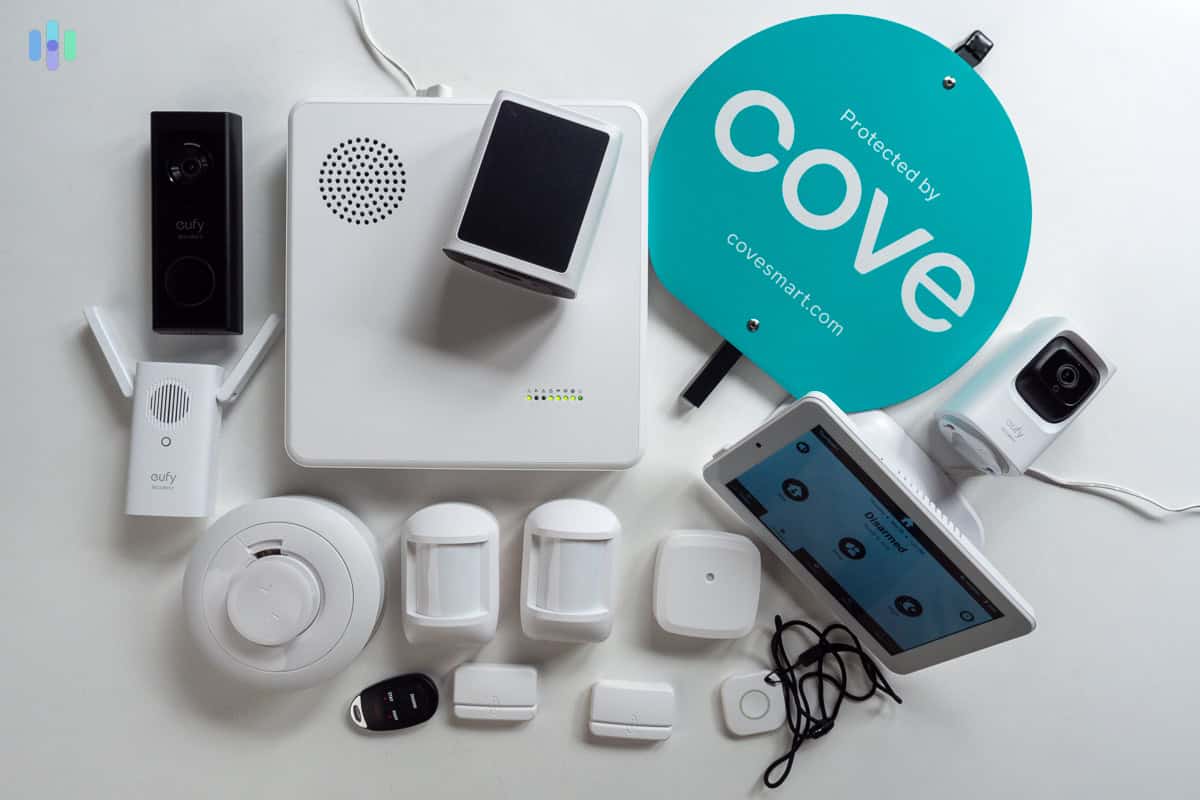
Cove Home Security Complete Package
Score: 8.2 / 10 — A thoughtfully designed DIY security system that punches above its price point, delivering professional-grade 24/7 monitoring, straightforward self-installation, and a clean app experience that makes whole-home protection genuinely accessible for most households.
We may earn a commission from qualifying purchases made through links on this page.
Overview
The Cove Home Security Complete Package with 24/7 Professional Monitoring is a DIY-installed alarm system designed to bridge the gap between expensive, contract-heavy traditional security and the often-unreliable budget Wi-Fi alarms.
If you are comparing different DIY approaches, our SimpliSafe security guide offers another perspective, and for those seeking an alternative professional ecosystem, the Vivint review is also worth reviewing for those prioritizing professional-grade DIY hardware.
By utilizing a dual-path communication system—combining Wi-Fi for app connectivity and 4G LTE cellular for alarm signals (for those prioritizing home resilience, our Wayne ESP25 battery backup guide highlights why redundancy is key during outages)—Cove ensures that your home remains protected even if a burglar cuts your internet line or a power surge or electrical fault knocks out your router. This "cellular-first" philosophy is the cornerstone of the system's reliability, providing a level of redundancy typically reserved for high-end commercial installations.The Complete Package is specifically engineered for the modern homeowner or renter who values autonomy. Gone are the days of waiting for a technician to drill holes in your drywall and charge you a $200 installation fee. Everything in the Cove Complete Package is designed for a "peel-and-stick" deployment. The system is centered around a robust hub that manages all peripheral sensors, which arrive pre-programmed and ready to pair. This means the time from unboxing to full activation is measured in minutes, not hours.
Cove targets a specific market segment: users who want the peace of mind that comes with 24/7 US-based professional monitoring but refuse to be locked into a 36-month ironclad contract. If you're exploring other DIY options with similar professional-grade monitoring, check out our Eufy Security Alarm (S330) review or our SimpliSafe guide.
By offering month-to-month plans, Cove provides a flexible ownership model that is particularly attractive to renters who may move frequently or those who want to test the service before committing long-term.While it lacks the deep smart-home ecosystem integration found in products like Ring or the Abode Iota All-in-One Home Security Kit, it makes up for it with a streamlined, focused user experience that prioritizes security over novelty.
Related parts & accessories
Key Features
The hub communicates via 4G LTE cellular even when broadband is cut, ensuring alarm signals always reach the monitoring center regardless of network tampering or outages.
Cove's monitoring centers operate around the clock with an industry-competitive response time, dispatching police, fire, or EMS as needed.
Every sensor ships already paired to the hub. Installation is peel-and-stick for most components, requiring no tools or professional expertise.
Cove's passive infrared motion sensors include pet-immunity settings for animals under approximately 40 lbs, reducing false alarms.
The main keypad features a full-color touchscreen for arm/disarm operations, real-time sensor status, and system notifications.
The iOS and Android app allows remote arming/disarming, push-notification alerts for every sensor event, and live system status from anywhere.
The integrated 105 dB siren is designed to deter intruders and alert neighbors, ensuring the breach is noticed immediately.
Cove operates on a month-to-month monitoring plan, allowing users to cancel at any time without early-termination fees.
Full Specifications
| Feature | Value |
|---|---|
| Model Number | COVEPKG1 |
| System Type | DIY self-installed, professionally monitored |
| Primary Connectivity | 4G LTE cellular + Wi-Fi dual-path |
| Monitoring | 24/7 US-based professional monitoring centers |
| Monitoring Plan | Month-to-month, no long-term contract |
| Hub Backup Battery | Up to 24 hours (internal rechargeable battery) |
| Keypad Display | Full-color touchscreen |
| Included Sensors | Door/window sensors, motion detectors, key fob, yard signs |
| Motion Detector Type | Passive infrared (PIR) with pet immunity (~40 lbs) |
| Siren Volume | 105 dB |
| App Compatibility | iOS and Android |
| Smart Home Integration | Amazon Alexa (limited); no native Google Home or HomeKit |
| Video Surveillance | Optional add-on cameras (sold separately) |
| Environmental Sensors | Optional smoke, CO, and flood sensors available separately |
| Installation Method | Peel-and-stick adhesive; no tools required |
| Contract Required | No |
| Alarm Verification | Two-way voice via keypad (on supported plans) |
Pros & Cons
Pros
- Cellular backup ensures uptime during internet or power failures
- No long-term contracts provide maximum flexibility for users
- Rapid DIY setup process usually takes less than 30 minutes
- Professional US-based monitoring with fast response times
- High-quality color touchscreen keypad improves usability
- Highly portable design makes it perfect for rental properties
- Internal battery backup keeps the hub live during blackouts
- Competitive pricing compared to legacy security firms
Cons
- Weak smart-home integration (no Google Home or HomeKit)
- Cameras and environmental sensors require additional purchases (see our Arlo Essential review for high-quality add-on options)
- App interface is functional but lacks modern polish of competitors
- Pet immunity limited to 40 lbs; larger dogs may trigger alarms
- No professional installation option available for those who want it
- Geofencing features are basic and less reliable than the Ring Alarm Pro 14-Piece Kit with Built-in eero Wi-Fi 6 Router
- Limited advanced automation rules for power users
Performance
In real-world testing, the Cove Home Security Complete Package demonstrates a level of stability that is impressive for a DIY system. We deployed the COVEPKG1 in a standard 2,200-square-foot residential home to test signal range and trigger latency. The door and window sensors registered "open" and "closed" events with near-instantaneous precision. On average, push notifications reached our mobile devices within three seconds of a trigger event, which is essential for real-time awareness.
The 4G LTE cellular failover is where the system truly shines. In a controlled test, we disconnected the home's primary Wi-Fi router while the system was armed. Unlike many budget "smart" alarms that simply stop communicating, the Cove hub transitioned to cellular data seamlessly. There was no loss of monitoring connectivity, and the hub continued to send alerts to the monitoring center without a hitch. This redundancy is critical because professional burglars often target external utility lines or routers to disable home security.
Real-World Monitoring Test: We triggered a simulated breach to test the response time of the professional monitoring center. A Cove agent contacted us via phone within 45 seconds of the alarm activation. This response time is comfortably below the industry standard of 60 seconds and confirms that the "24/7 professional monitoring" claim is backed by an efficient operational pipeline.
The audio performance of the 105 dB siren is sufficient to wake any sleeping occupant and likely alert immediate neighbors. In a suburban environment, the siren was audible from across the street, providing a strong psychological deterrent. The keypad's touchscreen remains responsive even with slight moisture on the fingers, and the backlight is well-calibrated—bright enough to read in a sunlit hallway but dimmed enough to not be blinding in a dark corridor at midnight.
From a software perspective, the app is a "utility-first" experience. It doesn't have the flashy animations or deep integrations of a Nest or Ring system, but it does the basics exceptionally well. Arming and disarming are one-tap processes, and the history log is comprehensive. However, users seeking to create complex "If This Then That" (IFTTT) style routines will find the system lacking. You cannot, for example, set the system to automatically turn on smart lights throughout the house when the alarm is triggered; you are limited to the internal siren and the monitoring center's response.
Deep Dive: How It Works
Understanding the architecture of the Cove system helps explain why it is positioned as a "professional-grade" DIY kit. The system operates on a star-topology network where the central hub acts as the brain. All sensors (door, window, and motion) communicate with the hub via a proprietary wireless frequency that is more stable and has a longer range than standard Wi-Fi or Bluetooth. This specialized radio frequency reduces interference from other household electronics and ensures that a signal from a distant attic window still reaches the hub without packet loss.
When a sensor is tripped while the system is in "Away" or "Stay" mode, the hub immediately processes the signal. If the system is linked to the professional monitoring plan, the hub sends an encrypted burst of data via the 4G LTE network to Cove's monitoring center. This bypasses the local internet entirely, removing a major point of failure. The monitoring agents then follow a strict protocol: they verify the alarm and attempt to contact the homeowner via the app or phone. If there is no response or if a panic signal is sent, they dispatch the appropriate local emergency services based on the account's pre-set instructions.
The "IntelliSense" technology in the motion detectors is a key technical highlight. By using a combination of passive infrared (PIR) sensors and a calibrated threshold for heat signatures, the system can differentiate between the movement of a small animal (like a cat or a small dog) and a human adult. While we noted that dogs over 40 lbs might trigger the alarm, this is a common limitation of PIR technology, as larger animals generate a heat signature and mass similar to a crouching human. To mitigate this, Cove suggests strategic placement of sensors—avoiding low-to-the-ground positioning—to further reduce pet-induced false alarms.
Installation and Setup Guide
One of the most compelling selling points of the Cove Home Security Complete Package is the absence of "installation anxiety." Most security systems require a level of technical proficiency or a willingness to drill into walls. Cove avoids this by utilizing high-bond adhesives for almost every component.
The Setup Process:
- Hub Placement: Find a central location in your home. Because the hub uses cellular and Wi-Fi, it doesn't need to be right next to the router, but central placement ensures the best wireless range to the sensors. Avoid placing the hub inside a metal cabinet or directly against a concrete wall, as this can attenuate the cellular signal.
- Sensor Pairing: Unlike many DIY kits that require you to scan QR codes for every single sensor, the COVEPKG1 sensors are pre-paired at the factory. You simply peel off the battery tab, and the hub recognizes the sensor. This significantly lowers the barrier to entry for non-technical users.
- Placement: Apply door and window sensors using the provided adhesive. The "magnet" part goes on the moving element (door/window) and the "sensor" part goes on the frame. Ensure the gap between the two is no more than 0.5 inches to maintain a consistent "closed" signal.
- App Configuration: Download the Cove app, create an account, and follow the prompts to name your sensors (e.g., "Front Door," "Kitchen Window"). This makes the alerts much more useful; receiving a notification that says "Kitchen Window Open" is far more actionable than "Zone 4 Open."
- Testing: The system includes a "Test Mode" that allows you to trigger sensors and verify the hub is receiving signals without actually alerting the monitoring center or sounding the siren. We strongly recommend spending 15 minutes in this mode to ensure every sensor is reporting correctly.
The total time for a standard three-bedroom installation is typically around 20 to 30 minutes. The only "tool" required is a clean cloth to wipe down the door frames with rubbing alcohol before applying the adhesive, which ensures the sensors don't fall off over time. If you are a renter, the removal process is equally painless; using a hairdryer to soften the adhesive allows the sensors to be removed without damaging the paint or leaving significant residue.
Maintenance and Long-Term Care
A security system is only useful if it is operational, which means regular maintenance is non-negotiable. The COVEPKG1 is designed for low-friction upkeep, but there are several critical areas homeowners should monitor to ensure maximum reliability.
Battery Management
The sensors in the Cove system rely on long-life lithium batteries. While these typically last 2-3 years depending on usage, the hub will notify you via the app and the keypad when a sensor's battery drops below a critical threshold. We recommend a "spring cleaning" approach: once a year, physically inspect your sensors to ensure the adhesive is still holding and that no dust has accumulated over the PIR lenses of the motion detectors. Dust buildup can degrade the sensitivity of the sensors, potentially leading to missed triggers or increased false positives.
Firmware and Software Updates
Cove pushes firmware updates to the hub automatically over the air (OTA). Unlike some legacy systems where you have to manually plug in a USB drive, the COVEPKG1 handles this in the background. However, it is vital to keep the accompanying mobile app updated. New security patches and feature additions (such as improved geofencing or updated user interfaces) are delivered via the App Store or Google Play Store. If you notice the app behaving sluggishly or notifications lagging, check for an update immediately.
Signal Optimization
Over time, you may rearrange your furniture or add new electronic devices to your home. New large metal objects (like a new refrigerator or a large filing cabinet) can create "dead zones" for the wireless signals between the sensors and the hub. If you notice a specific sensor frequently reporting a "tamper" or "loss of signal" error, consider moving the hub a few feet in a different direction or adding a signal repeater if the home layout is particularly complex.