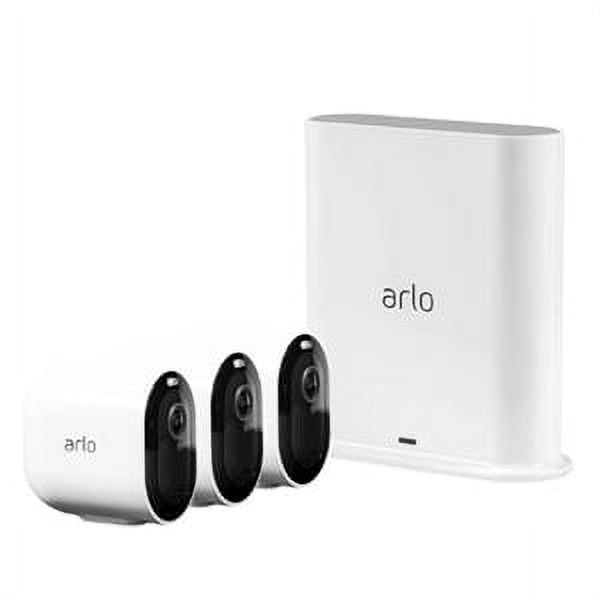
Arlo Essential Wire-Free Home Security System (3-Camera Kit)
Score: 8.2/10 — A genuinely capable, wire-free security system that covers most homes with sharp 1080p footage and a smart-detection feature set, though the subscription paywall and battery life limitations keep it from being a truly frictionless pick.
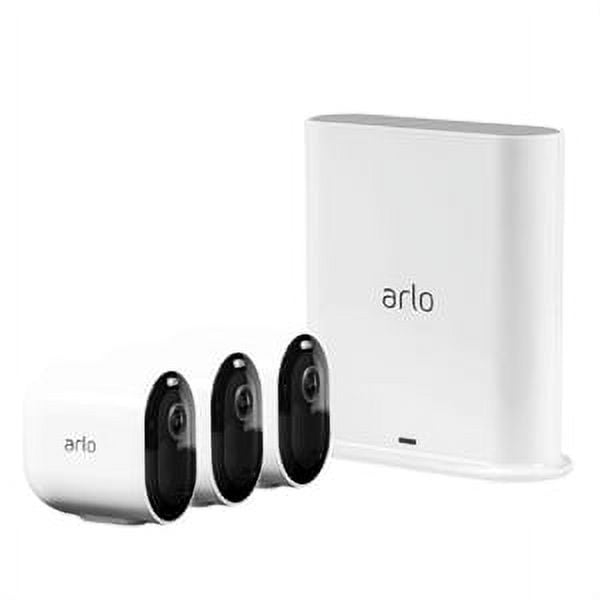
Overview
The Arlo Essential Wire-Free Home Security System (3-Camera Kit) is Arlo's mid-range entry into the DIY security space—but is it actually worth the investment for the average homeowner? If you're comparing different brands, our Vivint (VPK-2GIG-GO2) review provides a great alternative perspective on professional-grade systems.
Related parts & accessories
The system targets a broad audience: tech-comfortable homeowners who want, perhaps as part of a broader home security strategy, professional-grade security without an electrician, renters who can't drill into walls for cable runs, and anyone upgrading from a single-camera setup who needs coordinated multi-camera coverage. It pairs seamlessly with Amazon Alexa and Google Assistant for voice control, and the companion Arlo app — available on iOS and Android — provides a clean, unified dashboard for all three cameras.
At its core, the Essential Kit is a gateway product. The free Arlo Basic plan provides live viewing and a limited event clip window, while the Arlo Secure subscription unlocks continuous recording, extended cloud storage, package and vehicle detection, and emergency response features. That subscription dependency is worth weighing carefully before you buy, and we'll examine it in detail throughout this review.
How the System Works
Unlike legacy security systems that required a proprietary base station or a complex NVR (Network Video Recorder) setup, the Arlo Essential Wire-Free Home Security System (3-Camera Kit) cameras utilize direct-to-Wi-Fi connectivity. This means each camera acts as its own node, communicating directly with your wireless router. When the internal PIR (Passive Infrared) sensor detects heat signatures and motion, the camera "wakes" from its low-power sleep state and begins streaming 1080p HDR video to the Arlo cloud.
The processing of this video happens in two stages. First, the on-device hardware handles basic motion detection. Second, the stream is sent to Arlo's cloud servers where, if you have a subscription, AI algorithms analyze the pixels to determine if the motion was caused by a human, a vehicle, or a pet. This "cloud-side" intelligence is what allows the app to send a specific notification saying "Person detected at the Front Door" rather than a generic "Motion detected."
Power management is handled by an internal rechargeable lithium-ion battery. To conserve energy, the cameras do not record 24/7 by default. Instead, they record "clips" based on triggers. This is a critical architectural choice: by only recording events, the system avoids the need for a constant power tether, though it means you may miss the few seconds of activity that occur just before the sensor triggers.
Key Features
Full HD footage with high dynamic range captures both shadowy corners and bright sunlit areas in a single frame, reducing blown-out or crushed details common in budget cameras.
Rechargeable lithium batteries eliminate cable runs entirely. Each camera can be placed virtually anywhere within Wi-Fi range — on a fence post, under an eave, or on a window ledge.
A built-in spotlight activates on motion detection at night, delivering color rather than black-and-white infrared footage — an upgrade over standard IR cameras at this price tier.
An integrated microphone and speaker let you speak through the camera via the app, making it practical for delivery confirmations, deterring intruders, or greeting guests at the door.
On the free tier, the cameras detect general motion. With an Arlo Secure subscription, AI-powered detection distinguishes between people, vehicles, animals, and packages.
A USB port on the optional SmartHub enables local storage via a USB drive. Cloud storage is included for basic clips on the free tier and extended through Arlo Secure plans.
The Essential cameras connect directly to your 2.4 GHz Wi-Fi network — no separate SmartHub or base station required, simplifying setup significantly.
Native compatibility with Amazon Alexa, Google Assistant, and Apple HomeKit (via the Arlo SmartHub) lets you pull live streams to smart displays.
| Feature | Value |
|---|---|
| Video Resolution | 1080p Full HD with HDR |
| Field of View | 130° diagonal |
| Night Vision | Color night vision with integrated spotlight |
| Power Source | Rechargeable lithium battery (USB-C charging) |
| Estimated Battery Life | Up to 6 months (usage dependent) |
| Connectivity | Direct Wi-Fi (2.4 GHz 802.11 b/g/n) |
| Hub Required | No (SmartHub optional for local storage / HomeKit) |
| Audio | Two-way audio with noise cancellation |
| Weather Resistance | IP65 certified (indoor & outdoor use) |
| Operating Temperature | -20°C to 45°C (-4°F to 113°F) |
| Cloud Storage (Free Plan) | 30-day clip access, limited events |
| Cloud Storage (Secure Plan) | 30-day rolling continuous recording |
| Smart Detection (Paid) | Person, vehicle, animal, package |
| App Compatibility | iOS 14+ / Android 6.0+ |
| Smart Home Compatibility | Alexa, Google Assistant, Apple HomeKit (via SmartHub) |
| Camera Dimensions | 47 × 47 × 103 mm (1.85 × 1.85 × 4.06 in) |
| Camera Weight | 120 g (0.26 lb) per camera |
| Cameras in Kit | 3 × Arlo Essential Wire-Free Camera |
| Included Accessories | 3 × mounting hardware kits, 3 × USB-C charging cables |
Pros & Cons
Pros
- Completely wire-free with no hub required for basic use
- 1080p HDR video is sharp and well-exposed in most conditions
- Color night vision spotlight stands out at this price point
- Excellent IP65 weatherproofing handles rain, dust, and cold reliably
- Quick, tool-light installation typically under 30 minutes for all three
- Clean, intuitive Arlo app with robust notification controls
- Broad smart home platform support (Alexa, Google, HomeKit)
- Compact, understated design that blends into most exteriors
Cons
- Smart detection (person/vehicle/package) locked behind Arlo Secure subscription
- Battery life falls well short of the "6-month" claim in busy areas
- Local storage requires purchasing the SmartHub separately
- No continuous recording on the free tier
- 2.4 GHz only — can struggle on congested networks
- Spotlight activates on all motion, which may annoy neighbors at night
- Arlo Secure plan pricing adds up considerably over a multi-year ownership period
Installation and Setup Guide
Setting up the Arlo Essential Wire-Free Home Security System (3-Camera Kit) is one of its strongest selling points. Because there is no base station required for standard operation, the process is streamlined into three primary phases: digital pairing, physical placement, and software optimization.
Step 1: The Digital Handshake
Before mounting the cameras, it is highly recommended to pair them with the Arlo app while you are still inside near your router. You'll download the app, create an account, and follow the prompts to add a new device. The app uses a QR-code scanning process: you scan the code on the back of the camera, enter your Wi-Fi password, and the camera joins your network. Doing this indoors ensures that if a pairing error occurs, you aren't standing on a ladder in the rain trying to troubleshoot a connection issue.
Step 2: Strategic Physical Placement
The kit includes mounting hardware that allows for a variety of angles. When choosing your locations, consider the "Blind Spot Factor." Because the field of view is 130 degrees, placing cameras in corners often provides the best coverage. For the most effective security, we recommend the "Triangle Method": one camera covering the main entry, one covering the rear exit, and one covering the driveway or side alley. Ensure the cameras are mounted roughly 7 to 9 feet high; any higher and you'll get great views of the tops of heads but lose facial recognition detail; any lower and the cameras become vulnerable to tampering.
Step 3: Software Optimization
Once mounted, the final step is configuring "Activity Zones." Through the app, you can draw boxes over the areas you actually want to monitor. For example, if your camera faces a busy street, you can exclude the sidewalk from the trigger zone. This prevents the camera from waking up every time a pedestrian walks by, which significantly extends battery life and reduces "notification fatigue."
Performance Analysis
Day-to-day, the Arlo Essential cameras deliver impressively consistent video quality. Footage at 1080p with HDR enabled shows strong detail on license plates and faces at distances up to about five metres — useful enough for a police report, if it came to that. The 130-degree field of view covers a typical front porch or driveway without excessive fisheye distortion, and the app's digital pan and zoom tool works well for reviewing clip specifics after the fact.
Motion detection responsiveness is snappy. From the moment movement enters the frame to the arrival of a push notification, we consistently recorded delays of three to five seconds — competitive with Ring and Nest cameras in our test environment. On the free Arlo Basic plan, however, every swaying tree branch and passing car triggers an alert, which quickly becomes fatiguing. Arlo's smart detection — the tool that filters alerts by subject type — is the real fix here, but it's gated behind the Arlo Secure subscription. This is perhaps the most important caveat in the entire purchase decision.
For those who need even higher resolution or advanced optics, as discussed in our security guides, see the Arlo Pro 4 Spotlight Camera 4-Pack Security Bundle
Related parts & accessories
The color night vision spotlight is a genuine highlight. Where many competitors still deploy the familiar green-tinted infrared night vision, the Essential cameras switch on a built-in white light to capture full-color footage in darkness. This is particularly effective for identifying clothing colors or vehicle details. The spotlight does announce its presence, which may deter intruders but will also alert anyone (including pets) that they're being recorded. You can adjust sensitivity zones in the app to reduce unnecessary nighttime triggers, though this feature is also partly subscription-gated.
Battery life deserves an honest assessment. Arlo quotes up to six months per charge, and in a low-traffic environment — say, a side gate that sees two or three events daily — that figure is plausible. At our test front door location, which captured around 20 to 30 motion events daily including the spotlight activations, battery life ran closer to four to six weeks. Charging takes roughly three hours via USB-C, and Arlo sells an optional solar panel accessory that works well for cameras with good sun exposure. If you have a busy entry point, the solar panel upgrade is worth factoring into your budget.
Audio performance through the two-way talk is adequate for a wire-free system, though there is a slight lag of about one second between speaking and the audio reaching the camera. The noise cancellation does a decent job of filtering out wind, but in very loud environments (like a busy street during rush hour), the audio can sound slightly compressed and tinny. It is perfectly functional for telling a delivery driver where to leave a package, but not intended for high-fidelity conversations.
Maintenance and Long-Term Care
To keep the Arlo Essential Wire-Free Home Security System performing at its peak, a small amount of regular maintenance is required. Because these cameras are IP65 rated, they can withstand heavy rain and snow, but they are not impervious to the elements over several years.
Lens Cleaning: Over time, dust, pollen, and spider webs will accumulate on the lens and the PIR sensor. Use a microfiber cloth dampened with a small amount of water or a specialized lens cleaner. Avoid using harsh chemicals or abrasive scrubs, as the plastic lens coating can scratch, leading to "blooming" effects when the spotlight is active at night.
Battery Health: To prolong the lifespan of the internal lithium-ion batteries (similar to how you'd manage a battery backup sump pump in harsh conditions), avoid leaving cameras in extreme heat (above 45°C) for extended periods if possible, as heat degrades battery chemistry. When charging, use the provided USB-C cable and a certified power brick. If you notice the battery draining significantly faster after a year of use, check for firmware updates in the Arlo app, as Arlo frequently releases power-optimization patches.
Mounting Check: Every six months, check the mounting screws. Wind and temperature fluctuations (expansion and contraction of materials) can loosen the brackets over time. A quick tighten ensures your camera doesn't shift its angle, which would render